
 Home
Home- Algorithm (Automated) Trading Tutorial
- What is Forward and Back Testing in MT5? A Beginner’s Guide
What is Forward and Back Testing in MT5? A Beginner’s Guide
This article will explain the significance of forward testing, its differences from backtesting, and provide a detailed guide on how to perform forward testing on the MT5 platform, along with common issues.
What is Forward Testing❓
In forex trading, Forward Testing involves applying specific trading rules in real-time market conditions to verify their effectiveness.
Unlike backtesting, which uses historical data, forward testing uses real-time market data for validation.
It is a key method for determining whether trading rules are effective in real market scenarios.
Difference Between Forward Testing and Backtesting
Backtesting involves using historical exchange rate data to test the effectiveness and performance of trading rules. Besides validating the rules, backtesting allows for parameter adjustments to optimize the trading strategy (improve performance).
However, when optimizing, it is crucial to be cautious of the risk of overfitting.
Overfitting refers to over-adjusting trading parameters to fit historical data (past exchange rates). While such trading rules may perform well in backtests, they often fail to maintain effectiveness in real markets and may not yield desired results in forward testing. For example, a strategy optimized for a specific historical period may fail in a different market condition.
🔍MT4 Backtesting Method: Parameter Settings, Optimization, and Report Download
🔍MT5 Backtesting Method: Parameter Settings, Optimization, and Report Download
How to Perform Forward Testing ⚙️
This article will guide you through the steps to perform forward testing on the Titan FX MT5 (MetaTrader 5) platform, providing specific instructions and key points to note.
MT4 does not have a built-in forward testing feature, but you can simulate forward testing by manually defining the test range, using a demo account, or third-party tools.
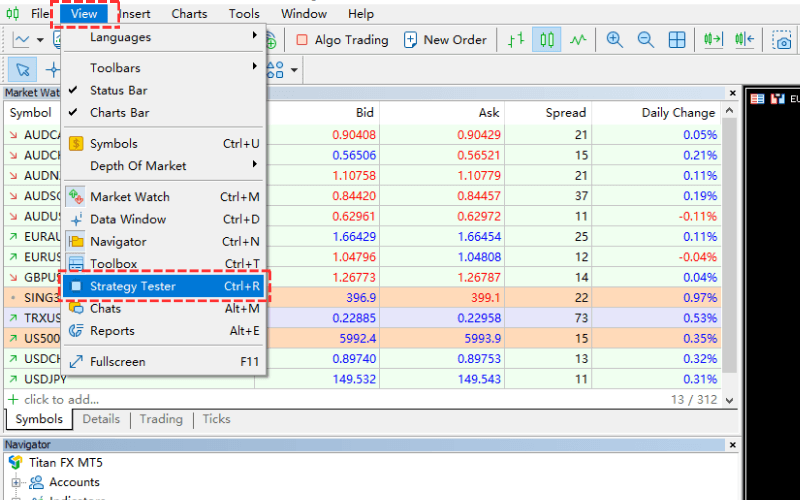
Step 1:
Click on "View" from the menu bar, then select "Strategy Tester", or simply press Ctrl + R.
Step 2:
In the Strategy Tester menu, select "Forward Optimization".
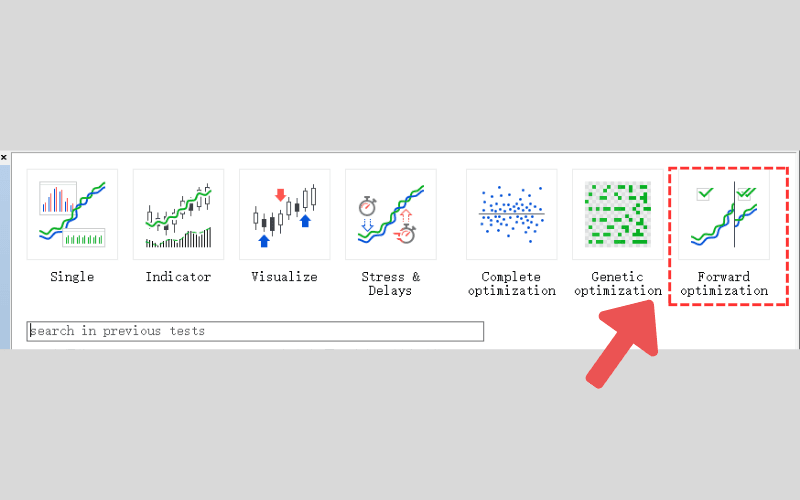
Key Explanation: The menu differences are only in the initial settings
The Strategy Tester offers multiple menu options. If you are only performing regular optimization, select "Complete Optimization."
If you are conducting both optimization and forward testing, choose "Forward Optimization."
No matter which option you select, you will enter the same Strategy Tester settings page.
When selecting "Forward Optimization," the settings related to forward testing will be automatically pre-configured.
If you select "Complete Optimization," you can also manually configure the "Forward Testing" options to perform forward testing.
Step 3:
Set up the necessary items for Forward Testing and Optimization.
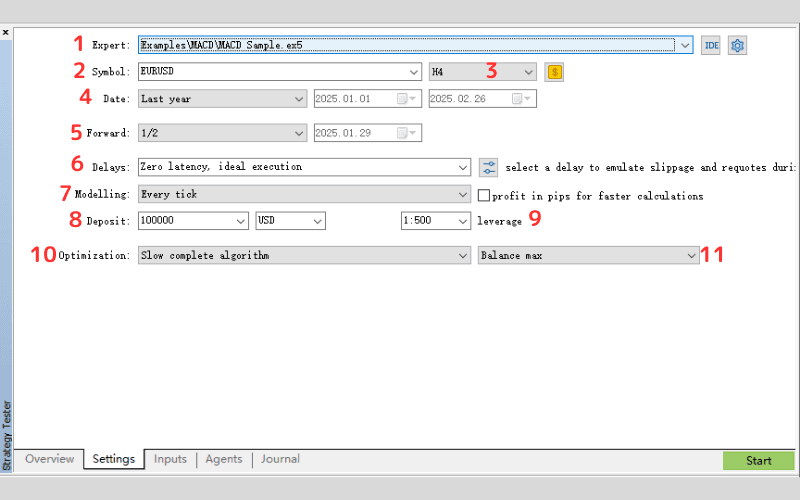
| No. | Item | Description |
|---|---|---|
| 1 | Expert | Select the EA (Expert Advisor) to test. |
| 2 | Symbol | Select the currency pair or other financial instruments (e.g., gold, oil). |
| 3 | Timeframe | Choose the time frame for testing (e.g., M1, M5, H1, D1, etc.). |
| 4 | Date | Set the date range for testing, including start and end dates. |
| 5 | Forward | Set the forward test period: ・"1/2": First half for optimization, second half for forward testing. ・"Custom": Specify any date for forward testing. |
| 6 | Delays | Set the slippage (delay in trade execution) in milliseconds. |
| 7 | Modelling | Select the pricing model: ・Every tick: Most accurate model. ・Every tick based on real ticks: Simulated based on real price data. ・1-minute OHLC: Fastest but least accurate. ・Open price only: Simulated based on open price. ・Math calculations: Uses mathematical models for calculation. |
| 8 | Deposit | Set the initial deposit for the simulated account. |
| 9 | Leverage | Set the leverage for the simulated account. |
| 10 | Optimization | Choose whether to perform parameter optimization and the optimization method: ・Disabled: No optimization. ・Slow complete algorithm: Backtest all parameter combinations. ・Fast genetic based algorithm: Backtest selected parameter combinations based on genetic algorithm. ・All symbols selected in Market Watch: Select all instruments for optimization based on live quotes. |
| 11 | Optimization Criteria | Choose the filtering or sorting criteria for optimization results: ・Balance max: Sort by account balance in descending order. ・Profit factor max: Sort by profit factor in descending order. ・Expected payoff max: Sort by expected profit in descending order. ・Drawdown min: Sort by drawdown in ascending order. ・ Recovery factor max: Sort by recovery factor in descending order. ・Sharpe Ratio max: Sort by Sharpe ratio in descending order. ・Custom max: Sort based on custom criteria. ・Complex Criterion max: Sort by complex standards in descending order. |
Slow complete algorithm vs. Fast genetic based algorithm in Optimization
Slow complete algorithm: Backtests all combinations of input parameters as specified in the parameter label.
Fast genetic based algorithm: Based on specific criteria, selects some input parameter combinations for backtesting, which shortens optimization time.
The fast genetic-based algorithm optimizes faster, but the downside is that not all combinations are tested.
Step 4:
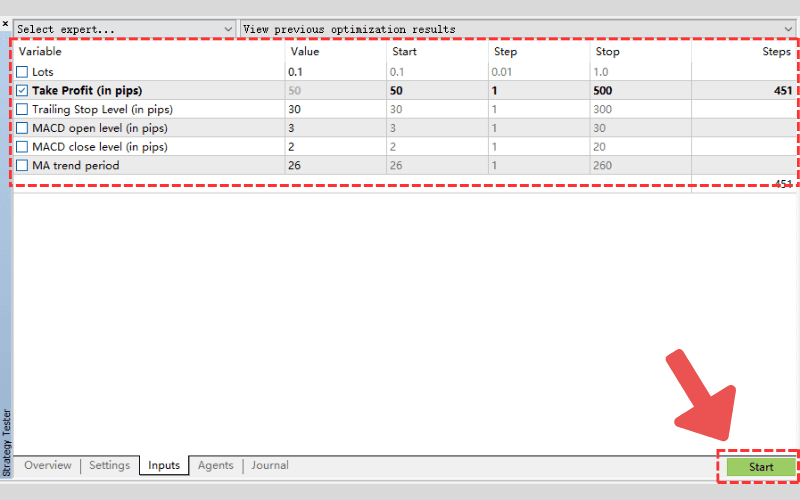
In the "Inputs" tab next to the "Settings" tab, check the parameters to optimize, and enter the "Value," "Start," "Step," and "Stop" for each.
Once the setup is complete, click the "Start" button to initiate the optimization process.
Step 5:
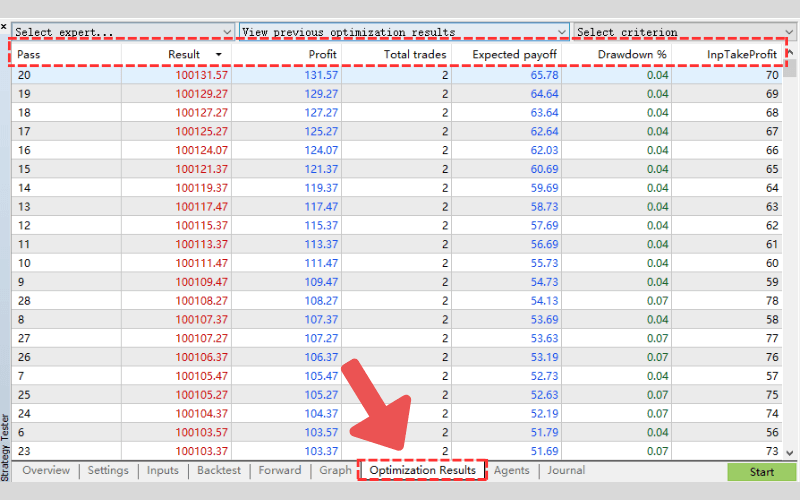
After the forward test is complete, check the "Optimization Results" tab, where the results will be displayed in a list.
Each result will be numbered (pass), and sorted based on optimization criteria (e.g., "Balance Max").
Double-click on any result in the "Forward Results" list to view the detailed information.
Step 6:
In the "Optimization Results" tab, double-click on the result you want to view. This will display three tabs: "Backtest," "Forward," and "Chart."
"Backtest" and "Forward" Tabs:
You can view the performance during the sample period and the non-sample period separately.
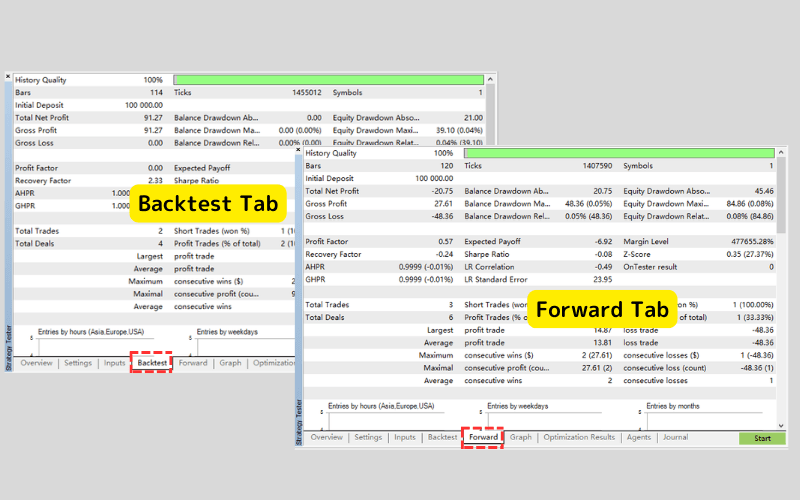
Chart Tab:
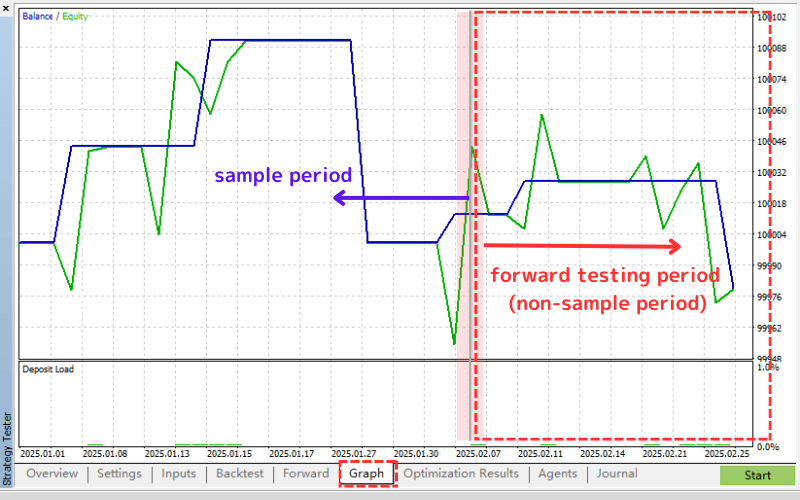
In the profit/loss chart, a gray line will appear. The portion before the line represents the optimization data period (sample period), and the portion after the line represents the forward testing period (non-sample period).
The performance during the non-sample period is the key to determining whether overfitting has occurred.
Titan FX Offers Free EAs and Forward Test Results
Titan FX provides free Expert Advisors (EAs) and forward test results to help traders choose the right trading strategy.
These EAs are tested with real market data, showcasing their actual performance.
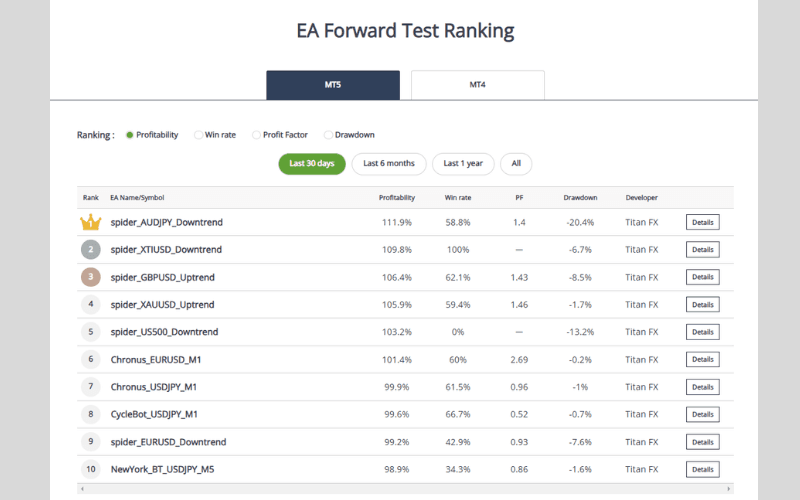
Through Titan EA Forward Test Ranking, traders can evaluate the performance of different EAs and choose the one that best aligns with their trading strategy.
Common Questions and Answers About Forward Testing (Q&A)
Q1. Is Forward Testing Useful?
Forward testing provides valuable insights.
Since it is conducted in a real market environment, it helps determine whether a trading rule is applicable to current market conditions, which backtesting cannot provide.
Forward testing and backtesting complement each other, and combining both helps adjust and build more reliable trading rules. This ensures that trading strategies are robust and adaptable to changing market conditions.
Q2. What is Forward Optimization?
Forward optimization is a method that divides historical data (past exchange rates) into training data and testing data for optimization and validation.
The optimization is first done using one portion of the data, and then the parameters are evaluated on another portion of testing data.
This simulates both backtesting and forward testing, effectively avoiding overfitting. This approach ensures that the strategy is not overly tailored to historical data and can perform well in real-time markets.
Q3. What is Walk Forward Testing?
Walk Forward Testing is a method where the testing period is iteratively shifted and repeated to evaluate whether the performance of an automated trading system remains stable. This method helps traders identify strategies that perform consistently across different market conditions.
Summary🌟
Forward testing is essential for validating trading strategies in live markets, helping avoid overfitting and improve stability. By testing on out-of-sample data, traders can assess whether strategies perform consistently in unknown conditions.
Combining backtesting, forward testing, and walk-forward testing ensures strategies are robust and adaptable, increasing confidence for real-world application. This process helps traders build reliable rules and enhance long-term profitability.
Further Reading
- EA in FX Trading: Development, Pros, Cons, and Risks
- Key Types of EA Forex Trading Programs and Manual Trading Differences
- MQL4 Tutorial: What Is MQL4? A Beginner's Guide to Writing MT4 EAs
- MQL5 Tutorial: What Is MQL5? A Beginner's Complete Guide to Writing MT5 EAs
The financial markets research team at Titan FX. We produce educational content for investors across a wide range of instruments, including forex, commodities (oil, precious metals, agriculture), stock indices, US equities, and crypto assets.
Primary Sources (by Category)
- Development & Platform: MetaQuotes (developer of MT4/MT5), MQL5 Official Community