

Support
Titan FX provides a simple and efficient account opening and funding process for clients worldwide. In most cases, you can start trading once you have completed basic verification. Below is a summary of the key deposit and verification requirements:
| User Type | Deposit Availability | Required Verification |
|---|---|---|
| General regions (Japan / Taiwan / Hong Kong / Singapore / Malaysia, etc.) | Deposit available immediately | SMS verification |
| Specific regions (including Mainland China) | Deposit available after verification | Full KYC (ID verification + proof of address) |
Open Account
China Titan FX Registration Guide
Learn how mainland China users can open a Titan FX live account step by step. This guide explains registration, email verification, how to skip SMS verification, and how to complete KYC with ID and proof of address.
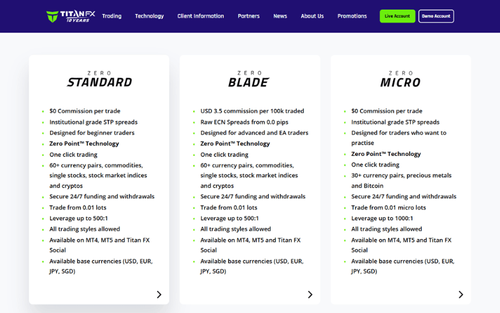
Comparison of Titan FX Account Types: Standard, Blade, and Micro
Titan FX offers three account types tailored to traders' needs. The Standard Account has no commission fees and supports diverse products. The Blade Account offers industry-leading tight spreads with transaction fees. The Micro Account, ideal for small investors, features 1,000x leverage and micro lot sizes. Each account provides unique benefits to suit various trading styles.
Hong Kong Titan FX Registration Guide
Learn how Hong Kong users can open a Titan FX live account in just a few minutes. This guide covers registration, SMS verification, email confirmation, and key KYC notes.
Japan Titan FX Registration Guide
Learn how to open a Titan FX live account in Japan in just a few minutes. This guide covers registration, SMS verification, email confirmation, and key KYC notes.
Singapore Titan FX Registration Guide
Learn how Singapore users can open a Titan FX live account in just a few minutes. This guide covers registration, SMS verification, email confirmation, and key KYC notes.
Taiwan Titan FX Registration Guide
Learn how to open a Titan FX live account in Taiwan in just a few minutes. This guide covers registration, SMS verification, email confirmation, and key KYC notes.
Malaysia Titan FX Registration Guide
Learn how to open a Titan FX live account in Malaysia in just a few minutes. This guide covers registration, SMS verification, email confirmation, and key KYC notes.
Deposit
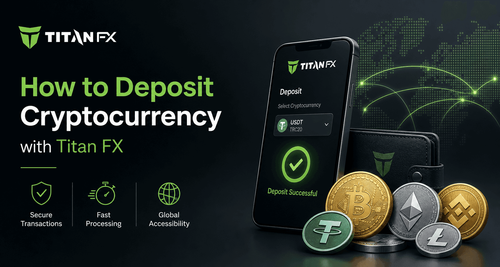
Crypto Deposits
Never miss a market opportunity. Titan FX supports instant deposits with major cryptocurrencies. In this article, we’ll explain how to transfer funds from your crypto wallet and share a few tips to ensure your deposit is processed quickly and smoothly.
Titan FX Bitwallet Deposit Guide
This article explains how traders residing in Japan can deposit funds using Bitwallet (with Japanese yen as an example). Bitwallet deposits are free of charge and are processed instantly. In addition to Japanese yen, Bitwallet supports deposits in USD, EUR, and AUD. To use Bitwallet for deposits, you must register a Bitwallet account in advance, and the email address must match the one used for your Titan FX account.
Titan FX Local Bank Deposit Guide (For Residents in Japan/Example in Japanese Yen)
This article provides a detailed guide for traders residing in Japan on how to deposit Japanese Yen into Titan FX via local bank transfer. If your bank offers online services, you can conveniently make the transfer online. Since this involves a domestic bank transfer within Japan, the deposited funds are processed quickly and credited promptly.
Titan FX Credit Card Deposit Guide (Non-Taiwan Regions)
This article provides a detailed credit card deposit guide for traders residing in regions such as Singapore, Malaysia, Japan, Hong Kong, and Macau, helping you smoothly deposit funds to Titan FX. The guide covers the steps for credit card verification and binding during the first deposit, as well as the subsequent process for making additional deposits. Titan FX supports credit card deposits, offering a simple and fast process with no transaction fees, and funds are credited instantly.
Titan FX Credit Card Deposit Guide (For Taiwan Residents)
This article provides a detailed step-by-step guide for traders residing in Taiwan to make deposits using a credit card. Titan FX offers a fee-free credit card deposit service with funds credited instantly. For the first deposit, you will need to link your credit card on the Titan FX client platform. For subsequent deposits with the same card, re-linking is unnecessary, and deposits can be made directly. To ensure a smooth transaction process, it is recommended to use Visa or MasterCard credit cards.
KYC
Titan FX KYC Guide|SMS-Verified Users (ID Only)
This guide is for Titan FX users who can complete SMS verification. By uploading your ID to finish KYC, you can remove the USD 10,000 deposit limit, enable withdrawals, and access full account functions. This article explains the ID upload steps and review process.
Titan FX KYC Guide|For Users Without SMS Verification (ID + Address Proof Required)
This guide explains how Titan FX users in regions where SMS verification is unavailable can complete full KYC by uploading both their ID and address proof. Follow the step-by-step instructions to successfully verify your account and activate all trading functions.
Withdraw
Titan FX Credit Card Withdrawal Process Guide
When you wish to withdraw funds from your Titan FX trading account using a "Credit Card," please select "Credit Card" as the withdrawal method in the client portal. Then, choose the card you used for the deposit and submit the withdrawal request. After confirming the withdrawal request, Titan FX will process it immediately, and the funds will typically be credited to your account within 1 to 5 days.
Titan FX Bitwallet Withdrawal Guide
This article will provide a detailed guide on how Titan FX users residing in Japan can withdraw Japanese yen via Bitwallet. Bitwallet withdrawals are typically processed on the same day. After submitting the withdrawal request, you will need to log in to your email and click "Confirm" within 1 hour.
Titan FX Local Bank Withdrawal Guide (For Residents in Japan/Example in Japanese Yen)
This article will provide a detailed guide on how Titan FX users residing in Japan can withdraw Japanese yen via local banks. If the trading account holds other currencies, such as USD or EUR, these foreign currencies will be automatically converted into Japanese yen based on the real-time exchange rate when withdrawn to a domestic Japanese bank account. After the withdrawal request, the funds will be transferred to the designated bank account within approximately 2-3 business days.
Client Cabinet
How to Add a New Trading Account on Titan FX
Opening an additional account at Titan FX is very simple. Log in to the client portal and apply by specifying the conditions. You can open up to 15 accounts without any conditions. Choose between MT4/MT5 platforms, different account types, and leverage to meet your trading needs. Learn the detailed steps and important notes.
How to Change Leverage on Titan FX
Adjusting leverage settings on the Titan FX Client Dashboard is simple and straightforward. This article explains the conditions for changing leverage, step-by-step instructions, available leverage levels, and how to request a leverage increase.
How to Change and Check Titan FX Account Types
Titan FX account type changes, whether between Standard or Blade accounts, can be easily processed through the client portal even after account creation.