

China Titan FX Registration Guide

Before registering for a Titan FX live account, mainland China users need to prepare one proof of identity document and one proof of address document (one document from each category is required for verification).
Below are the accepted documents and requirements:
| Category | Accepted Documents | Requirements |
|---|---|---|
| Proof of Identity | ・National ID card ・Passport ・Driver’s license | ・All document details must be clearly visible ・The document must be valid and not expired |
| Proof of Address | ・Household registration book (hukou) ・Utility bill ・Bank statement ・Other official documents showing your name and address | ・All document details must be clearly readable ・Must include: issue date (within the last 6 months, except hukou), full name, issuing authority, and full residential address ・The address must match the one entered during registration |
Please make sure all uploaded documents are clear, complete, and meet the requirements to avoid delays during verification.
Choose Your Region to View the Account Opening Guide
Below, we’ll walk you through the full account opening process for mainland China users, along with important notes.
[Step-by-Step Guide] How to Open a Titan FX Live Account
This illustrated guide will walk you through the full process of opening a Titan FX live account.
The entire process consists of five simple steps:
Step 1: Register Your Account
First, visit the Titan FX official website and click Open Live Account to go to the registration page.
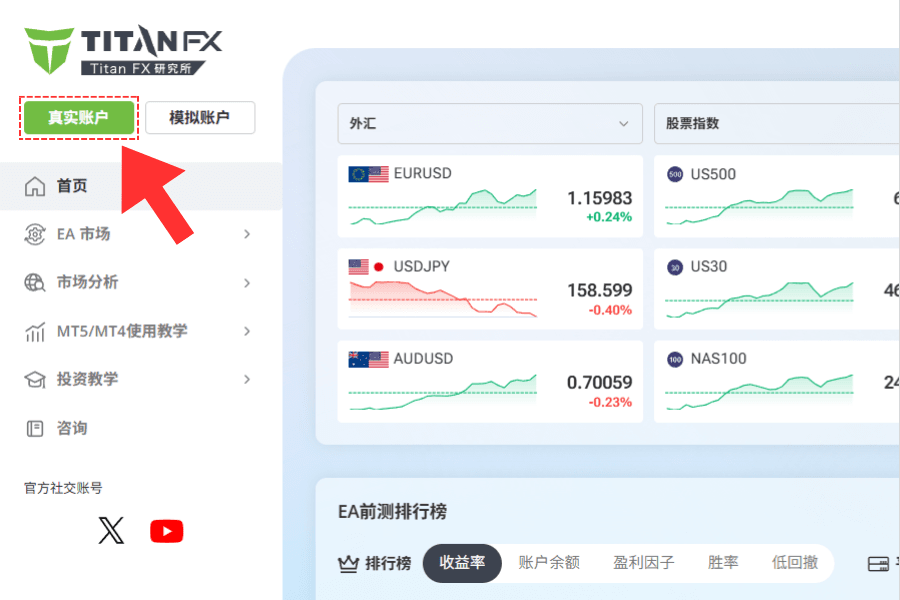
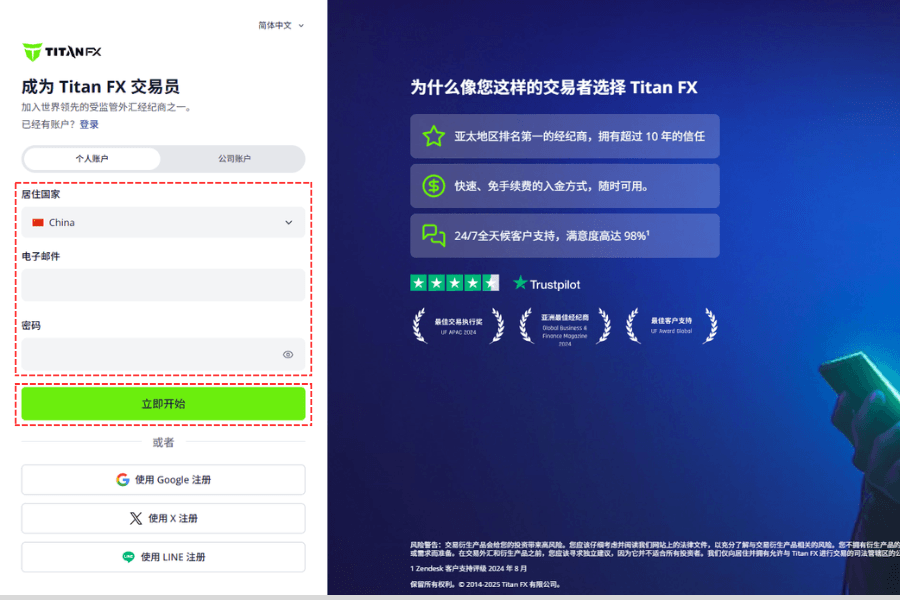
On the registration page, select your country of residence, enter your email address and login password, then click Get Started to continue.
Password Requirements:
- ▸ At least 8 characters
- ▸ At least 1 uppercase letter
- ▸ At least 1 lowercase letter
- ▸ At least 1 number
- ▸ At least 1 special character (for example:
~!@#$%^&*)
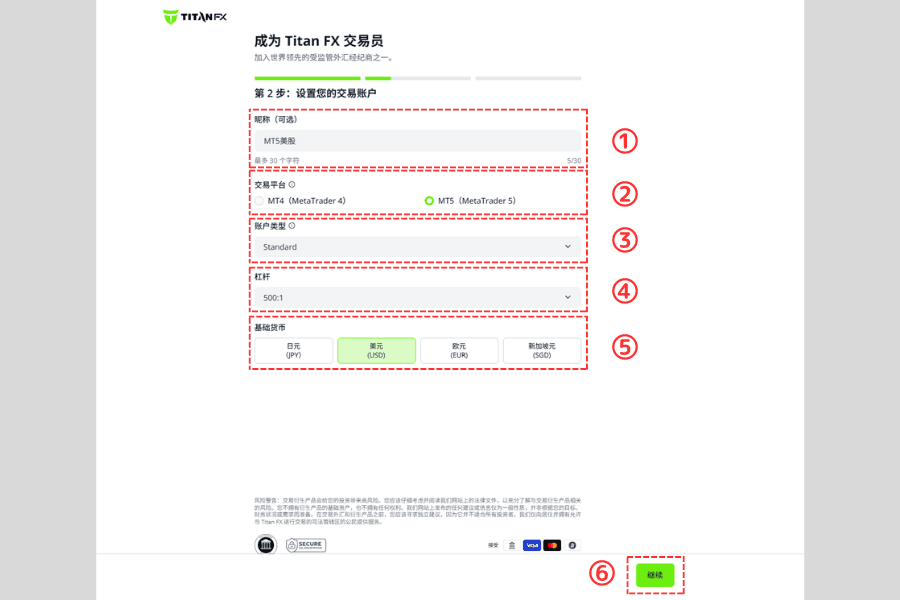
Step 2: Choose Your Trading Account Settings
After registration, the system will guide you to set up your trading account. Choose the options that best suit your needs:
| Item | Details |
|---|---|
| ① Nickname | Optional. You can name the account freely to distinguish it from other trading accounts |
| ② Trading platform | MT4 or MT5 |
| ③ Account type | Standard, Blade, or Micro |
| ④ Leverage | Up to 1,000:1 for Standard and Blade accounts; up to 2,000:1 for Micro accounts (conditions apply) |
| ⑤ Base currency | USD, JPY, SGD, or EUR |
| ⑥ Continue | Review your settings and click Continue to proceed |
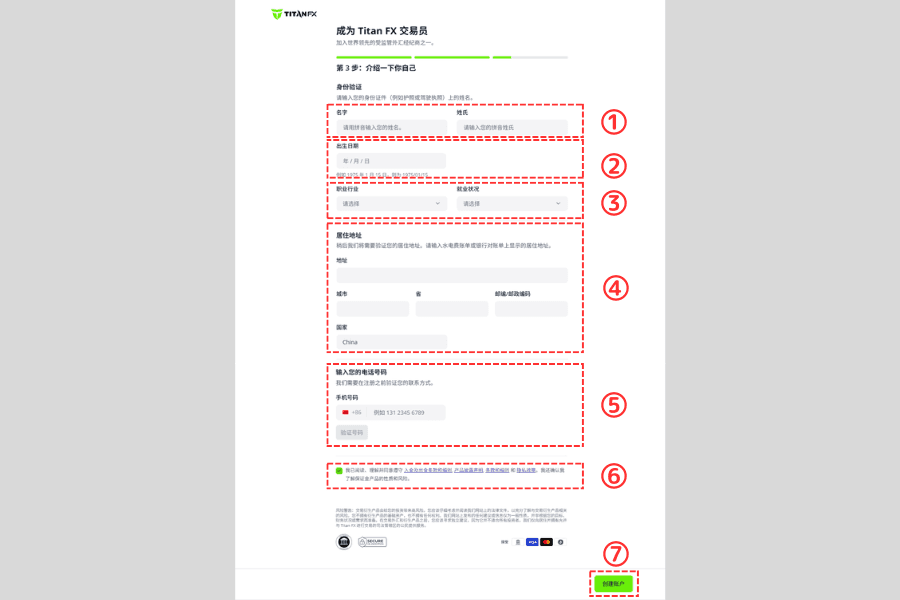
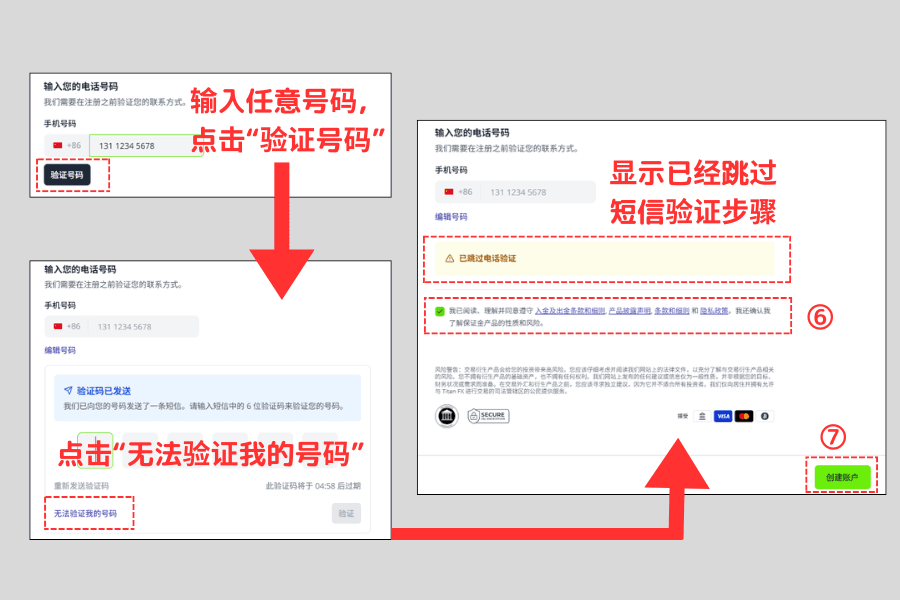
Step 3: Enter Personal Information and Skip SMS Verification
Please fill in your name, date of birth, occupation, contact details, and residential address in English. All information must match your identity documents exactly to ensure smooth verification.
※ At the moment, mainland China mobile numbers are not supported for SMS verification. After submitting your details, you will need to skip the SMS verification step using the method provided by the system. This will not affect the account opening process.| Item | What to Enter |
|---|---|
| ① Name | Enter your first name and last name in English |
| ② Date of birth | Enter your date of birth in numeric format, for example: August 10, 1990 → 19900810 |
| ③ Industry and employment status | Select your occupation category and current employment status |
| ④ Residential address | Enter your full address in English (province, city, district, street, building, unit number), including postal code |
| ⑤ Phone number | Enter any 11-digit mobile number (used only to enter the verification screen, then you will skip verification in the next step) |
| ⑥ Terms and risk acknowledgment | Read and agree to the relevant terms and policies |
| ⑦ Submit application | Click Create Account to submit your application |
How Mainland China Users Can Skip SMS Verification (Important)
Since mainland China mobile numbers are currently not supported for SMS verification, please follow these steps to skip it:
- Step 1: Enter any 11-digit number in the phone number field (it does not need to be a real number), then click Verify Number.
- Step 2: When the verification code input area appears, click I can’t verify my number below it.
- Step 3: The system will display Phone number verification skipped, which means you have successfully skipped this step.
Then check the terms box (⑥) and click Create Account (⑦) to complete the application.
Step 4: Verify Your Email (KYC Still Required)
After completing the previous steps, the page will show the following message:
“Thank you for registering with Titan FX. Please verify your email address.”
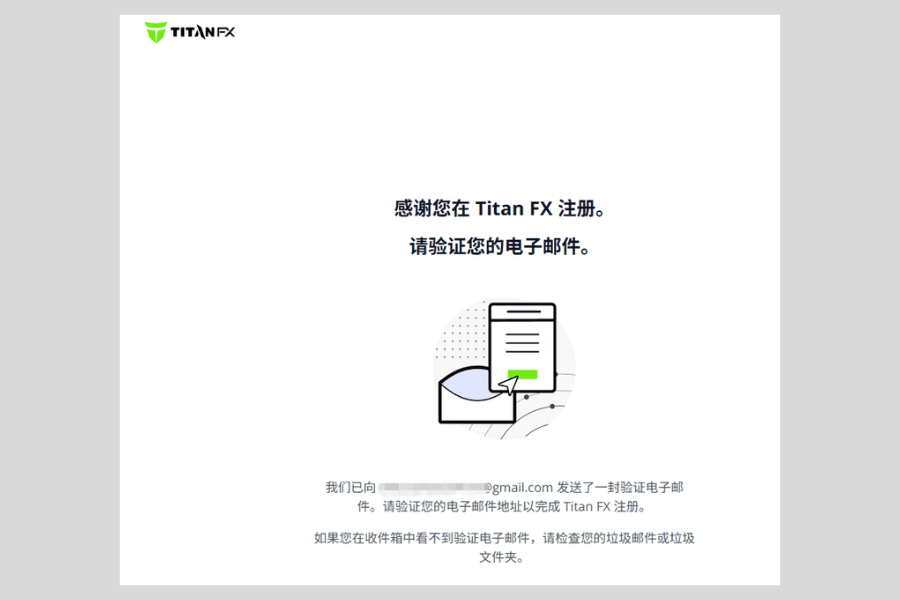
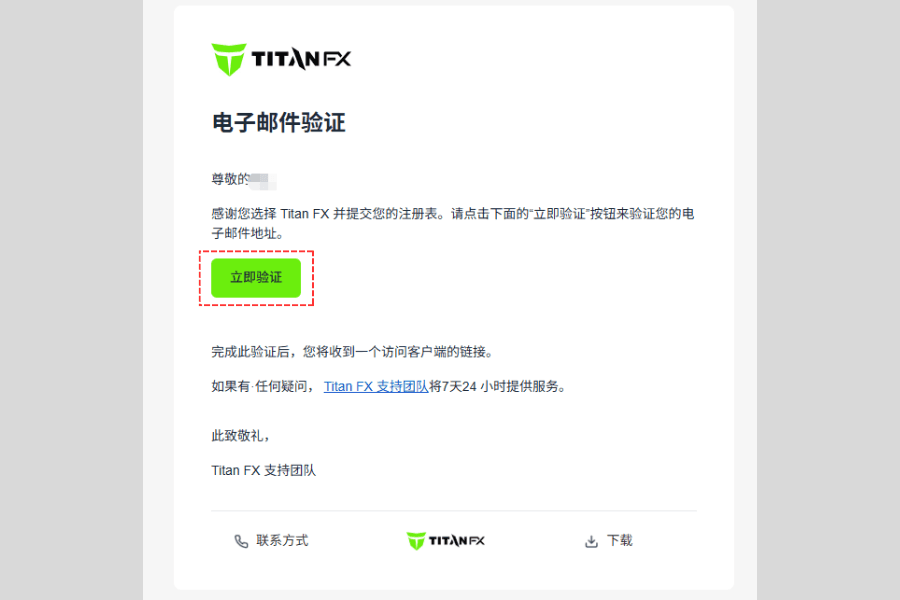
Titan FX will automatically send a verification email to the address you used during registration.
Open your inbox and click the Verify Now button in the email to complete email verification.
※ If you do not receive the email, please check your spam or junk folder.
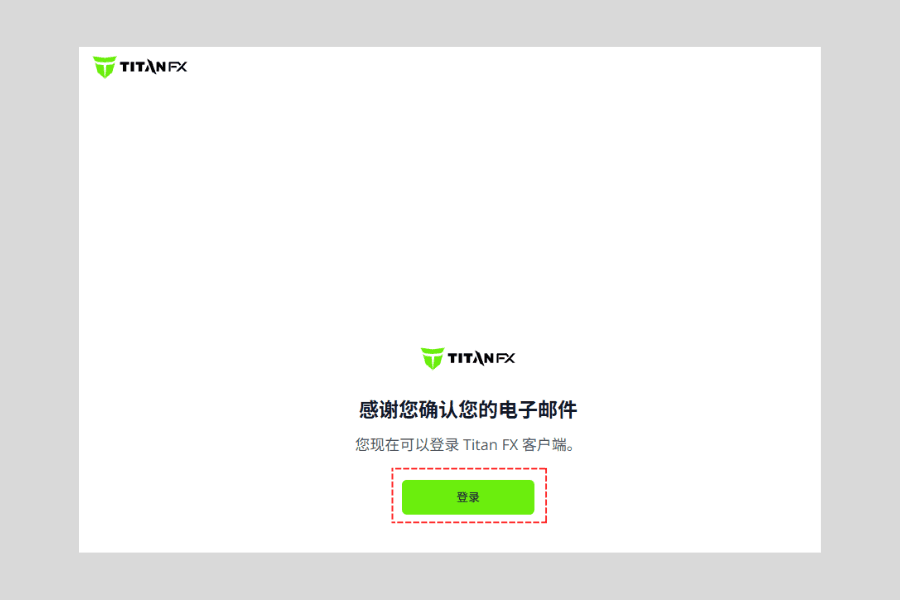
After verification, the page will display “Thank you for confirming your email”, which means your email verification is complete.
At this point, you can click Login to access the Titan FX client portal.
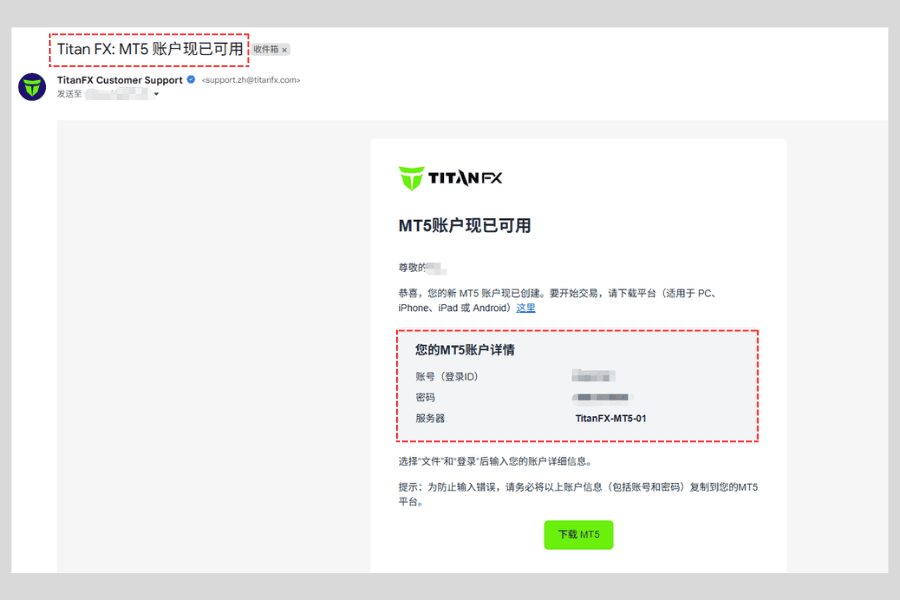
After verifying your email, you will also receive a notification email from Titan FX titled:
“Titan FX: Your MT4/MT5 Account is Ready”
This email includes:
- ▸ Your login ID
- ▸ Your initial password (can be changed in the client portal)
- ▸ Server information
If you do not see this email, please check your spam or junk folder for “Titan FX: Your MT4/MT5 Account is Ready”.
You can also log in to the client portal directly to view your account details and change your password to something easier to remember.
Step 5: Upload ID and Proof of Address (Complete Account Verification)
After verifying your email, mainland China users must upload both proof of identity and proof of address to complete account verification.
Your account can only be used for depositing, trading, and withdrawals after the verification is approved.
Below is how to upload the required documents in the client portal:
Step 1: Log in to the Titan FX client portal and go to the upload page
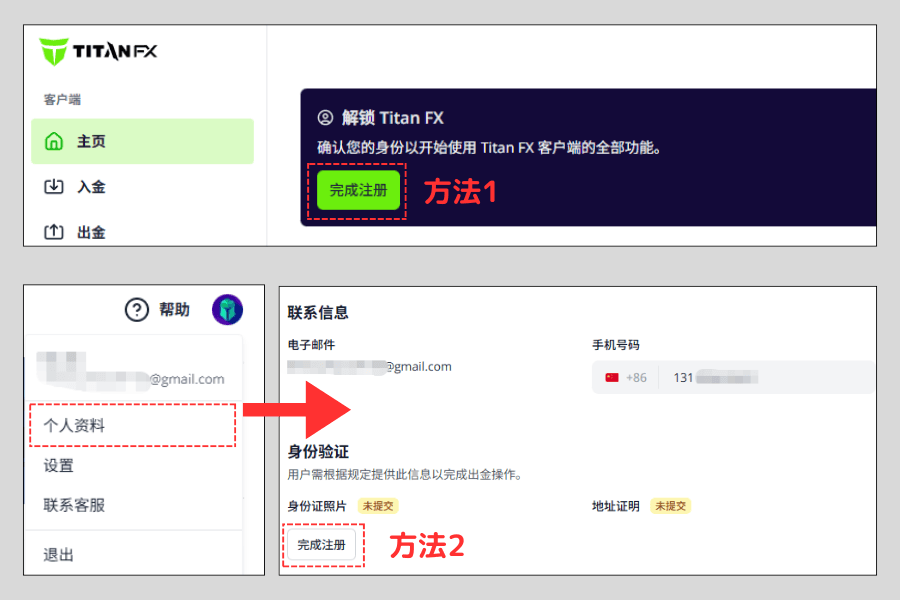
You can access the document upload page in either of the following ways:
- Method 1: After logging in, click Complete Registration on the homepage.
- Method 2: Click your profile icon in the top-right corner → select Profile → click Complete Registration.
Step 2: Upload your proof of identity
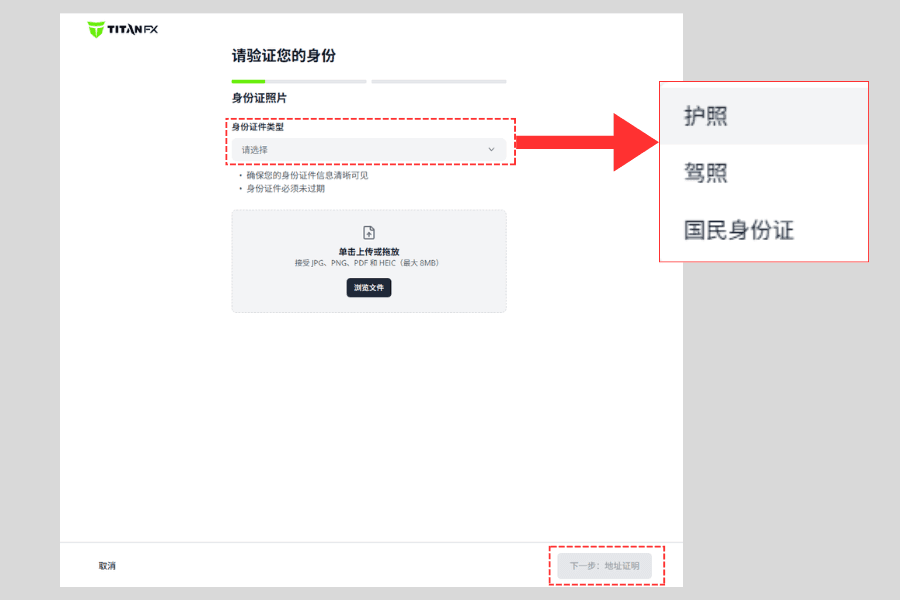
On the document upload page, choose the type of identity document you want to submit (passport, national ID card, or driver’s license).
After uploading, click Next: Proof of Address in the bottom-right corner to continue.
Step 3: Upload your proof of address
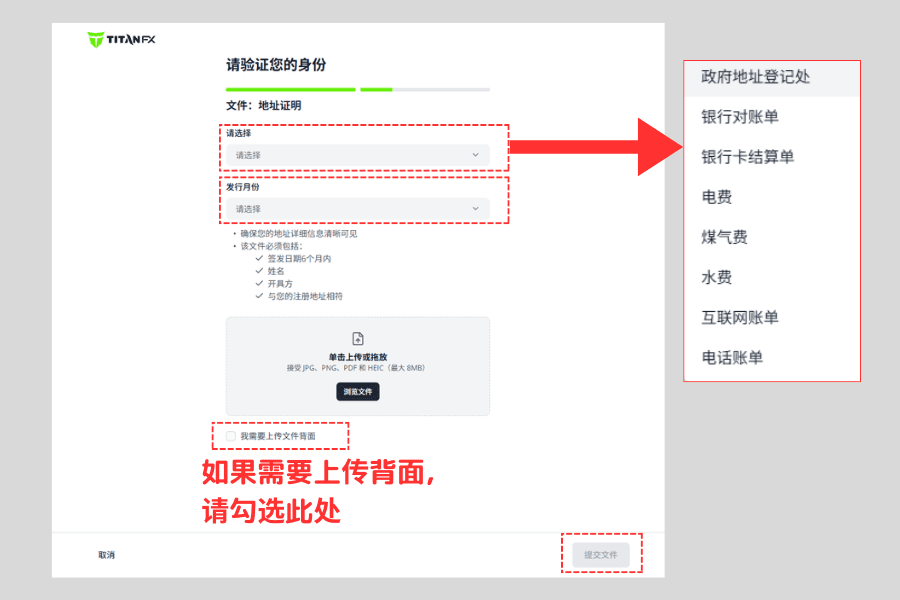
Upload a valid proof of address document (such as a household registration book, utility bill, or bank statement), and select the corresponding issue date as required.
After uploading, click Submit Files.
Step 4: Wait for approval
After submission, the system will display a Documents Submitted confirmation page.
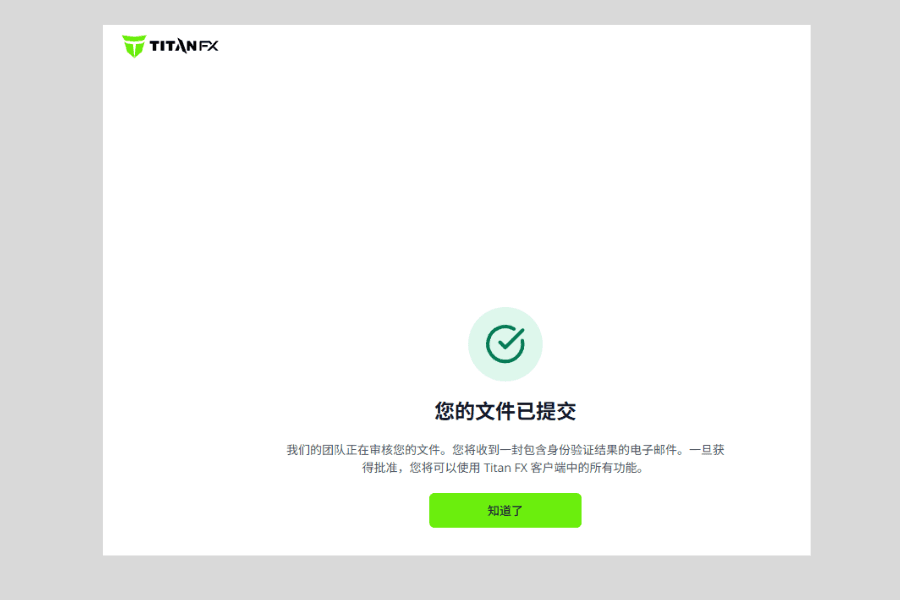
During the review period, the client portal may show a pending verification message. This is normal.
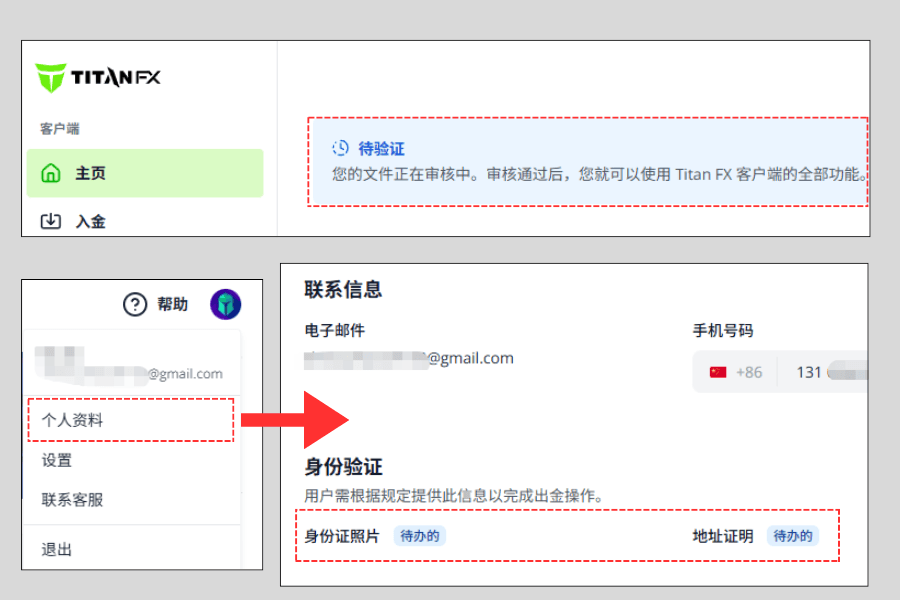
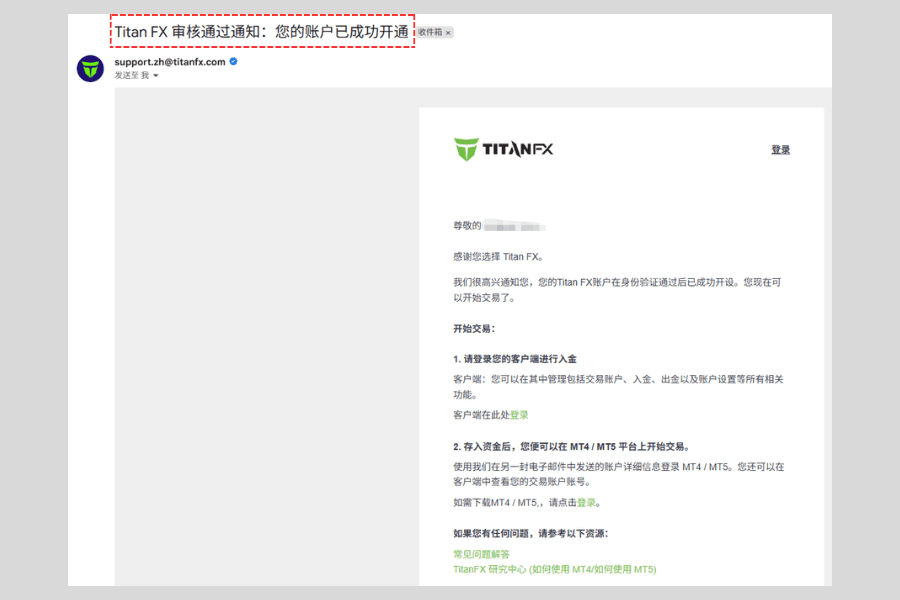
Verification is usually completed within 1 business day. Once approved, you will receive a confirmation email, and your account will be ready for deposits and trading.
FAQ and Important Notes
Q1: What should I do if I still can’t log in to the client portal after verifying my email?
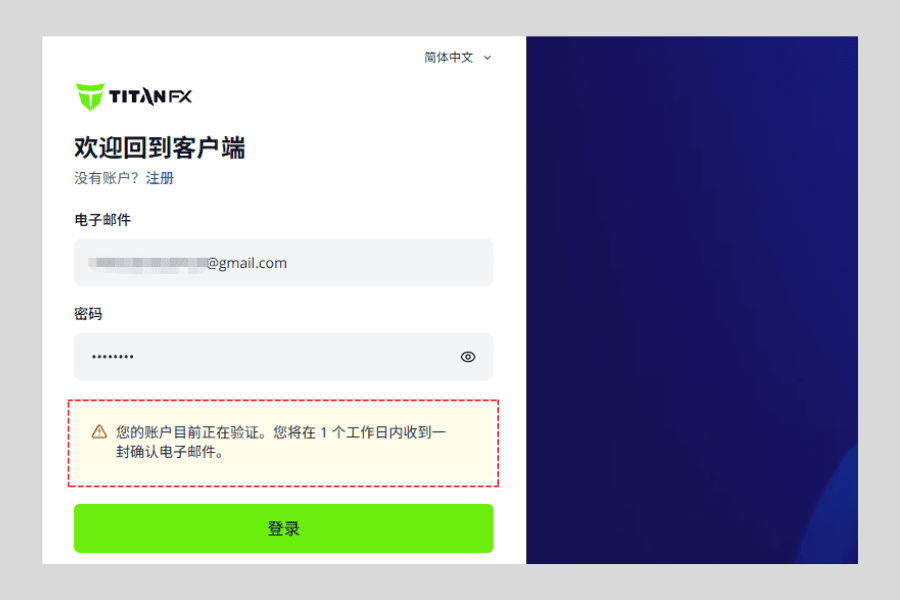
If you have already verified your email but still cannot log in to the Titan FX client portal, it usually means the personal information you entered during registration requires additional manual review.
In most cases, manual review is completed within 1 business day. Once approved, Titan FX will send you a confirmation email, and you will then be able to log in and use your trading account normally.
If your account is still under review, you may see a message similar to the following when trying to log in:
Q2: I didn’t receive the approval email. How can I check my verification status?
Once your verification is approved, Titan FX usually sends a confirmation email. If you did not receive it, you can check your status in the following ways:
| Method | Details |
|---|---|
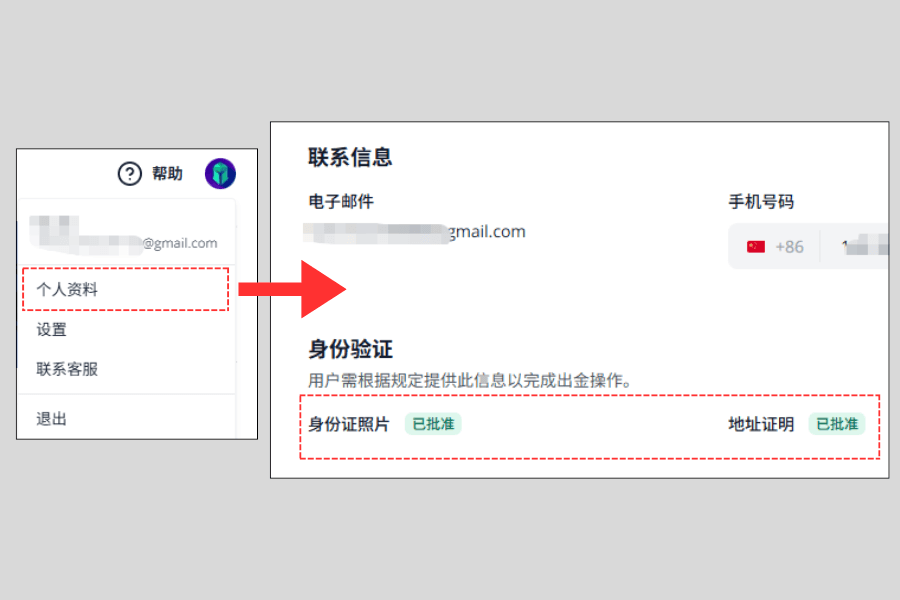
| Log in to the client portal | In Profile, if you see ID Photo: Approved / Proof of Address: Approved, your verification is complete |
| Check your spam folder | The email may have been filtered into spam or junk |
| Contact customer support | If the status has not updated for an extended period, contact support for assistance |
Q3: Why do I need to upload ID and proof of address?
Uploading proof of identity and proof of address is required to complete account verification so that you can deposit funds, trade, and withdraw without issues.
This is a standard procedure used by international brokers to protect account security and comply with regulatory requirements.