

Hong Kong Titan FX Registration Guide

Titan FX provides an efficient and stable trading environment, with a simple and fast account opening process.
Hong Kong users can apply online and complete the account opening process in just a few minutes. In addition, there is no need to upload proof of identity or proof of address. You can start depositing and trading immediately after completing SMS verification.
Regions currently supported for SMS verification account opening include: Hong Kong, Macau, Taiwan, Japan, Singapore, and Uruguay, with more countries and regions expected to be added in the future.
Choose Your Region to View the Account Opening Guide
Below, we will use Hong Kong residents as an example to explain the complete account opening process and important points in detail.
[Step-by-Step Guide] Titan FX Live Account Opening Process
Below is a step-by-step illustrated guide to help you complete the setup of your Titan FX live account.
The entire process takes only a few minutes and is simple to complete. It is divided into four steps:
Step 1: Register an Account
First, visit the official Titan FX website and click [Open Live Account] to enter the registration page.
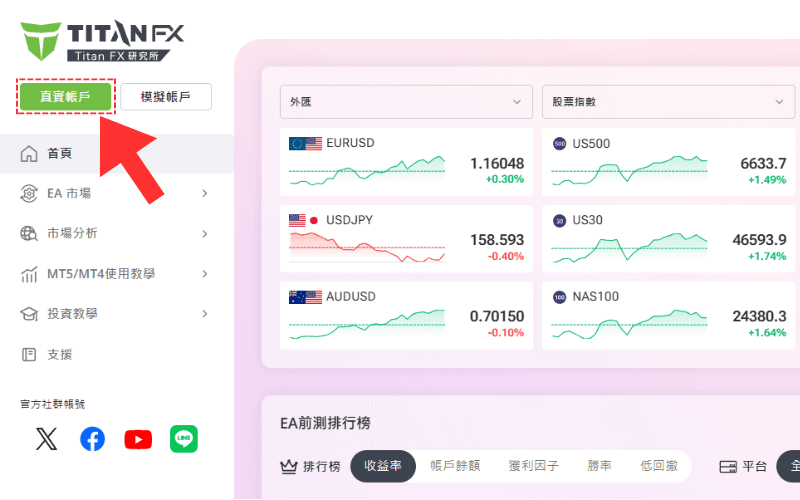
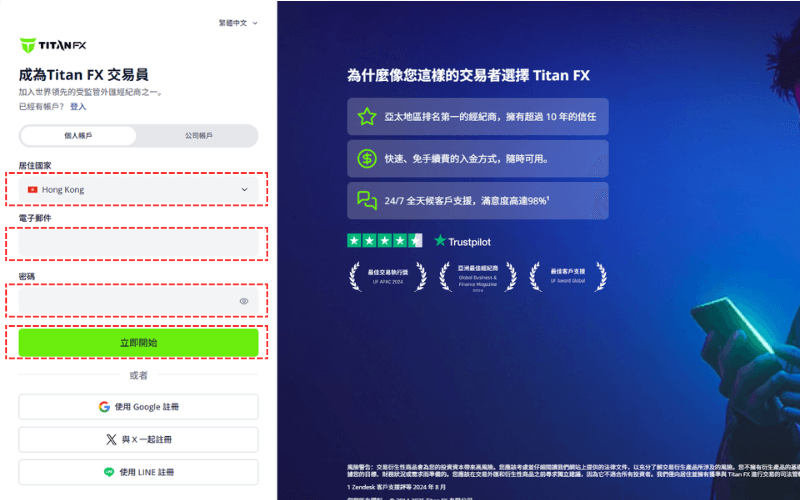
On the registration page, select your country of residence, enter your email address and login password, then click [Get Started].
Password Requirements:
- ▸At least 8 characters
- ▸At least one uppercase letter
- ▸At least one lowercase letter
- ▸At least one number
- ▸At least one special character (for example:
~!@#$%^&*)
Step 2: Choose Trading Account Settings
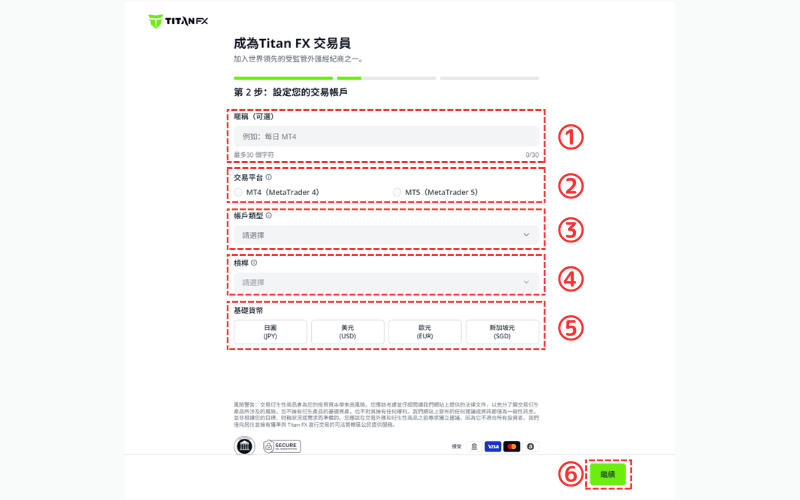
After registration, the system will guide you to set up your trading account details. Please choose the appropriate options based on the following items:
| Item | Details |
|---|---|
| ① Account Nickname | You may name it freely (optional) to distinguish between different accounts |
| ② Platform | MT4, MT5 |
| ③ Account Type | Standard, Blade, Micro |
| ④ Leverage | Up to 1,000:1 for Standard and Blade accounts; up to 2,000:1 for Micro accounts (conditions apply) |
| ⑤ Base Currency | Japanese Yen (JPY), US Dollar (USD), Singapore Dollar (SGD), Euro (EUR) |
| ⑥ Next Step | After confirming the above settings, click [Continue] to proceed |
Step 3: Enter Personal Information and Complete SMS Verification
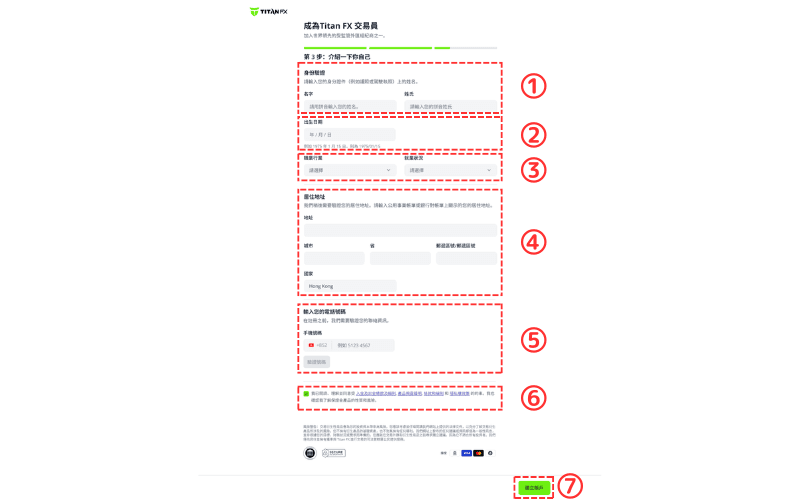
Please enter your name, date of birth, occupation, contact details, and residential address in English. All information must match your identity documents to ensure a smooth review process.
After filling in your basic information, the system will ask you to complete mobile phone SMS verification.
Please confirm that your mobile number is correct, click [Send Verification Code], then enter the 6-digit code you receive to complete verification.
※ If SMS verification fails, you may skip this step first. It will not affect the account opening process.| Item | Details |
|---|---|
| ① Name | Enter your first name and last name in English exactly as shown on your ID card or passport |
| ② Date of Birth | Enter your actual date of birth, for example: August 10, 1990 (format: 19900810) |
| ③ Industry & Employment Status | Select your work category and employment status |
| ④ Residential Address | Enter your full address in English (including city and street). Postal code can be entered as 0000 |
| ⑤ Phone Number | Enter a mobile number that can receive SMS messages |
| ⑥ Terms & Risk Confirmation | Read and check the boxes to confirm agreement with the relevant terms and policies |
| ⑦ Submit Application | Click [Create Account] to submit your account opening application |
Detailed SMS Verification Instructions
Please follow these steps to complete mobile phone SMS verification:
- Step 1: Enter a mobile number that can receive SMS messages, then click [Verify Number].
- Step 2: After receiving the SMS, enter the 6-digit verification code, then click [Verify].
- Step 3: Once you see “Phone number verified”, the verification is complete.
Then check item ⑥ and click ⑦ [Create Account] to complete your account opening application.
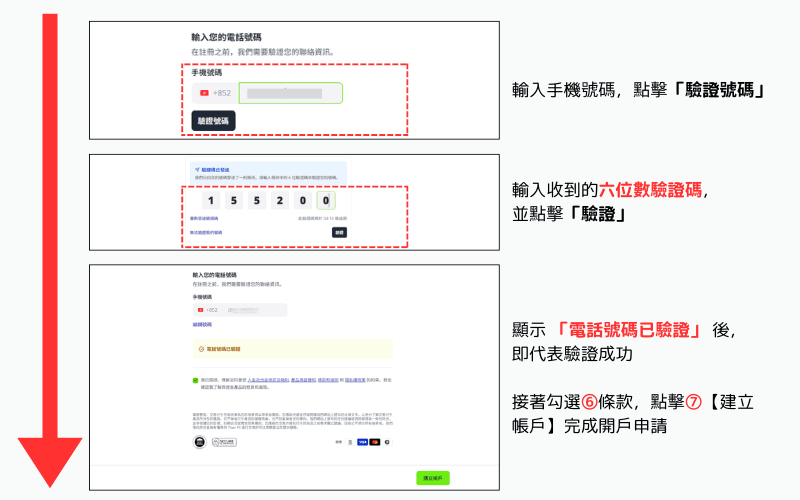
If you do not receive the verification code, you can click “Resend verification code” to try again, or choose “Unable to verify my number” to skip this step.
After opening your account, you can also complete verification later inside the client portal without affecting the overall account opening process.
Step 4: Verify Your Email and Activate Your Trading Account
After completing the above steps, the screen will display the following message: “Thank you for registering with Titan FX, please verify your email.”
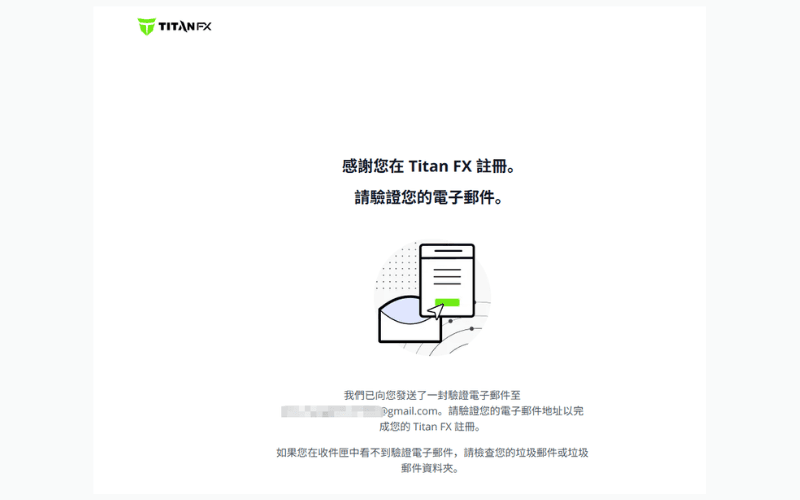
The system will then automatically send a confirmation email to the email address you used during registration.
Please open the email and click “Verify Now” to complete the email verification process.
※ If you do not receive the confirmation email, please check your spam folder.
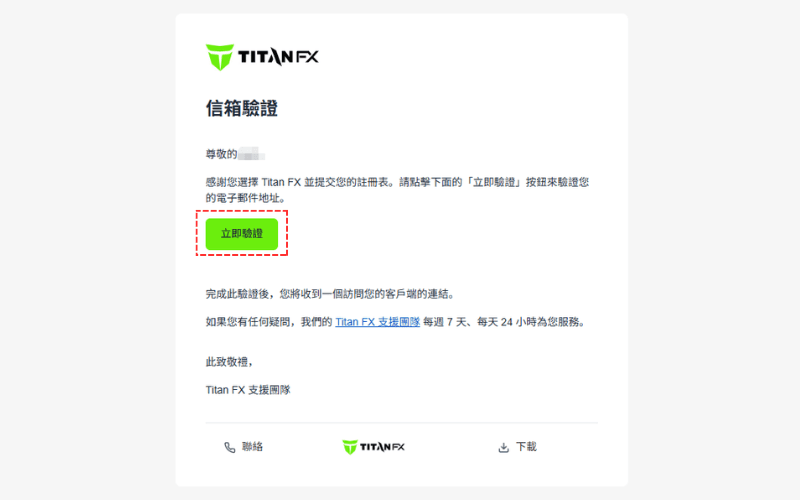
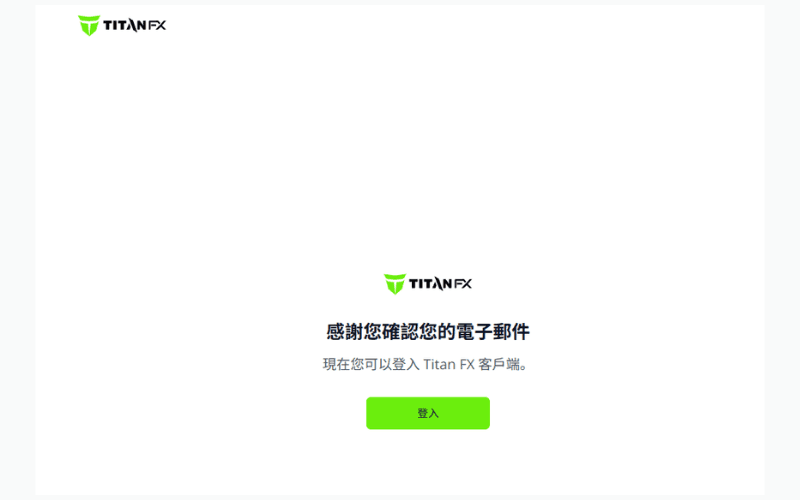
After verification is complete, the screen will display the message “Thank you for confirming your email”, which means your account has been successfully activated.
At this point, you can click [Login] to enter the Titan FX client portal.
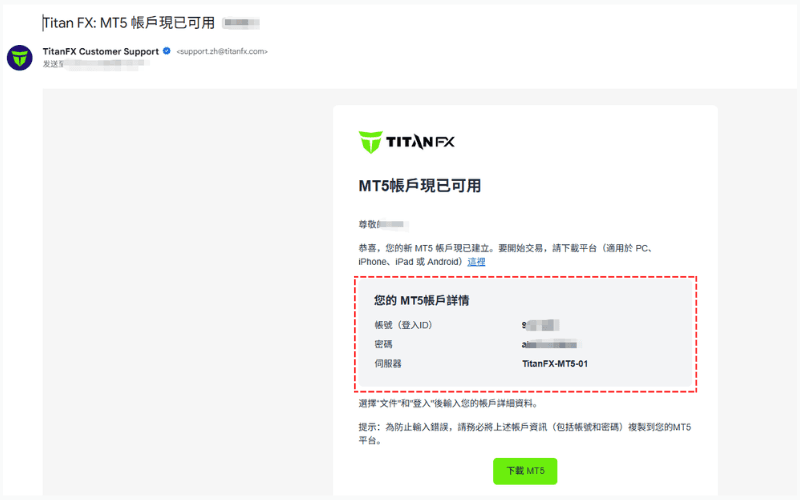
After completing email verification, you will also receive a notification email from Titan FX with the subject line: “Titan FX: Your MT4/MT5 account is now available”.
This email includes:
-
▸Login account number
-
▸Initial login password (can be changed in the client portal)
-
▸Server address
-
If you do not receive this email, please check your spam folder for “Titan FX: Your MT4/MT5 account is now available”.
-
You may also log in directly to the client portal to view your account details and change your password to something easier to remember.
FAQs and Important Notes
Q1: What should I do if I still cannot log in to the client portal after completing email verification?
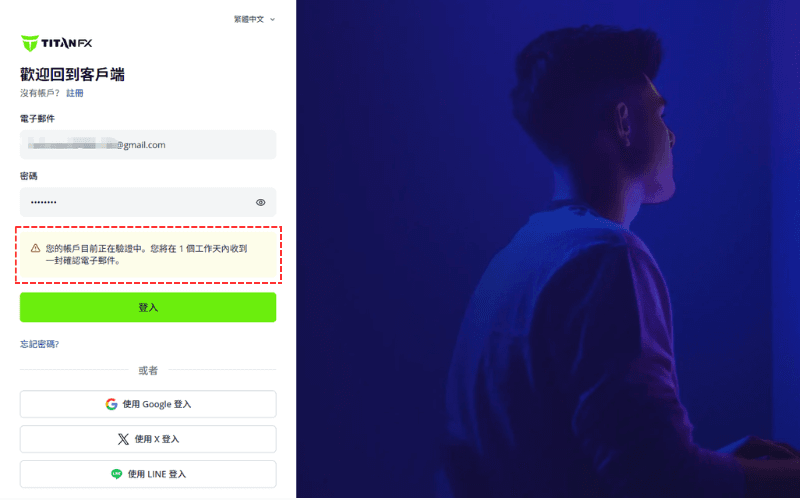
If you have completed email verification but still cannot log in to the Titan FX client portal, it may be because the personal information you submitted was incorrect, and the system requires a manual review.
In general, manual review is completed within 1 business day, and a confirmation email will be sent once verification is approved. After that, you will be able to log in normally and start trading.
If verification is still pending, you may see the following prompt when logging in:
Q2: What is the difference between successful and unsuccessful SMS verification?
If SMS verification is unsuccessful or skipped, you can still log in to the Titan FX client portal, but you will not be able to deposit funds or trade.
In this case, you must complete identity verification (KYC) and upload proof of identity and proof of address documents.
| Verification Status | Can Deposit | Can Trade | Can Withdraw | Required Documents |
|---|---|---|---|---|
| SMS verification successful | Yes | Yes | Documents required before withdrawal | Upload proof of identity before withdrawal |
| SMS verification unsuccessful | No | No | No | Proof of identity and proof of address required |
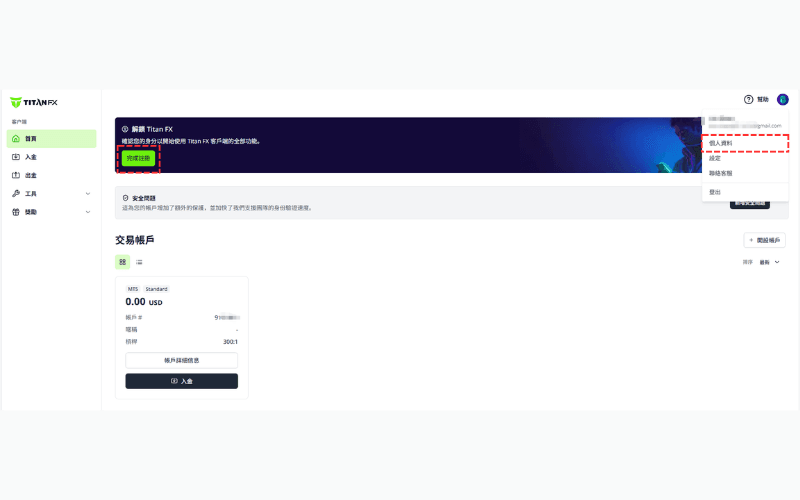
After logging in, a prompt will appear on the homepage. Please click [Complete Registration] or go to the [Profile] page to upload your documents and complete verification.
Q3: If I complete SMS verification later in the client portal, do I still need to submit proof of address?
No.
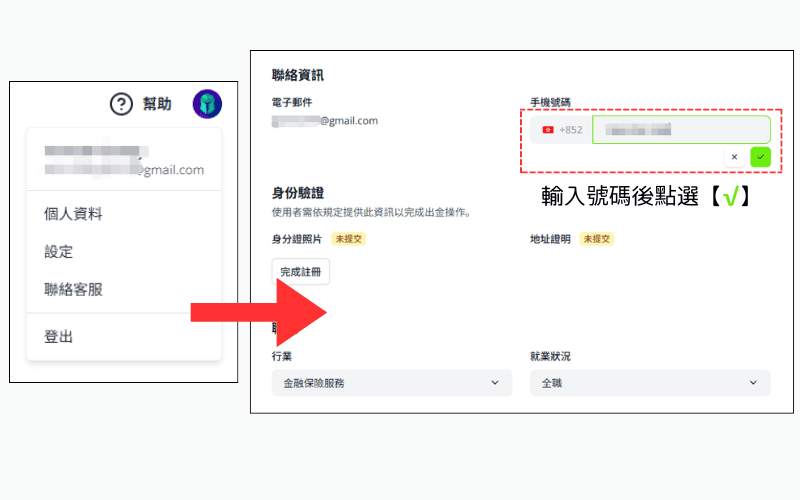
- If you skipped SMS verification during account opening, you can still complete it later after logging in to the Titan FX client portal.
- As long as you successfully complete mobile phone SMS verification in the client portal, you can deposit and trade without needing to submit proof of address.
How to do it:
Log in to the client portal → Click your profile icon in the top right corner → Select [Profile] → Click the phone number field → Enter your number and click √.
Q4: After completing SMS verification, are there any restrictions on deposits and trading?
Yes. After opening a Titan FX account, even if you have not yet completed identity verification (KYC), you can still deposit and trade.
However, please note the following restrictions:
- ▸The maximum amount you can deposit and trade is USD 10,000 (or equivalent).
- ▸If you want to withdraw profits earned from trading, you must first complete identity verification (KYC).
Further Reading: Titan FX KYC Process and Important Notes