
 Home
Home- Support (Account Opening / Deposit / KYC / Withdrawal)
- How to Add a New Trading Account on Titan FX
How to Add a New Trading Account on Titan FX
Opening an additional account with Titan FX is simple and straightforward. Just log in to the Client Cabinet, specify your desired account settings (account type, leverage, base currency, etc.), and your additional account will be instantly created.
Titan FX allows each client to open up to 15 accounts (1 initial account + 14 additional accounts) without any conditions. This flexibility enables traders to manage multiple accounts with varying account types or leverage settings to suit their trading strategies.
Steps to Open an Additional Titan FX Trading Account
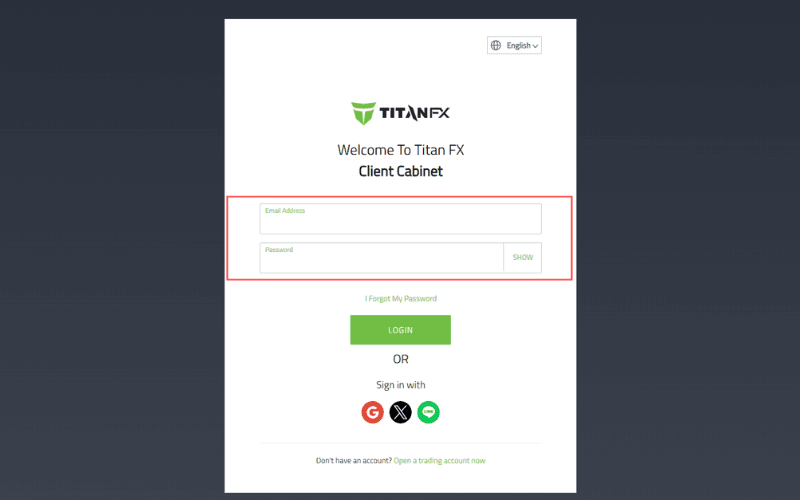
1. Log in to the Client Cabinet
Enter your registered email address and password for the Titan FX Client Cabinet and log in.
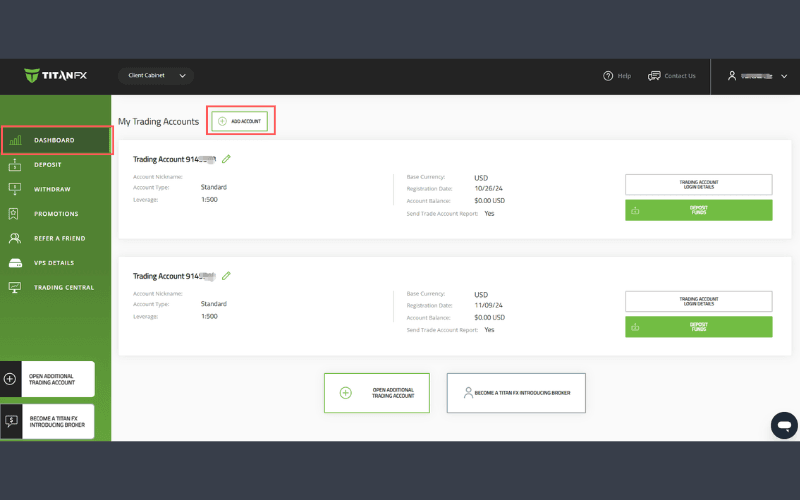
2. Open an Additional Trading Account
After logging in, click "ADD ACCOUNT" located at the bottom of the left sidebar.
3. Complete the Additional Account Registration Form
The "Additional Account Registration Form" will appear as a pop-up window.
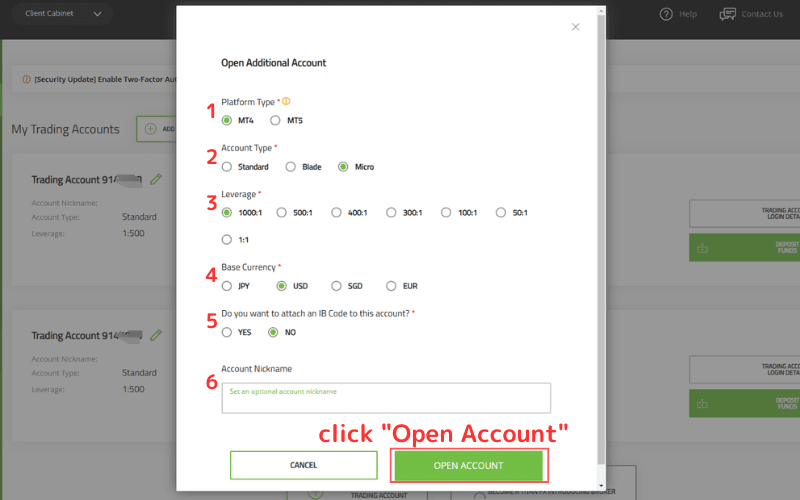
1.Platform Type
Choose between "MetaTrader4 (MT4)" or "MetaTrader5 (MT5)." If you are currently using MT4 but want to try MT5 for the additional account, select MT5.
2.Account Type
Select from "Standard Account," "Blade Account," or "Micro Account."
Opening a different account type from your existing one allows for flexible use according to trading needs.
Comparison of Titan FX Account Types: Standard, Blade, and Micro
3.Leverage
- For Standard or Blade accounts, leverage options include 1:1, 50:1, 100:1, 300:1, 400:1, and 500:1.
- For Micro accounts, leverage options include 1:1, 50:1, 100:1, 300:1, 400:1, 500:1, and 1000:1.
4.Base Currency
Choose from "JPY," "USD," "SGD," or "EUR."
The base currency should ideally match your deposit currency. However, opening accounts with different base currencies can reduce risks associated with exchange rate fluctuations.
5.IB (Introducing Broker)
- If you do not wish to specify an IB, select "No."
- If you are unsure, leave it blank.
- To specify an IB, select "Yes," then enter the IB code (7 digits) or the EA/IB name in the provided field.
6.Account Nickname
This field is optional.
For example, if the account is for trading gold exclusively, Nickname it "GOLD." Similarly, if it is for running a specific EA, you can Nickname it after the EA for easy identification.
※Account Nickname can be changed at any time.
After completing all the required fields, click "Open Account."
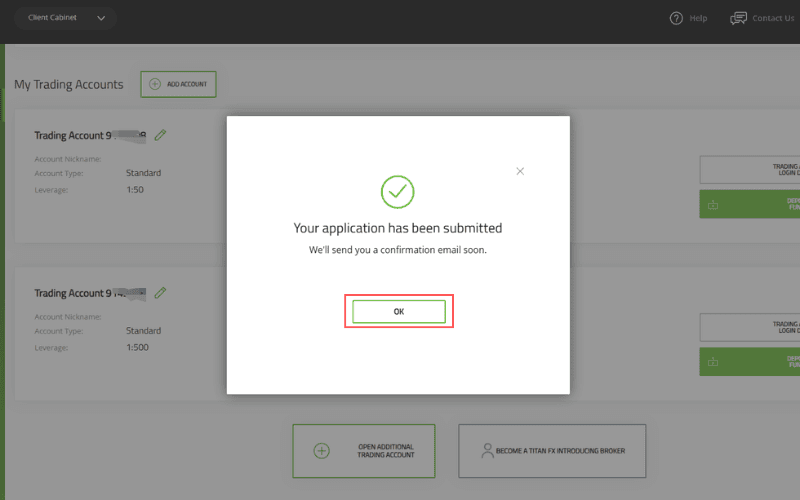
4. Submit Additional Account Information
Once the account details are successfully submitted, a message will appear stating, "Your application has been submitted.." Click "OK" to proceed.
5. Account Information Sent via Email
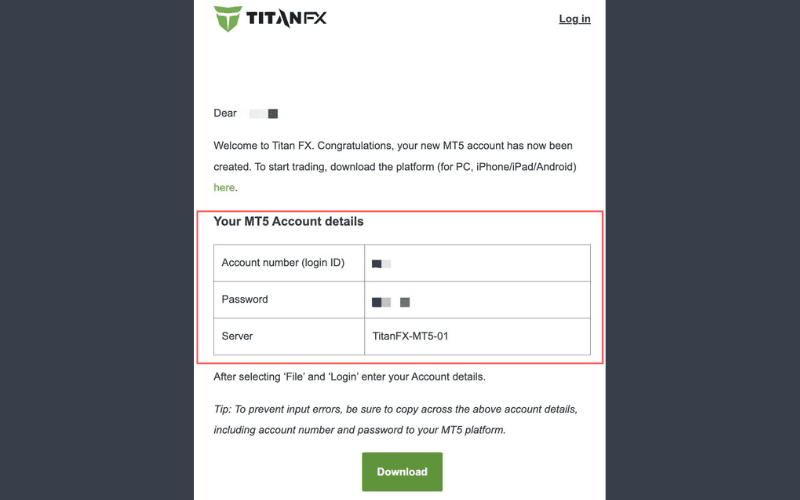
Once your request is processed, the additional account will be created immediately. Titan FX will send an email with the subject "Titan FX: Your MT5 (MT4) Account is Now Active!" to your registered email address.
The email will include your new MT5 (MT4) account number, password, and server name for logging in to your additional account.
You can use the provided details to access the newly created account on the Titan FX trading platform.
Notes
Situation where SMS (text message) verification and identity verification are not completed
If SMS verification is not completed, customers will not be able to apply for additional accounts.
SMS verification is only applicable to customers residing in the following regions. (※ This refers to the country of residence, not nationality)
- Taiwan
- Hong Kong
- Japan
- Singapore
- Macau
- Uruguay
SMS verification should be completed when opening an account. If it has not been completed, please do so in the customer portal.
For customers residing in regions where SMS verification is not applicable, identity verification must be completed before applying for an additional account.
After opening a live account, you will need to submit verification documents. You need to provide a valid photo ID (driver’s license, passport, ID card) and proof of address issued within the last 6 months (utility bills, etc.).
Situation where the opening of additional accounts takes longer
If an IB or more than 16 additional accounts are specified, you will receive an email titled "Additional Account Application Accepted." The additional accounts will not be opened immediately.
Titan FX's relevant department will conduct a review, and it may take one business day to send the login details for the additional account. Depending on the conditions, the additional account you wish to open may not be available.