

What Are Pending Orders in Forex Trading? A Guide to MT5/MT4 Order Types and Usage Tips
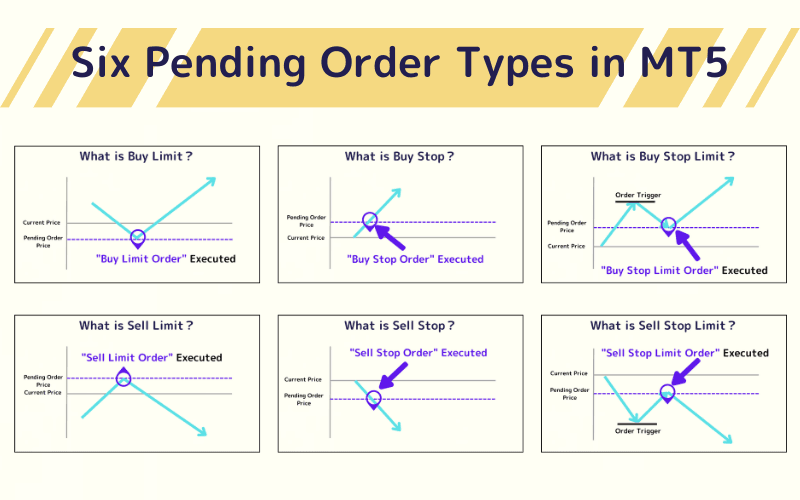
A Pending Order, also known as a pre-set order, refers to a type of trade order where traders specify conditions under which buy or sell transactions will automatically be executed at future price levels. Traders can set one or multiple pending orders, and when the market price reaches the predefined level, the system will automatically execute the buy or sell operation based on the specified conditions.
The MT5 (MetaTrader 5) platform supports six types of pending orders, whereas MT4 (MetaTrader 4) offers four types. The following content explores the features of each pending order type in MT5/MT4 and provides insights into their practical application strategies in trading.
- Definition: an order that auto-fills at a set price condition
- Six types: Buy/Sell × Limit / Stop / Stop Limit
- Three logics: limit waits a pullback, stop chases a breakout, stop-limit does both
- When to use: can't watch the screen, disciplined entries, breakouts/pullbacks
- Note: not guaranteed to fill; fast markets can slip or skip
1. Pending Order Types in MT5/MT4
The types of pending orders available in MT5/MT4 include the following:
| Types | Platform |
|---|---|
| Buy Limit | MT4, MT5 |
| Sell Limit | MT4, MT5 |
| Buy Stop | MT4, MT5 |
| Sell Stop | MT4, MT5 |
| Buy Stop Limit | MT5 |
| Sell Stop Limit | MT5 |
1.Buy Limit
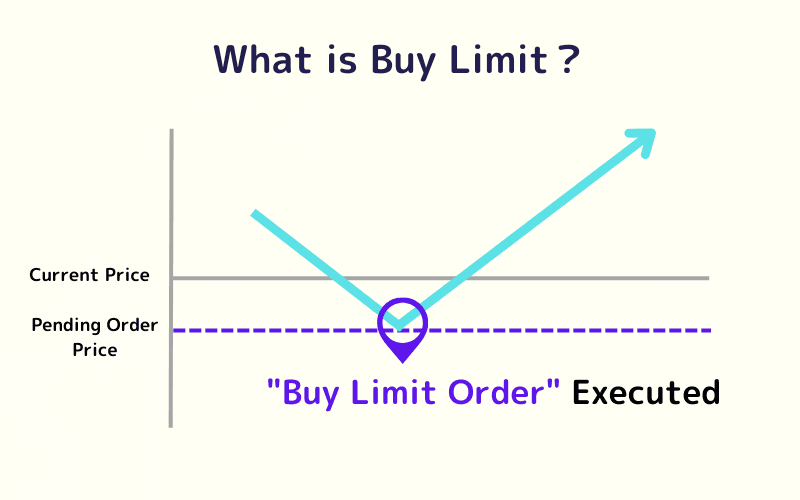
A Buy Limit order is a pending order to buy at a predefined price or lower. This type of order is used when a trader anticipates that the market price will drop to a certain level and then rebound upwards.
In simple terms, setting a Buy Limit order allows traders to buy at a price they consider to be a valuable entry point when the market retraces.
2.Sell Limit
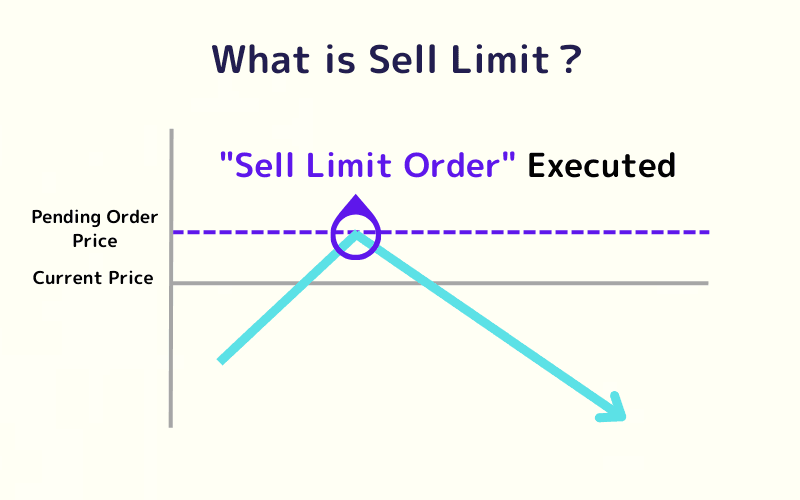
A Sell Limit order is the opposite of a Buy Limit order. It is executed automatically when the market price rises to a specified level or higher. This order type is suitable when traders expect the market price to rise to a high point and then reverse downward.
In simple terms, a Sell Limit order enables traders to sell at a price they believe to be an optimal exit point at higher levels.
3.Buy Stop
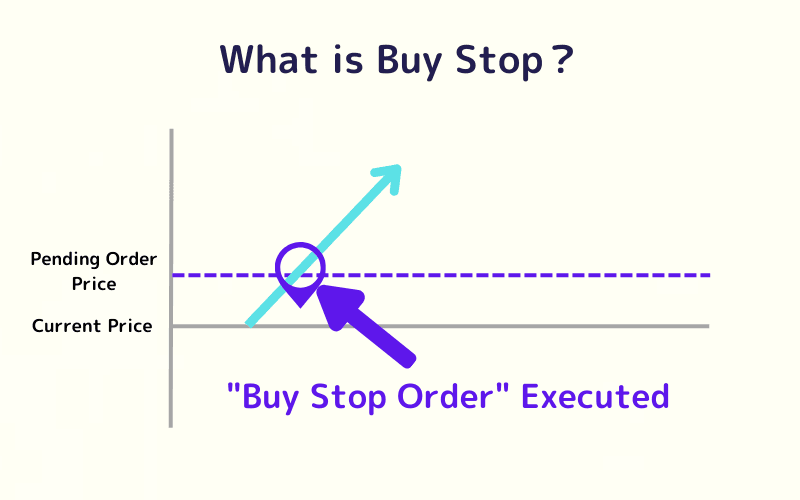
A Buy Stop order is placed above the current market price and is triggered when the price rises to the predefined level or higher. This type of order is used when traders predict that the price will break through a resistance level and continue to rise.
In simple terms, setting a Buy Stop order allows traders to automatically enter the market when the price breaks above a certain level, capturing the upward momentum.
4.Sell Stop
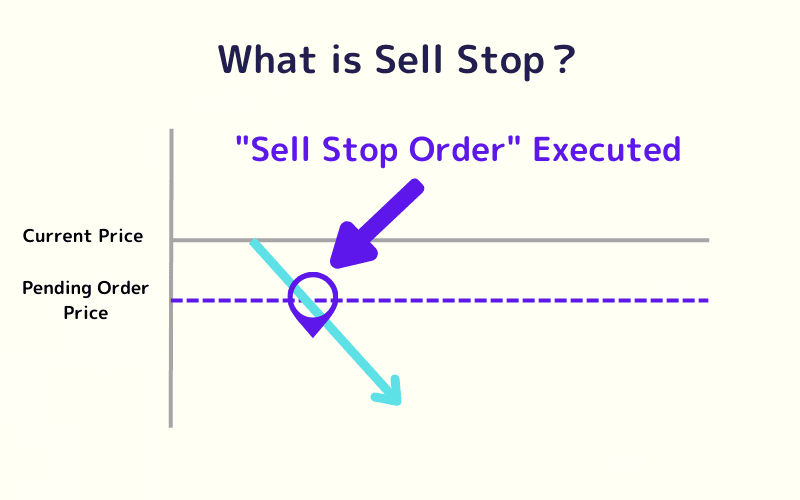
A Sell Stop order is placed below the current market price and is triggered when the price falls to the predefined level or lower. This order type is used when traders expect the market price to break a support level and continue downward.
In simple terms, setting a Sell Stop order allows traders to automatically sell when the price drops below a certain level, taking advantage of the downtrend.
5.Buy Stop Limit
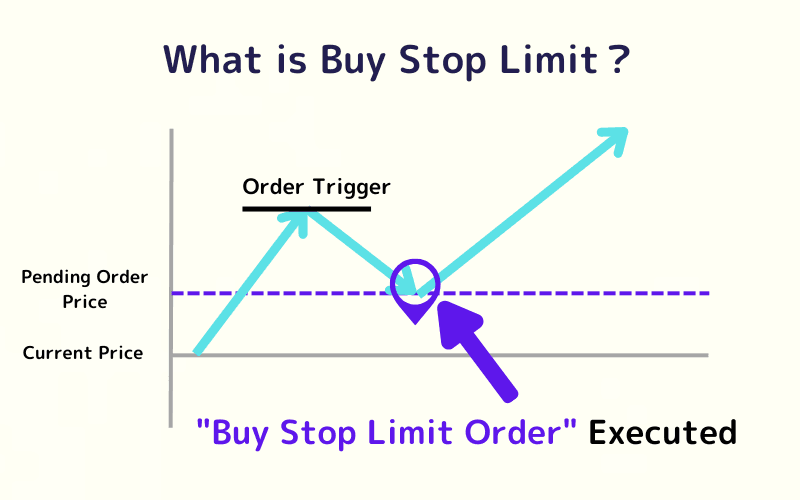
A Buy Stop Limit order combines the functionalities of a Buy Stop and a Buy Limit. Traders first set a trigger price. When the market price rises to the trigger price, a Buy Limit order is placed at a level lower than the trigger price. This type is suitable for traders who want to confirm an uptrend and enter at a more favorable price.
In simple terms, it allows traders to confirm the trend and set a better entry price for buying.
6.Sell Stop Limit
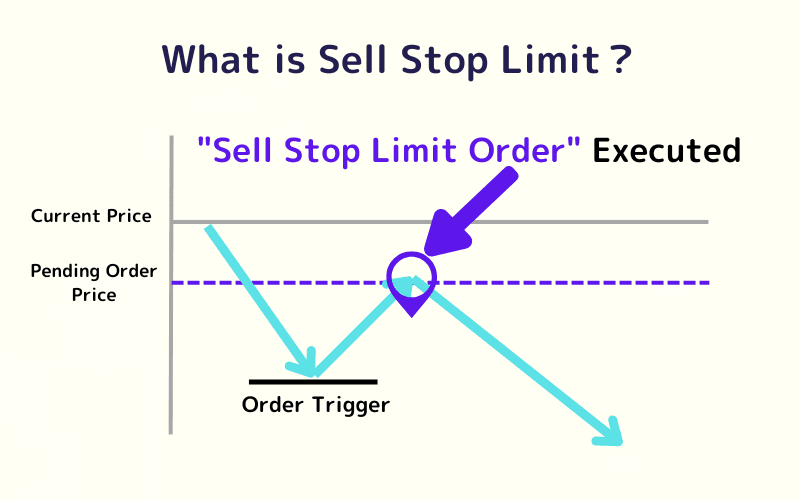
A Sell Stop Limit order combines the functionalities of a Sell Stop and a Sell Limit. Traders first set a trigger price. When the market price drops to the trigger price, a Sell Limit order is placed at a level higher than the trigger price. This order type is suitable for traders who want to confirm a downtrend and enter at a better selling price.
In simple terms, it allows traders to confirm the trend and set a more advantageous price for selling.
Trade Forex CFDs with Titan FX
Titan FX offers 50+ currency pair CFDs on MT4/MT5 with up to 1,000:1 leverage on major pairs, tight spreads, and the flexibility to go long or short. Micro accounts can reach up to 2,000:1 leverage when eligible.
2. Pending Order FAQs
Q1. Will a pending order always fill?
Not always. It executes only when price meets your conditions; if price never reaches it or gaps quickly, it may not fill.
Q2. Can I set a validity period for a pending order?
Yes. Most platforms support day or GTC (good-til-cancelled); if unfilled by expiry, it cancels automatically.
Q3. How do limit, stop, and market orders differ?
A limit waits for a better price on a pullback, a stop triggers after a breakout in the trend, and a market order fills immediately at the best current price.
Q4. Are pending orders suitable for all traders?
They suit traders who can't watch the screen or want disciplined entries, but fast markets can still cause slippage or non-fills, so manage risk.
Q5. What advanced tools pair well with pending orders?
Stop-loss/take-profit, stop-limit orders, and validity settings, combined with technical indicators to plan entries and exits.
3. Summary
| Order Type | Description |
|---|---|
| Buy Limit | Enters a long (buy) position when the price falls to a predefined level below the current price, also called a "bottom-picking order." |
| Sell Limit | Enters a short (sell) position when the price rises to a predefined level above the current price, also called a "top-picking order." |
| Buy Stop | Enters a long (buy) position when the price rises to a predefined level above the current price, also called a "momentum-buying order." |
| Sell Stop | Enters a short (sell) position when the price falls to a predefined level below the current price, also called a "momentum-selling order." |
| Buy Stop Limit | Triggers a buy limit order after the price rises to a trigger level and then pulls back, allowing entry at a lower limit price. |
| Sell Stop Limit | Triggers a sell limit order after the price falls to a trigger level and then rebounds, allowing entry at a higher limit price. |
Each pending order type serves unique trading scenarios. Traders can utilize these tools based on their understanding and predictions of market dynamics to optimize trading strategies, manage risks, and seize opportunities. The first four order types are most commonly used.
Further Reading
- MT4 (Windows) manual
- MT5 (Windows) manual
- What is stop loss?
- Forex margin trading basics
- What is a CFD?
- Reading the Two Buy/Sell Ratios: Why They Often Point Opposite Ways
Titan FX Trading Strategy Lab. We produce investor-education content covering forex, commodities (crude oil, precious metals, agricultural goods), stock indices, U.S. equities, and digital assets.
Primary Sources (by Category)
- Trading platforms: General order specs for MetaTrader 4/5 (limit, stop, stop-limit orders)
- Titan FX official: MT4 manual, What is stop loss?