

An indicator for identifying reversals in range-bound markets (Titan_Range_Rebound)
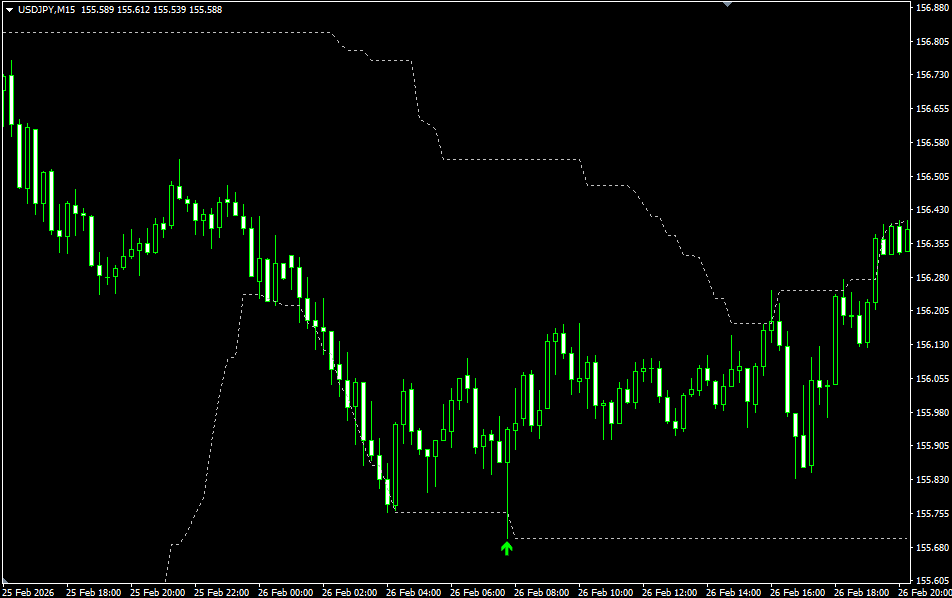
A Simple Signal Tool for Identifying “Rebounds” in Range Markets
The FX market is not always in a trending state. In fact, there are often extended periods when prices move back and forth within a defined range. Titan_Range_Rebound is an indicator that focuses on reversals occurring within such range-bound markets.
When price reaches the upper or lower boundary of a range and shows signs of a potential reversal, the indicator displays arrows on the chart for clear visual identification. Without complex analysis, you can visually recognize when price is positioned at the edge of a range.
How It Works
This indicator first automatically calculates the current range width based on the recent highest high and lowest low over a specified period. If price slightly breaks above or below the range boundary but then closes back inside the range, it identifies this as a potential rebound.
It is designed to capture so-called wick breakouts or false break movements. A downward arrow is displayed when price rebounds from the upper boundary, and an upward arrow is shown when price rebounds from the lower boundary. Signals appear only after the candle has closed and will not repaint afterward.
In addition, the indicator includes a filter to suppress signals during excessively strong trending conditions, making it better suited for range-bound markets.
When to Use It
This indicator is not designed to follow trends. Instead, it performs best when the market is relatively calm. When price moves within a defined range, rebounds at the edges tend to attract market attention.
For beginners, rather than entering immediately when an arrow appears, it is recommended to use the signal as confirmation that price has reacted at the edge of a range. By combining it with other forms of analysis—such as support and resistance lines or moving averages—you can make more balanced trading decisions.
To Avoid Forced Counter-Trend Trades
While counter-trend strategies can work well in range markets, not every rebound will succeed. When a strong trend develops, range boundaries can be easily broken.
For this reason, it is important to use this indicator as a marker of potential opportunity rather than a definitive signal. By confirming the overall market environment and ensuring no strong trend is in place, you can reduce unnecessary entries.
※This indicator operates only on TitanFX Windows versions of MT5 and MT4.
Indicator Terms of Use
Only those who agree to all the following items may use the indicators distributed on this website (https://research.titanfx.com):
1.The indicators and related descriptions are based on various data believed to be reliable, but their accuracy and completeness are not guaranteed.
2.The data displayed by the indicators do not guarantee your investment results. Also, the displayed content may vary due to market conditions and communication environments.
3.Please make investment decisions using indicators at your own risk. We are not responsible for any disadvantages or damages arising from the use of indicators.
4.Specifications of the indicators are subject to change without notice. Changes will be announced on the indicator description pages, etc.
5.Indicators should only be used by customers who have downloaded them. Transferring or selling the indicators to third parties is prohibited.
Indicator Settings
Input (MT5) / Parameters (MT4) Tab Settings
| Variable Name | Description | Default |
|---|---|---|
| Range Measurement Bars | Specifies the number of bars used to measure the range. | 50 |
| Tolerance (Pips) | Specifies how many pips outside the range are still considered within the range movement. | 2.0 |
| Wick Ratio | Specifies the ratio between wick and body considered a sign of reversal. | 1.5 |
| Minimum Range Width | Specifies the minimum range width. | 20.0 |
| Maximum Range Width | Specifies the maximum range width. | 200.0 |
| Signal Interval Limit | Specifies how many bars to wait after a signal before allowing another signal to appear. | 5 |
| Display Range Lines | Specifies whether to display lines indicating the upper and lower range levels. | true |
Colors (MT5) / Color Settings (MT4) Tab Settings
| Variable Name | Description | Default |
|---|---|---|
| 0 | Specifies the arrow color when a rebound occurs. | Lime |
| 1 | Specifies the arrow color when a rejection occurs. | Tomato |
| 2 | Specifies the color of the upper range line. | Silver |
| 3 | Specifies the color of the lower range line. | Silver |