

How to Close a Position on MT5 (iOS)
MT5 (MetaTrader 5) for iOS (iPhone/iPad) offers several ways to close a position. This article explains how to instantly close an open position and how to partially close one on MT5 for iOS.
There are two main methods:
・Closing from the "Trade" screen
・Closing from the "Chart" screen
Closing from the "Trade" Screen
① On the "Trade" screen, tap the position you want to close.
② Select "Close" from the menu.
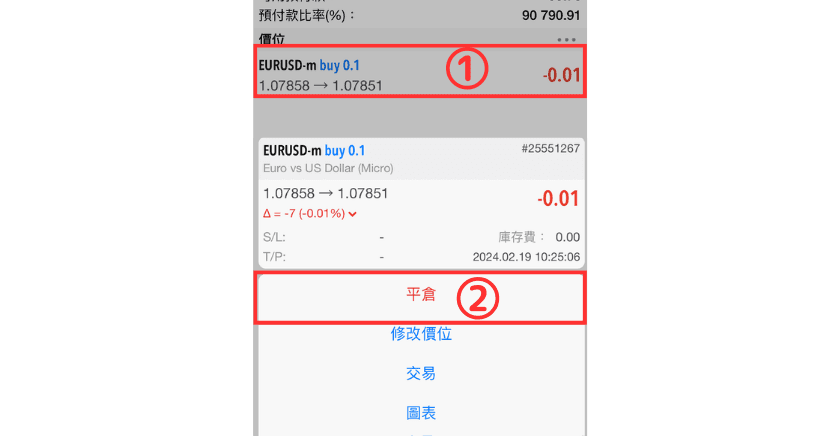
③ Tap the "Close at market ○○" button to complete the close.
You can also set the number of lots you want to close here to make a partial close.

Closing from the "Chart" Screen
① Tap the price line on the chart.
② Tap "Close".
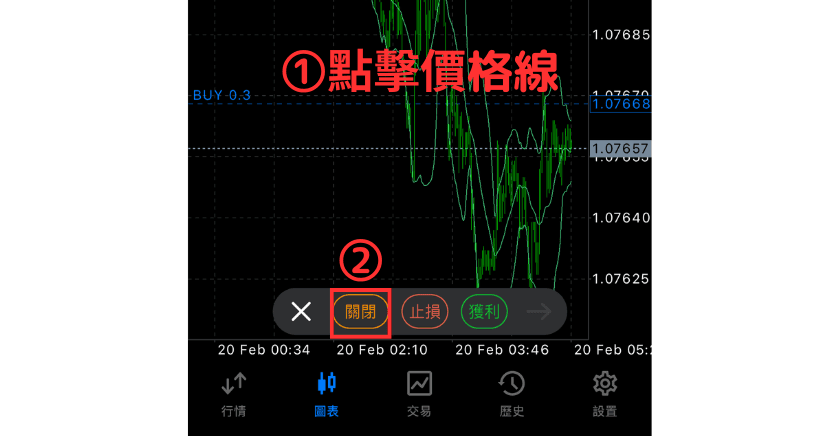
③ Tap the "Close at market ○○" button to complete the close.
You can also set the number of lots you want to close here to make a partial close.