

Stop Loss
Markets always carry sudden, unpredictable swings, and even seasoned traders cannot be on the right side of every position. Long-term survival depends less on how fast you profit than on whether you can exit decisively when a trade goes wrong—which is exactly why the stop loss sits at the heart of risk management.
This article will provide a detailed explanation of the concept, types, setting methods, common questions, and practical applications of stop loss, helping traders manage risks more effectively and protect their capital.
- Definition: A preset price that auto-closes a position to cap losses.
- 3 types: Standard stop loss, trailing stop, and OCO orders.
- vs Loss cut: A stop loss is trader-set; a loss cut is forced by low margin.
- MT4/MT5: Enter your exit price in the "S/L" field on PC, iOS, or Android.
- Risk rule: Keep risk per trade within 1–2% of account equity.
What is Stop Loss?
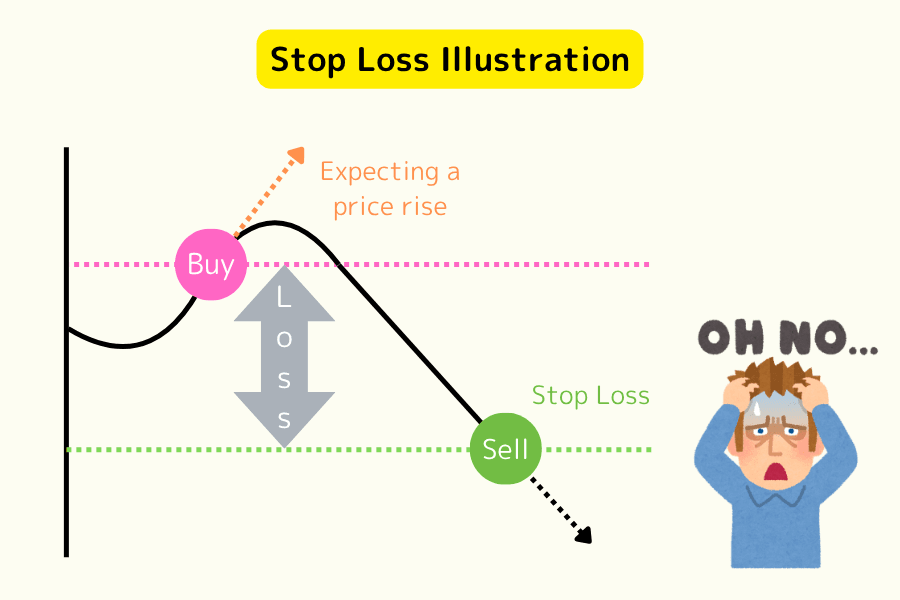
Stop Loss refers to a price point set by a trader when opening a position. When the market price reaches this point, the system automatically executes a closure operation to limit the loss within a preset range. In simple terms, stop loss is a measure to prevent traders from bearing excessive losses when the market moves unfavorably.
Stop loss is not only the "set stop price" but can also be understood as the "action of stopping the loss," meaning exiting the trade in a timely manner when the market conditions are adverse. This can effectively avoid significant losses caused by emotional overtrading.
Types of Stop Loss
1. Stop Loss Order: The Most Common Risk Management Tool
A Stop Loss Order is a common and practical risk management tool in forex trading. It allows traders to set a specific price as the stop loss point. When the market price reaches that point, the system automatically closes the position, helping traders control their losses.
For example, suppose you are trading EUR/USD and you buy at 1.2000. To prevent potential losses, you can set the stop loss at 1.1900. When the price drops to 1.1900, the system will automatically sell and close the position, avoiding further financial loss.
2. OCO Order (One Cancels Other): An Efficient Tool for Managing Both Stop Loss and Take Profit
An OCO (One Cancels the Other) order is a type of order that allows traders to set both a stop loss and a take profit order simultaneously, aiming to automatically manage both trading risks and profits. Once one of the orders is triggered, the other will be automatically canceled.
For example, suppose you are trading EUR/USD, and the current price is 1.2300. You expect the price to fluctuate in either direction, so you set the following two targets:
Take Profit Order: Sell when the price rises to 1.2500.
Stop Loss Order: Sell when the price drops to 1.2000.
If the price rises and reaches 1.2500, the take profit order will execute, and the stop loss order will be automatically canceled. Likewise, if the price drops to 1.2000, the stop loss order will execute, and the take profit order will be canceled.
3. Trailing Stop Order: A Dynamic and Flexible Risk Management Tool
A Trailing Stop Order is a flexible stop loss method that automatically adjusts the stop loss point as the market price moves in a favorable direction. This mechanism helps traders lock in potential profits and close positions in time when the market reverses, preventing losses from widening.
For example, suppose you buy EUR/USD at 1.2000 and set a trailing stop of 50 pips (0.0050). When the market price rises to 1.2100, the stop loss will automatically move up to 1.2050 to lock in part of the profit. If the price then retraces to 1.2050, the system will automatically close the position, securing your profit.
The Difference Between Stop Loss and Loss Cut
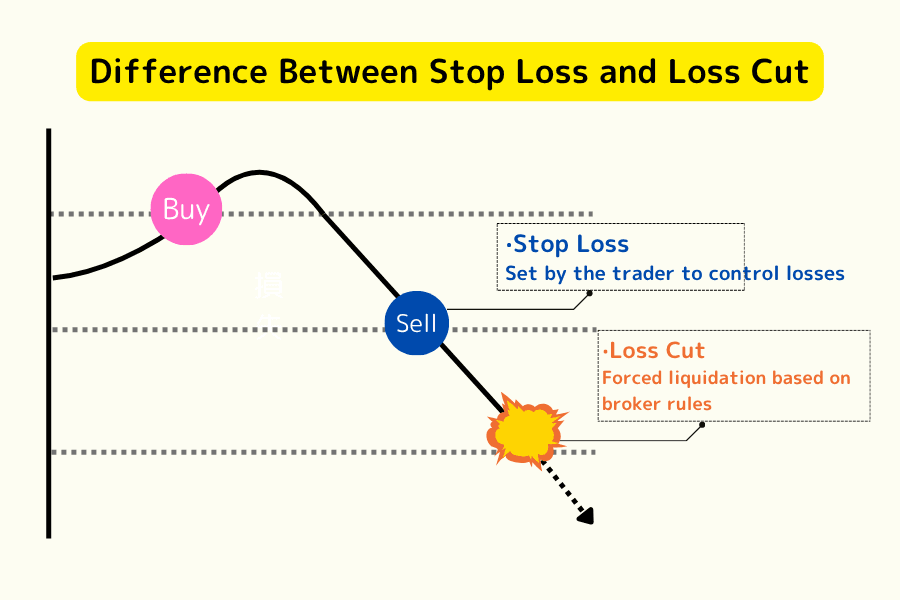
1. Stop Loss
Set by the trader themselves, the position is automatically closed when the specified price is reached. Stop loss is a risk management measure actively executed by the trader.
2. Forced Closure (Loss Cut)
Executed by the trading platform, when the margin is insufficient to maintain the position, the platform will automatically close the position. Unlike stop loss, forced closure is determined by the platform and does not consider the trader's preference.
| Comparison Item | Stop Loss | Loss Cut |
|---|---|---|
| Decision Maker | Set by the trader | Automatically executed by the platform |
| Closing Condition | Closes when the set price is reached | Closes when margin is insufficient |
| Can Other Positions Be Retained? | Can hold other positions | All positions will be forcibly closed |
Further Reading: What is Forced Closure? Learn About Its Calculation, Advantages, Disadvantages, and Methods to Avoid Margin Call Risks
Setting Stop Loss on MT4/MT5 Platforms
How to Set Stop Loss on MT4 for Desktop
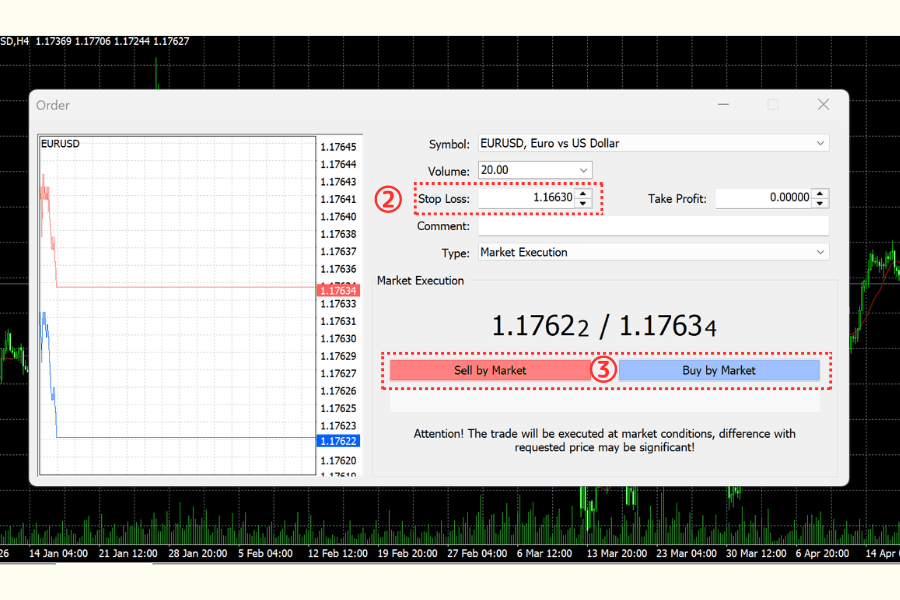
1.Open the MT4 platform and select "New Order."
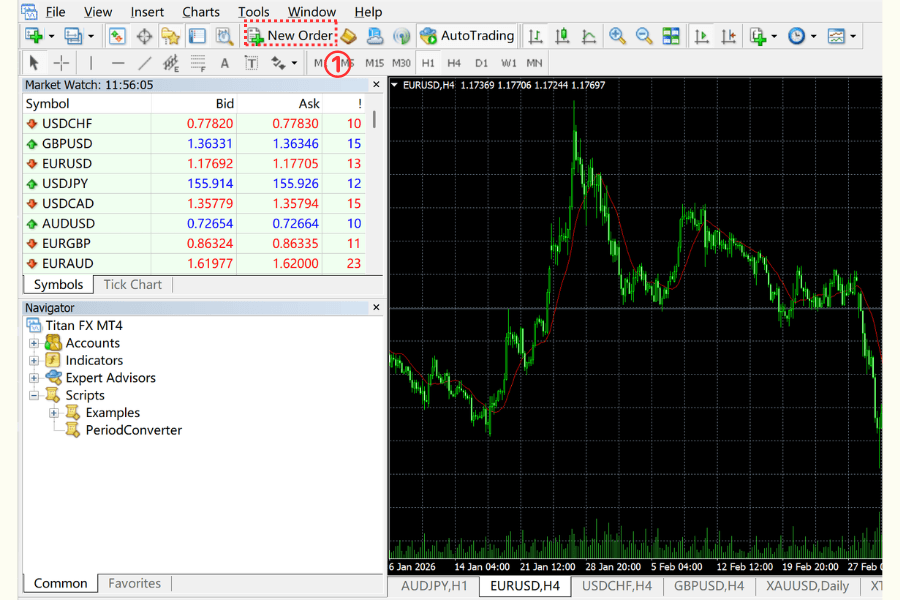
2.In the "Stop Loss" field, set the stop loss price.
3.After completing the settings, select "Sell by Market" or "Buy by Market" to confirm the trade.
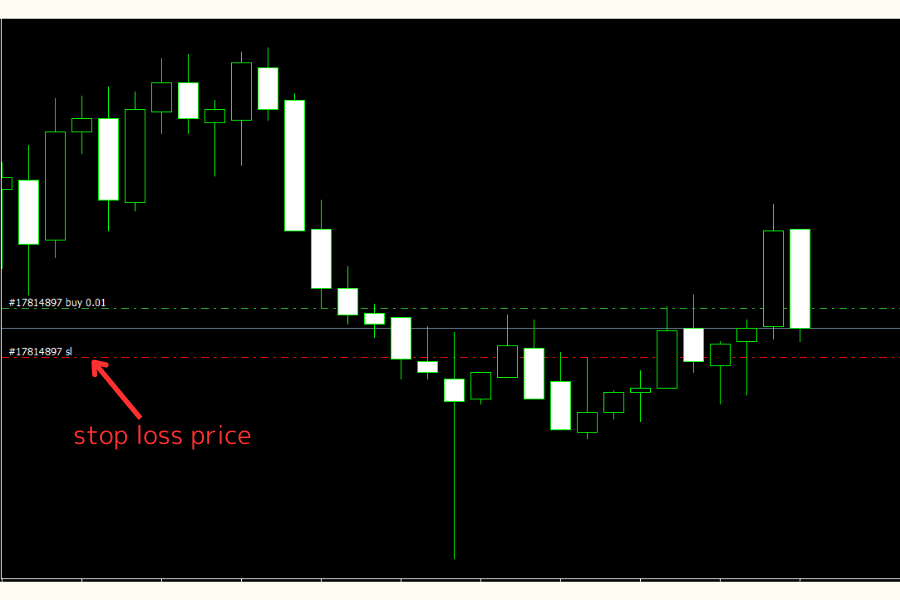
After completing, the green line on the chart will represent the entry price, while the red line will represent the stop loss price.
How to Set Stop Loss on MT4 for iOS
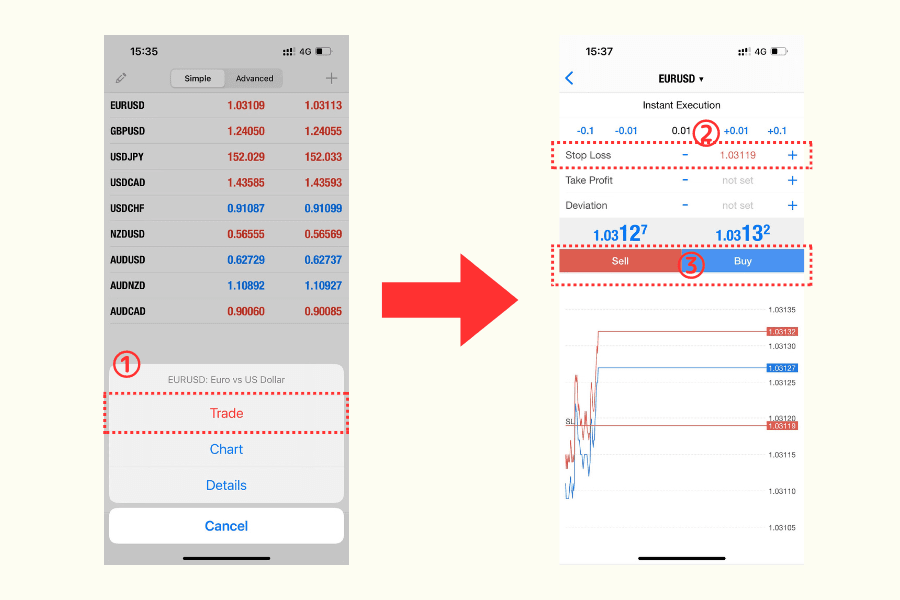
1.Select the "Trade".
2.Enter the stop loss price.
3.Choose "Sell" or "Buy".
Once completed, the stop loss price will be shown on the chart.
How to Set Stop Loss on MT4 for Android
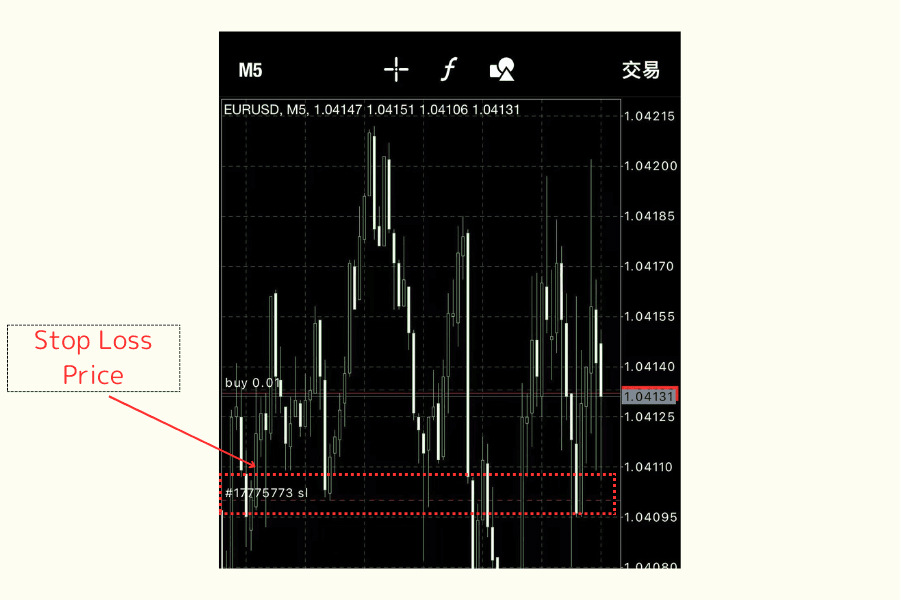
1.Tap the trade icon at the top left.
2.Enter the stop loss price.
3.Choose "Sell" or "Buy by Market."
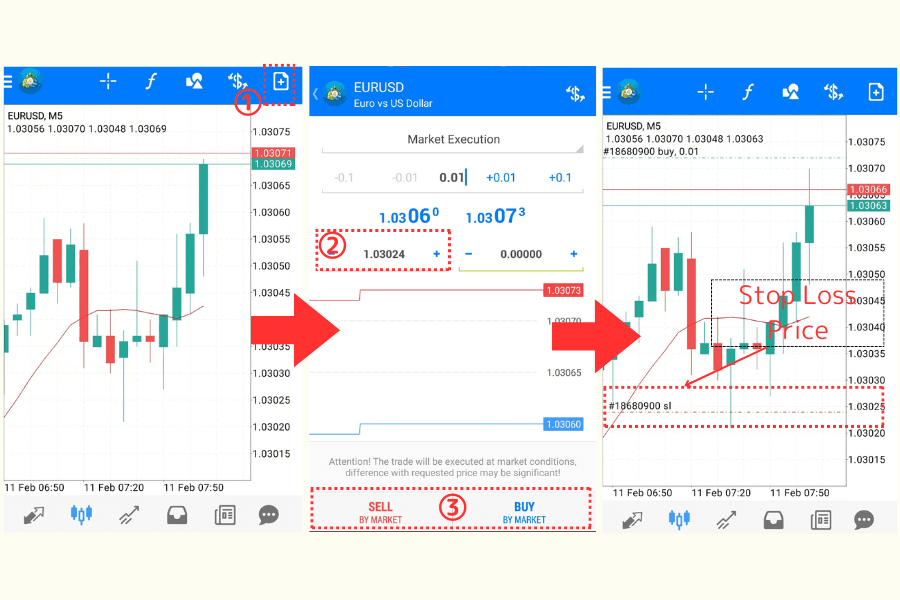
Once completed, the stop loss price will be shown on the chart.
How to Set Stop Loss on MT5 for Desktop
1.Open the MT5 platform and select "New Order."
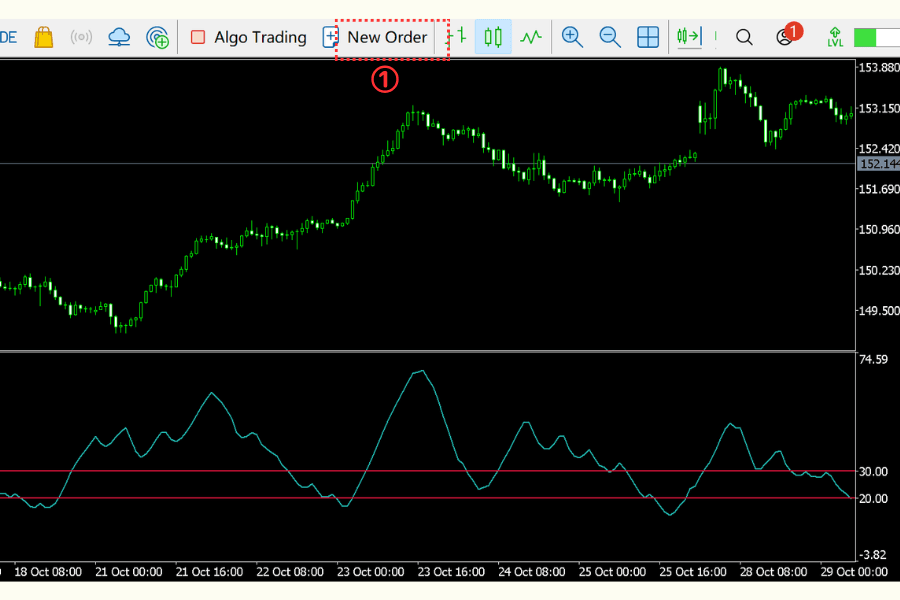
2.In the "Stop Loss" field, set the stop loss price.
3.After completing the settings, choose "Sell by Market" or "Buy by Market" to confirm the trade.
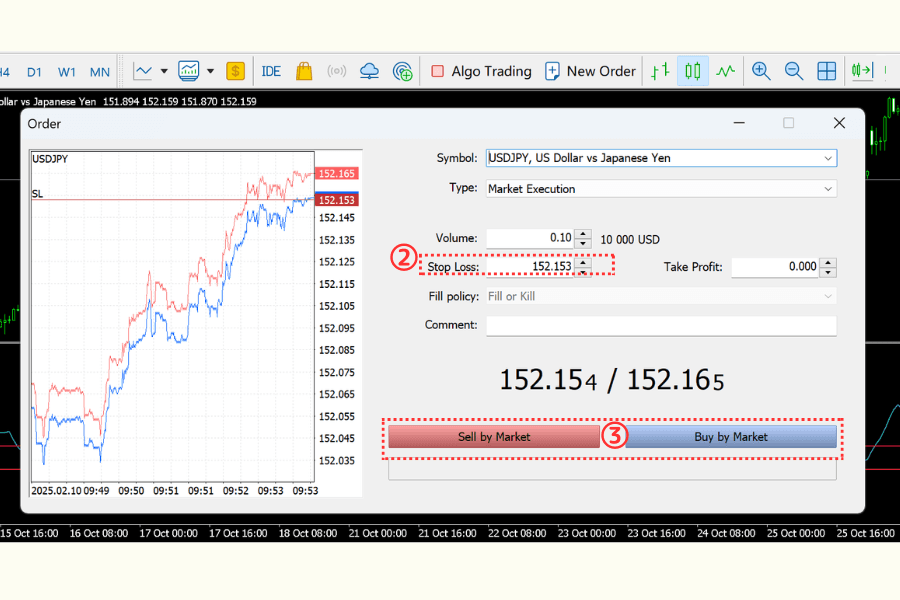
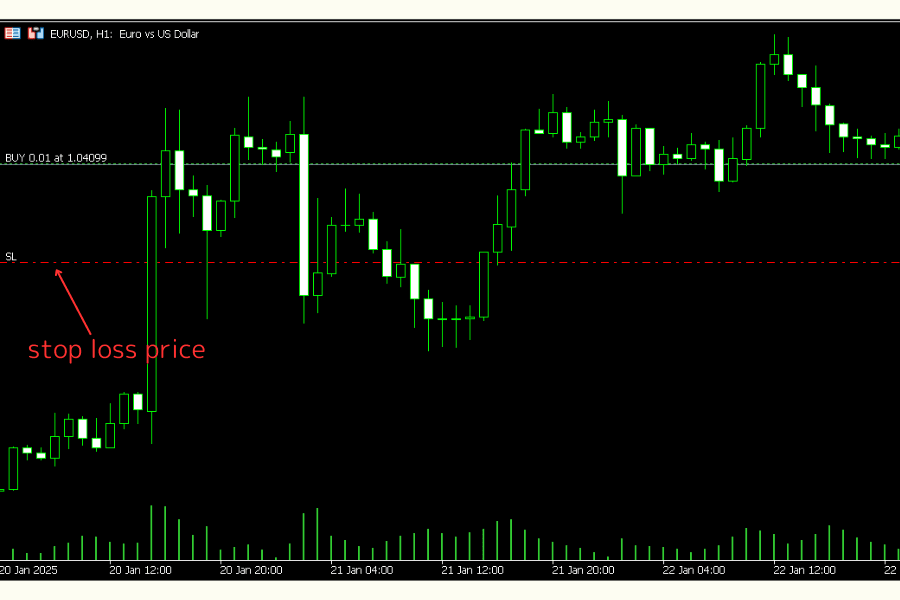
Once completed, the green line on the chart represents the entry price, while the red line represents the stop loss price.
How to Set Stop Loss on MT5 for iOS
1.Select the trade.
2.Enter the stop loss price.
3.Choose "Sell" or "Buy".
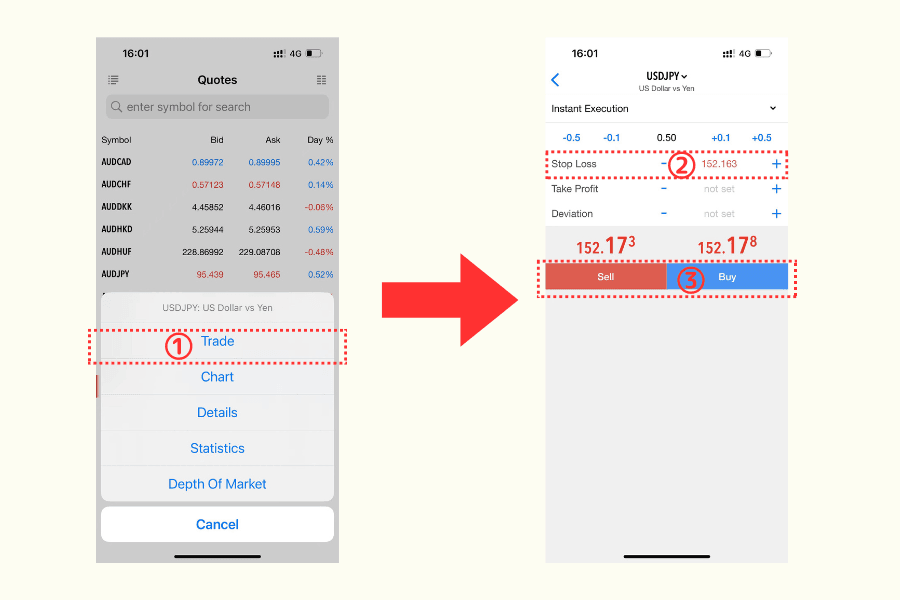
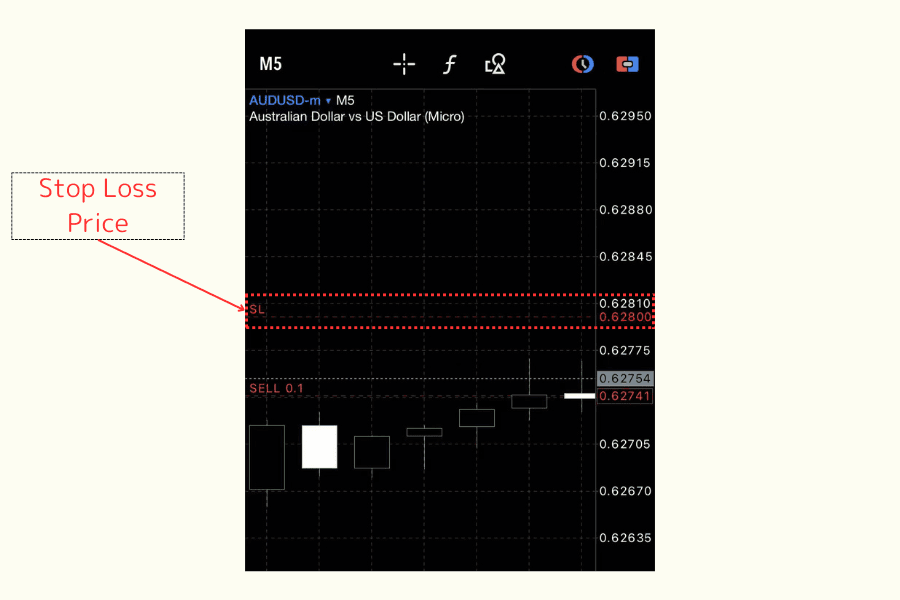
Once completed, the stop loss price will be shown on the chart.
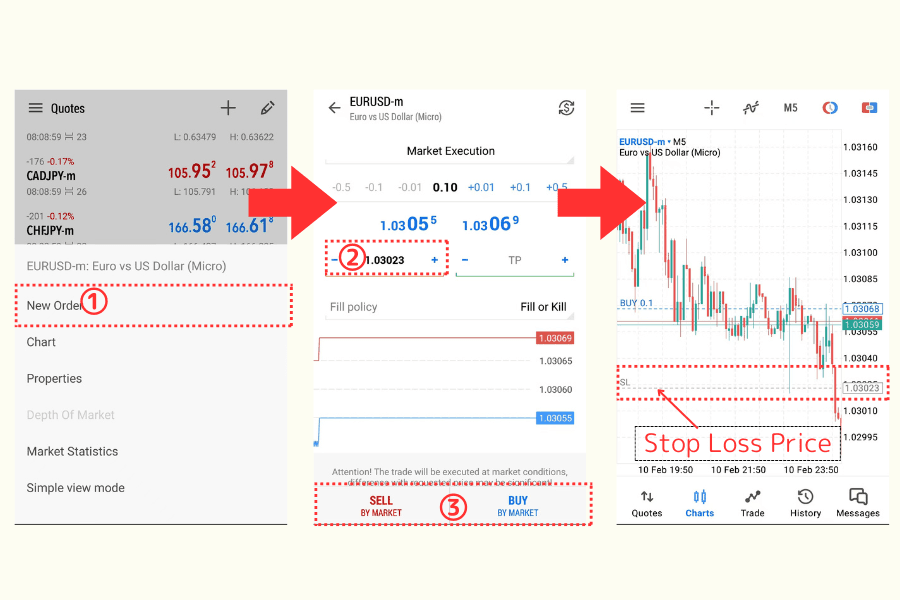
How to Set Stop Loss on MT5 for Android
1.Select "New Order."
2.Enter the stop loss price.
3.Choose "Sell" or "Buy."
Once completed, the stop loss price will be shown on the chart.
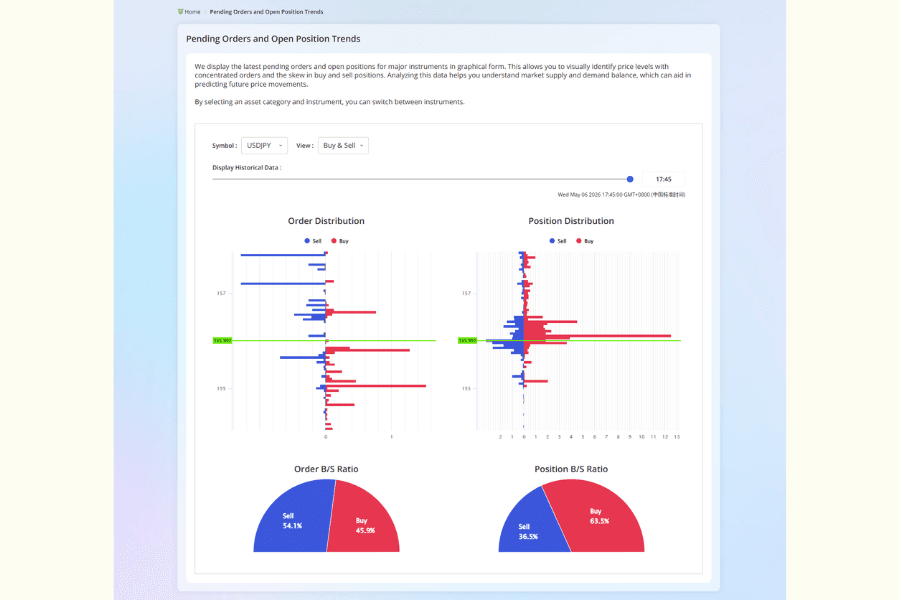
Titan FX Pending/Unclosed Trend Chart: A Tool for Market Insights
Titan FX offers a service called the "Pending/Unclosed Trend Chart," which visualizes and publicly displays trading data from global Titan FX clients, helping traders gain deeper insights into market dynamics. Through this service, traders can analyze potential future price movements, providing strong support for trading decisions.
For example, the trend chart clearly shows the distribution of pending orders, allowing traders to easily identify the areas where new orders are concentrated or where stop loss orders are clustered. This information helps traders gain insight into market sentiment and potential price changes, enabling them to capture trading opportunities more accurately.
Common Stop Loss Questions
1. What is Stop Hunting?
Stop hunting refers to the practice where market movers or institutions intentionally push the market price toward other traders' stop loss orders to profit from it. In such cases, market price fluctuations trigger stop loss orders from many traders.
How to Prevent Stop Hunting?
To avoid stop hunting, it’s recommended to set stop loss levels at a reasonable distance, avoiding obvious price points. Combine other technical indicators to confirm entry and exit points.
2. Where Should Stop Loss Be Set?
Stop loss should be set at a level that effectively controls risk but is not easily triggered by short-term market fluctuations. Typically, it is advisable to determine the stop loss point based on technical analysis, such as setting it outside of support or resistance levels, and adjust it according to the trader’s own risk management principles.
3. Why Might the Actual Stop Loss Price Differ from the Set Price?
The actual stop loss price may differ from the set price due to rapid market movements under high volatility, causing the price to skip over your stop loss point. This phenomenon is known as "slippage" and is a normal market behavior, particularly during major economic data releases or periods of low market liquidity.
To reduce the impact of slippage, it is suggested to avoid trading during highly volatile periods and set stop loss levels that reflect the market conditions. However, slippage may still occur in some situations.
4. What Are the Risks of Setting Stop Loss Too Far Away?
Setting a stop loss too far away can result in losses beyond a trader’s acceptable range. While a wider stop loss can reduce the risk of being triggered by short-term fluctuations, if the price moves unfavorably over the long term, it may lead to larger financial losses. Therefore, it’s crucial to balance risk control with strategy execution when setting stop loss levels.
Advantages and Challenges of Stop Loss
Advantages:
Helps traders control risk and protect capital.
Avoids emotional trading by relying on an automated risk management system.
Challenges:
Setting stop loss too tightly may cause it to be frequently triggered, affecting trading results.
During extreme market fluctuations, the stop loss might not be executed at the ideal price due to slippage.
Before entering a trade, you can use the Margin Calculator to estimate the required margin and position size and keep your risk within plan.
Conclusion
Stop loss is a core risk management strategy that every forex trader must master. Proper stop loss settings not only protect capital from excessive losses but also provide stable trade protection during market fluctuations. However, stop loss settings should not be fixed; they should be adjusted flexibly according to market conditions and individual risk tolerance. Over-relying on stop loss may limit trading potential, so it’s advisable to combine it with other trading strategies to form a more comprehensive risk management system.
By employing scientific stop loss management, traders can face market uncertainty with more confidence, keep risks within acceptable limits, and gradually achieve stable profitability. Remember, stop loss is key to capital protection and is the cornerstone for improving trading efficiency and long-term success.
Titan FX Trading Strategy Lab. We produce investor-education content covering forex, commodities (crude oil, precious metals, agricultural goods), stock indices, U.S. equities, and digital assets.
Primary Sources (by category)
- Best practice: CFA Institute — Risk Management curriculum on stop-loss methodology
- Behavioral analysis: Statman, M. (2014) "Behavioral Finance: Finance with Normal People", Borsa Istanbul Review — disposition effect and stop-loss avoidance
- Practical guides: U.S. CFTC (Commodity Futures Trading Commission) — retail trader risk-management bulletins; FCA (UK) Financial Conduct Authority — order-type risk disclosures