

Indicator for Displaying Percentage Changes of Selected Symbols on the Chart (Titan_SymbolCompare)

Display the Percentage Change of Six Selected Symbols on the Chart
This indicator displays the percentage change of six selected symbols on the chart.
It is recommended for users who want to analyze trends in price movements of other symbols while conducting their analysis.
Toggle Display for Each Symbol with Buttons
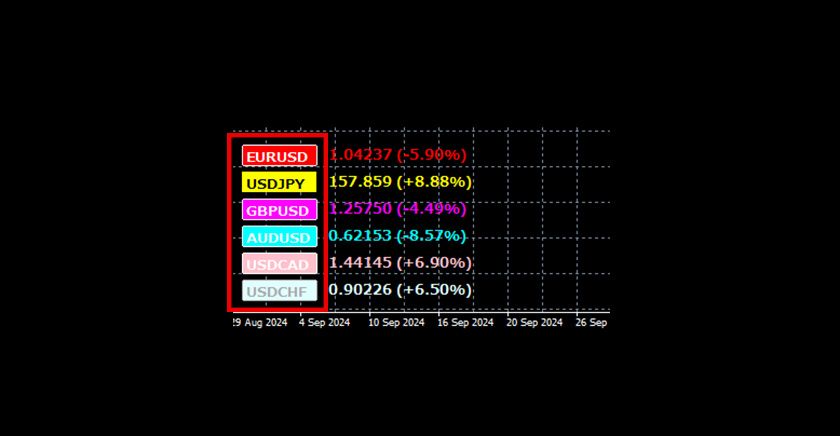
Buttons for each symbol appear on the chart. Clicking a button allows you to toggle the display on or off for that specific symbol.
[Example of Buttons Displayed on the Chart]
Display Percentage Changes for Inverted Prices
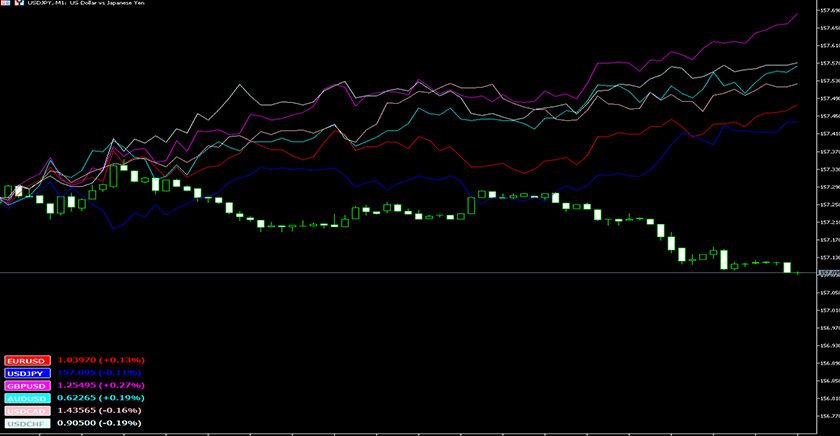
If you set "Reverse" to "true" in the settings, the indicator will display the percentage change for "1/Price of the Symbol." For example, with USDJPY, you can display the percentage change of JPYUSD. This feature is useful for comparing and analyzing the strength of multiple symbols against a single currency.
[Example of Major Currencies' Strength Against the USD]
This indicator works only with the Windows version of MT5 and MT4 for TitanFX.
Indicator Terms of Use
Only those who agree to all the following items may use the indicators distributed on this website (https://research.titanfx.com):
1.The indicators and related descriptions are based on various data believed to be reliable, but their accuracy and completeness are not guaranteed.
2.The data displayed by the indicators do not guarantee your investment results. Also, the displayed content may vary due to market conditions and communication environments.
3.Please make investment decisions using indicators at your own risk. We are not responsible for any disadvantages or damages arising from the use of indicators.
4.Specifications of the indicators are subject to change without notice. Changes will be announced on the indicator description pages, etc.
5.Indicators should only be used by customers who have downloaded them. Transferring or selling the indicators to third parties is prohibited.
Indicator Settings
Input Tab (for MT5) / Parameter Input Tab (for MT4) Settings
| Variable Name | Description | Default |
|---|---|---|
| Symbol 1-6 | Enter the names of the symbols to display. | EURUSD, USDJPY, GBPUSD, AUDUSD, USDCAD, USDCHF |
| Reverse | Select "true" to display the percentage change of "1/Price." Select "false" to display the percentage change of the price itself. | false |
| Line Color | Specify the color of the lines to display. | Red, Yellow, Magenta, Aqua, Pink, LightCyan |
| Line Width | Specify the width of the lines to display. | 1 |
| Line Style | Specify the style of the lines to display. | Solid |
| Text Color | Specify the color of the text (inside buttons). | White, DarkGray |
| Text Size | Specify the size of the text to display. | 10 |
Color Tab (for MT5) / Color Settings Tab (for MT4)
This indicator does not use this tab.