

An indicator that allows you to monitor market compression conditions (Titan_Trend_Compression_Index)
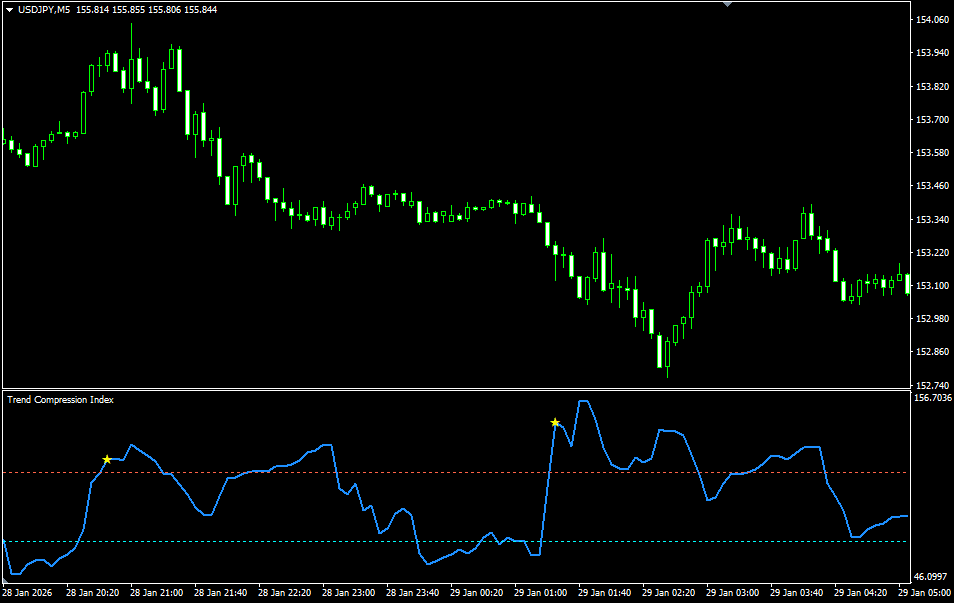
A Tool for Understanding Market “Conditions”
The FX market does not always move significantly. After a prolonged period of calm, a trend can suddenly emerge. One of the common challenges beginners face is not knowing whether it is the right time to enter a trade or whether they should wait.
The Trend Compression Index (TCI) is an indicator that focuses not on price direction, but on overall market “conditions.” It clearly displays in numerical form whether the market is currently building energy or has already begun to move.
When the value is high, it indicates small price movements and a compressed market condition. Conversely, when the value is low, it shows that price movements are expanding, indicating a state of dispersion. This allows traders to objectively understand the current market phase before analyzing the chart in detail.
From Compression to Expansion — Capturing the Moment of Movement
After an extended quiet period, the market can begin to move significantly. When TCI remains at a low level, it represents a phase where energy is being accumulated. When the value rises, it signals that price movements are starting to expand.
Particularly important is the timing when the market shifts from a compressed state to an expanded state. This change may indicate a shift in the market rhythm. When using trend-following strategies, such conditions tend to provide more favorable trading opportunities.
However, TCI does not directly generate buy or sell signals. Rather than indicating direction, it serves as a supplementary tool to assess whether the market environment is conducive to movement.
Reducing Unnecessary Trades
For beginners, it is more important to reduce unnecessary entries than to increase the number of trading opportunities. When the market is in a compressed state, choosing to wait rather than rushing into a position can often be the more effective decision.
The Trend Compression Index does not produce flashy signals. Instead, it quietly reveals the underlying “ease of movement” within the market. Use it not to increase trade frequency, but to enhance the quality of your trading decisions.
※This indicator operates only on TitanFX Windows versions of MT5 and MT4.
Indicator Terms of Use
Only those who agree to all the following items may use the indicators distributed on this website (https://research.titanfx.com):
1.The indicators and related descriptions are based on various data believed to be reliable, but their accuracy and completeness are not guaranteed.
2.The data displayed by the indicators do not guarantee your investment results. Also, the displayed content may vary due to market conditions and communication environments.
3.Please make investment decisions using indicators at your own risk. We are not responsible for any disadvantages or damages arising from the use of indicators.
4.Specifications of the indicators are subject to change without notice. Changes will be announced on the indicator description pages, etc.
5.Indicators should only be used by customers who have downloaded them. Transferring or selling the indicators to third parties is prohibited.
Indicator Settings
Input (MT5) / Parameters (MT4) Tab Settings
| Variable Name | Description | Default |
|---|---|---|
| ATR Period | Specifies the ATR period used to calculate the TCI. | 20 |
| Smoothing Period | 50 | |
| Compression Threshold | 70 | |
| Expansion Threshold | Defines the level recognized as an expansion state. | 110 |
| Show Markers | Specifies whether to display a mark when transitioning from a compression state to an expansion state. | true |
| Notifications | Specifies whether to enable alerts. | true |
Colors (MT5) / Color Settings (MT4) Tab Settings
| Variable Name | Description | Default |
|---|---|---|
| 0 | Color of the TCI line | DodgerBlue |
| 1 | Specifies the color of the compression threshold line. | Aqua |
| 2 | Specifies the color of the expansion threshold line. | Tomato |
| 3 | Specifies the color of the mark. | Yellow |