

Indicator for Drawing Trendlines Based on ZigZag (Titan_ZigZag_Trend)

Automatically Draw Trendlines Connecting ZigZag Highs and Lows
This indicator automatically draws trendlines connecting the highs or lows of ZigZag patterns on MT4 and MT5. Trendlines are helpful for identifying market direction and potential reversal points. With this indicator, you can avoid the manual task of drawing lines and efficiently check trendlines.
Key Features of the Indicator
Specify the Reference ZigZag Pattern with a Vertical Line
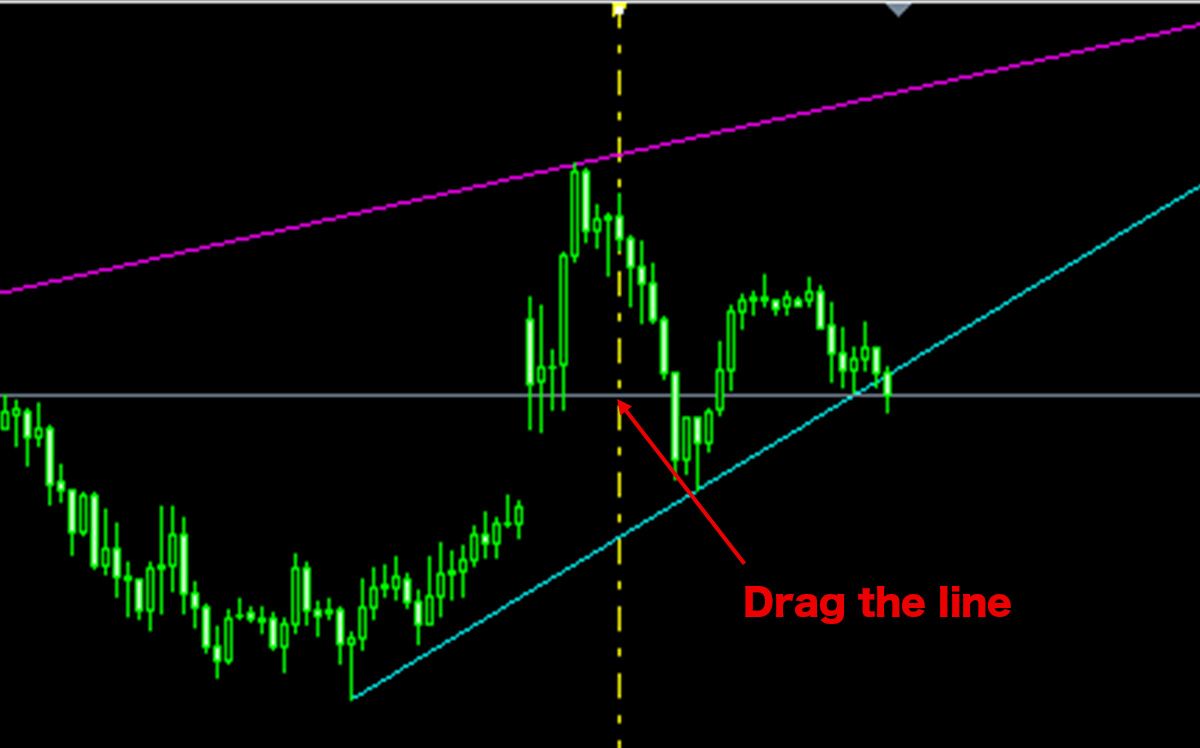
In this indicator, you can specify the reference ZigZag pattern by moving a vertical line displayed on the chart. The trendline will automatically draw between the highs and lows of the ZigZag patterns before and after the vertical line, allowing you to base trendlines on specific price movements.
【Vertical Line Displayed on Chart】
Adjust ZigZag Parameters to Draw Trendlines for Different Periods
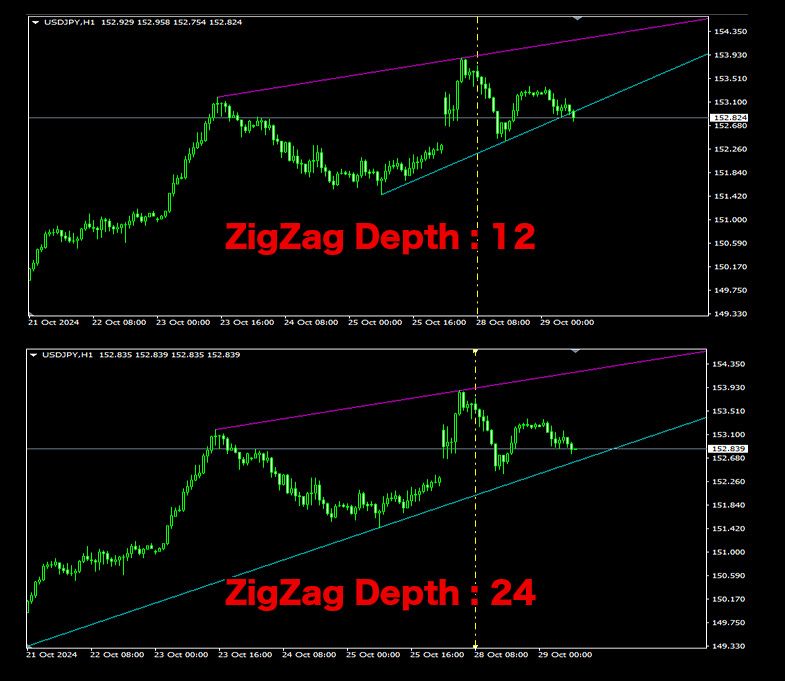
The indicator includes options to customize ZigZag parameters, enabling you to adjust them to draw trendlines representing short-term or long-term trends.
【Example of Short- and Long-Term Trendlines】
Draw Multiple Trendlines by Specifying Serial Numbers
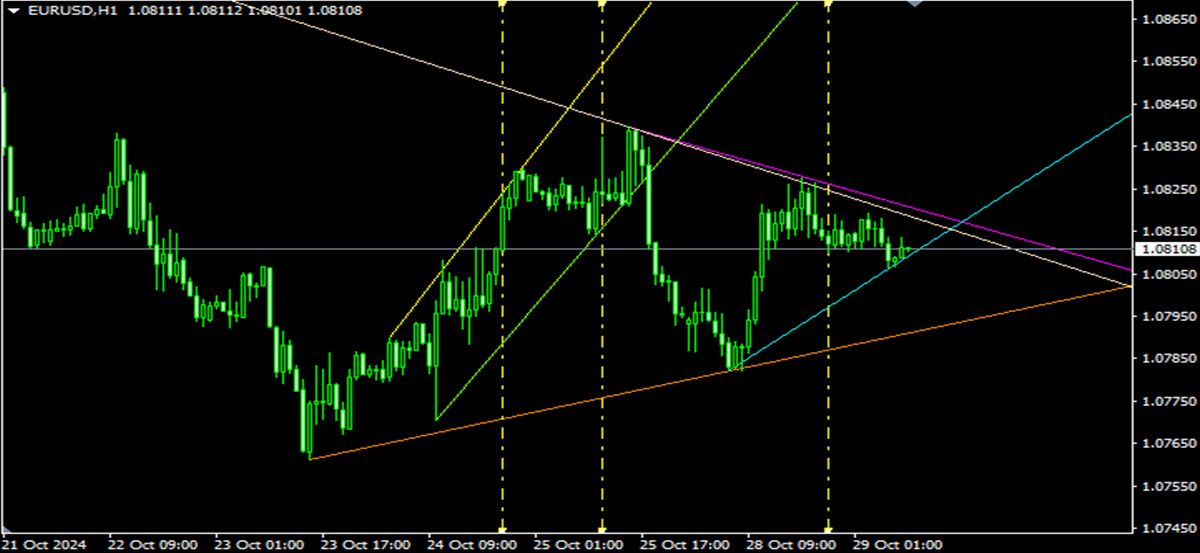
If you want to display multiple trendlines with different periods or conditions, you can assign Serial Numbers to draw multiple trendlines simultaneously. This feature allows you to display trendlines based on various conditions in parallel, enhancing the depth of your market analysis.
【Example of Multiple Trendlines】
Note: This indicator works exclusively on TitanFX's Windows MT5 and MT4 platforms.
Indicator Terms of Use
Only those who agree to all the following items may use the indicators distributed on this website (https://research.titanfx.com):
1.The indicators and related descriptions are based on various data believed to be reliable, but their accuracy and completeness are not guaranteed.
2.The data displayed by the indicators do not guarantee your investment results. Also, the displayed content may vary due to market conditions and communication environments.
3.Please make investment decisions using indicators at your own risk. We are not responsible for any disadvantages or damages arising from the use of indicators.
4.Specifications of the indicators are subject to change without notice. Changes will be announced on the indicator description pages, etc.
5.Indicators should only be used by customers who have downloaded them. Transferring or selling the indicators to third parties is prohibited.
Indicator Settings
Settings in the Input Tab (MT5) or Parameter Input Tab (MT4)
| Variable Name | Description | Default |
|---|---|---|
| Serial No | Sets a unique number to distinguish multiple displays. | 1 |
| ZigZag Depth | Specifies the Depth (period) of the base ZigZag. | 12 |
| ZigZag Deviation | Sets the Deviation (rate of change) for the base ZigZag. | 5 |
| ZigZag BackStep | Specifies the BackStep (minimum period for reversal) for the base ZigZag. | 3 |
| Color (Base Line) | Sets the color of the vertical line to specify the ZigZag for drawing lines. | Yellow |
| Style (Base Line) | Sets the style of the vertical line to specify the ZigZag. | Dashdot |
| Width (Base Line) | Sets the thickness of the vertical line to specify the ZigZag. | 1 |
| Display (Trendline upside and downside) | Determines whether to display lines connecting highs or lows. | true |
| Color (Trendline upside and downside) | Specifies the color for the lines connecting highs or lows. | Magenta, Aqua |
| Style (Trendline upside and downside) | Sets the style for lines connecting highs or lows. | Solid |
| Width (Trendline upside and downside) | Sets the thickness of the lines connecting highs or lows. | 1 |
Colors Tab (MT5) or Color Settings Tab (MT4)
This indicator does not use this tab.