How to use MT5/MT4
Installation and Login for MT4 (Mac)
How to order for MT4 (Mac)
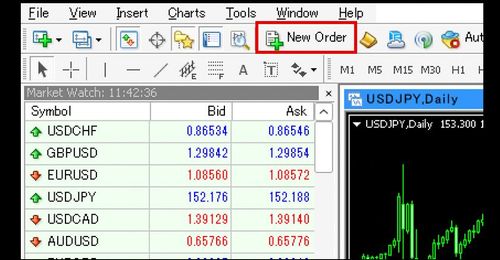
Ordering through the MT4 (Mac) Order Window
How to display the MT4 (Mac) order window in four ways, and how to place a market order (Market Execution) and a limit/stop order (Buy Limit / Sell Limit / Buy Stop / Sell Stop) from it.
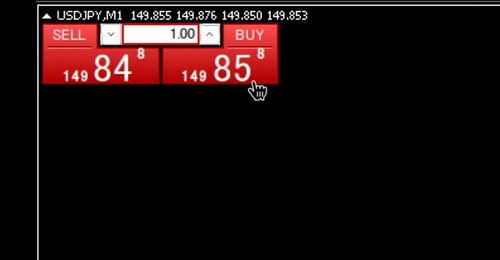
One-Click Ordering in MT4 (Mac)
How to enable one-click trading in MT4 (Mac) via the Options window and place instant BUY/SELL orders from the chart trading panel.
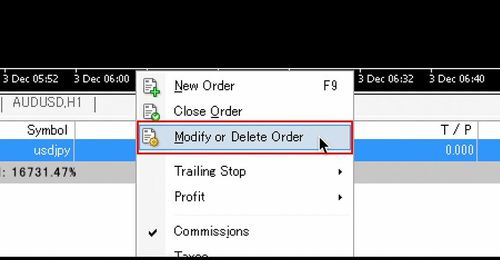
How to Modify Existing Positions in MT4 (Mac)
This guide explains how to add or modify closing limit/stop orders (S/L and T/P) for existing positions in MT4 (Mac): from the order placement window, and by dragging levels on the chart.
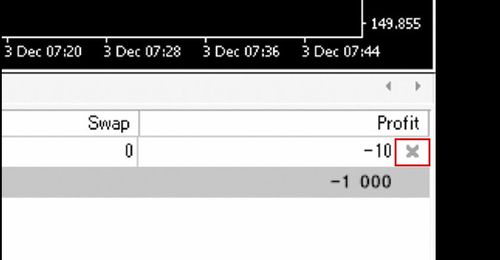
How to Settle Existing Positions in MT4 (Mac)
This guide explains how to close (settle) existing positions in MT4 (Mac): full close from the Terminal or the chart with one-click trading on or off, and partial close.
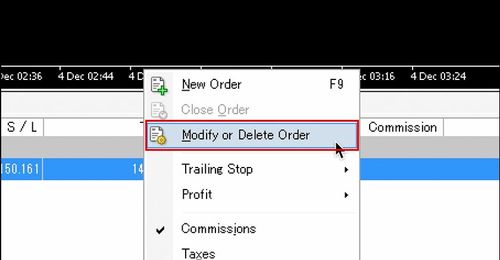
Modifying and Canceling Orders in MT4 (Mac)
This guide explains how to modify or delete pending limit and stop orders in MT4 (Mac): from the order placement window (Terminal or chart) and by dragging on the chart.
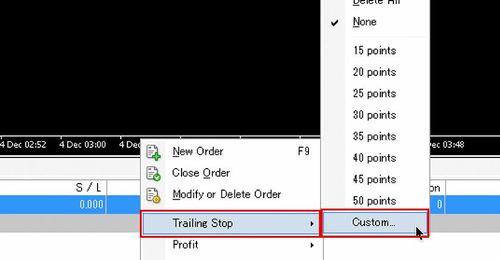
Setting up Trailing Stops on MT4 (Mac)
This guide explains how to set and remove trailing stops on existing positions in MT4 (Mac), including important precautions.
Basic Operations of MT4 Charts (Mac)
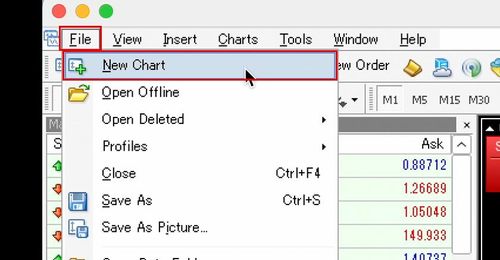
Displaying New and Reopening Closed Charts in MT4 (Mac)
How to open a new chart (File menu, toolbar, or Market Watch), close a chart, and reopen a closed chart in MT4 (Mac).
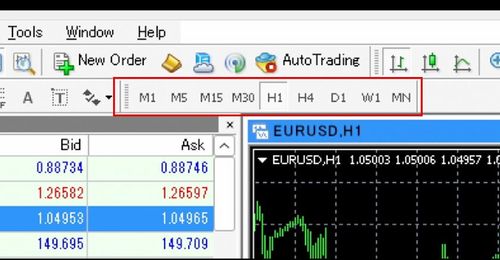
Methods for Changing the Chart Time Frame in MT4 (Mac)
How to change the chart time frame in MT4 (Mac) from the toolbar, chart right-click menu, or Chart menu, and how to show the timeframe toolbar.
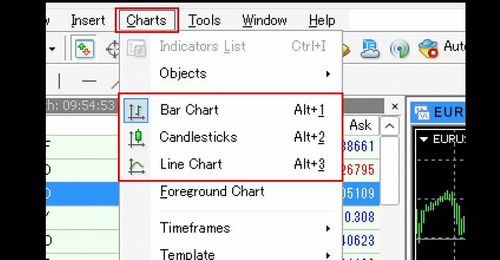
Methods for Changing the Type of Chart in MT4 (Mac)
How to switch the chart type (candlestick, bar, line) in MT4 (Mac) from the toolbar, the Chart menu, or the chart Properties screen.
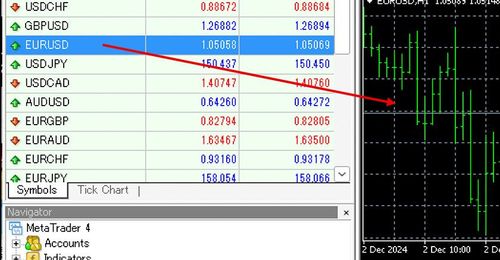
Methods for Changing the Symbol in MT4 Charts (Mac)
How to change the chart symbol in MT4 (Mac): drag and drop a symbol from the Market Watch, or press Enter and type the symbol name on the chart.
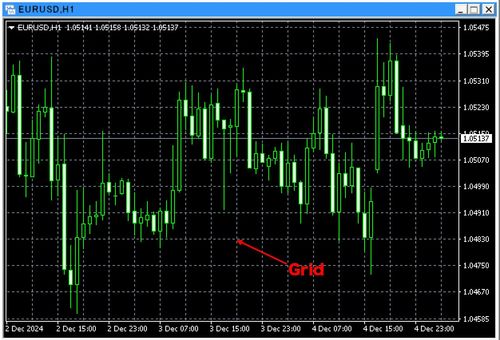
Methods for Toggling the Grid Lines Display in MT4 (Mac)
How to toggle the grid display in MT4 (Mac) charts on and off from the right-click menu or the Charts menu.
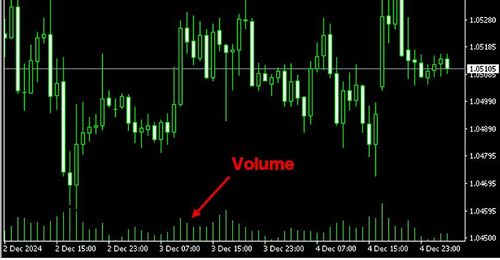
Methods for Toggling the Tick Volume Display in MT4 (Mac)
How to toggle the tick volume display in MT4 (Mac) charts on and off from the right-click menu or the Charts menu.
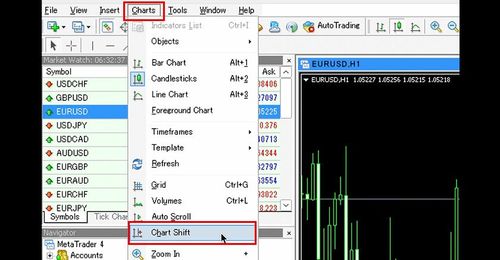
Methods for Toggling the Chart Shift in MT4 (Mac)
How to use the chart shift function in MT4 (Mac): toggle it from the toolbar or the Charts menu, and adjust the width of the space on the right edge of the chart.
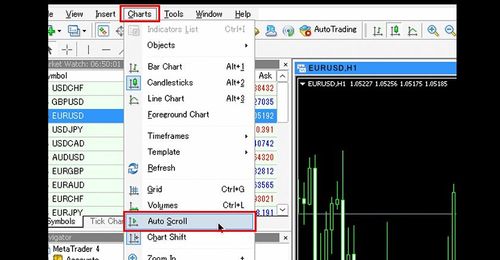
Methods for Toggling the Auto-Scroll Function in MT4 (Mac)
How to toggle the auto-scroll function in MT4 (Mac) on and off from the toolbar icon or the Charts menu.
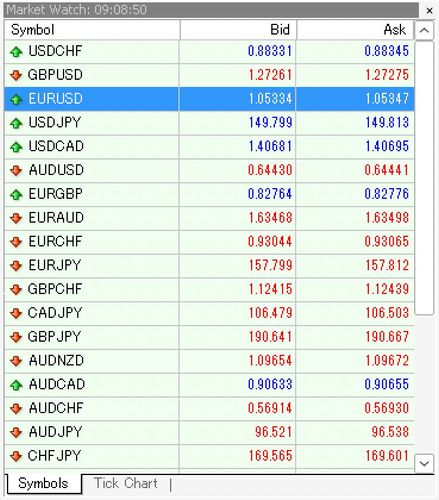
Configuration of the Market Watch in MT4 (Mac)
This guide explains the MT4 (Mac) Market Watch: the Symbols and Tick Chart tabs, adding and removing symbols, adjusting display items, and reordering symbols.
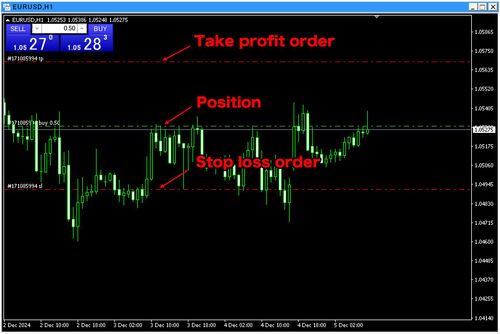
Methods for Toggling the Display of Positions and Order Levels in MT4 (Mac)
This guide explains how MT4 (Mac) shows current positions and pending stop/limit order levels on the chart, and how to toggle them via Tools > Options > Charts.
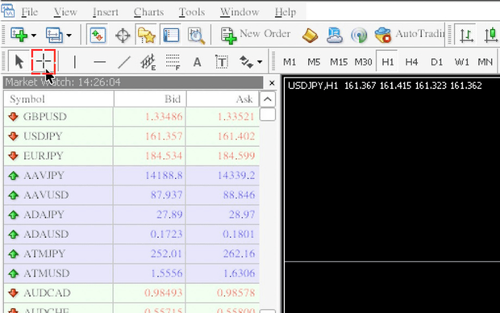
How to Use the Crosshair in MT4 (Mac)
How to use crosshair mode in MT4 (Mac): switch via the toolbar or control+F, read the price and time at the cursor position, and measure candlesticks and points by dragging.
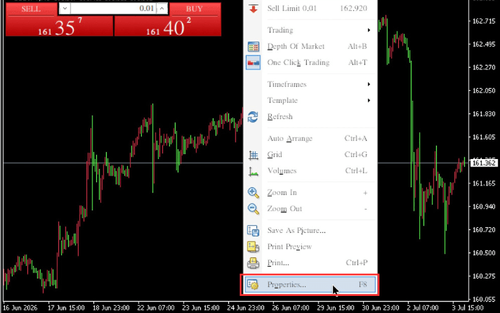
Chart Color Settings on MT4 (Mac)
How to customize chart colors in MT4 (Mac) from the Colors tab of the chart Properties window, using preset color schemes or custom colors.
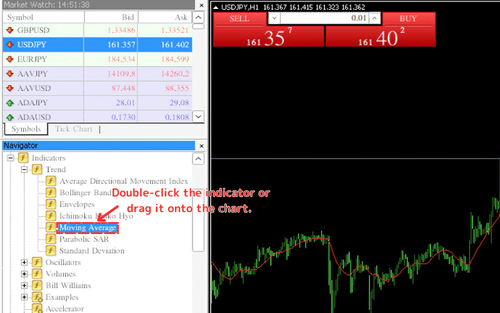
How to Set Up Indicators on MT4 (Mac)
How to display indicators on MT4 (Mac) from the Navigator, configure them via the Parameters, Levels, Visualization, and Colors tabs, and edit or delete them from the Indicators List.
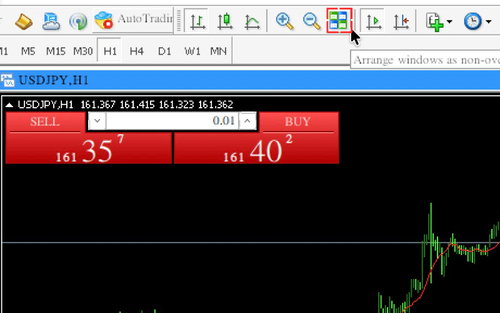
How to Align Charts on MT4 (Mac)
How to align charts in MT4 (Mac): tile, cascade, or arrange charts horizontally and vertically from the toolbar or the Window menu.
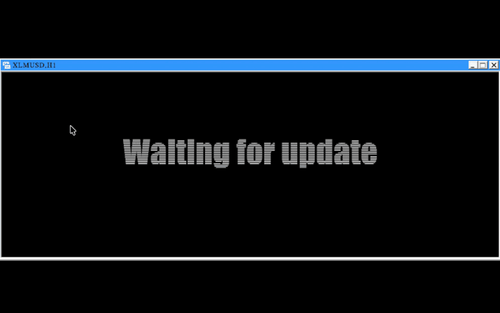
How to Resolve "Waiting for Update" on MT4 (Mac) Charts
How to fix the "Waiting for update" message on MT4 (Mac) charts by dragging the symbol from the Market Watch onto the chart.
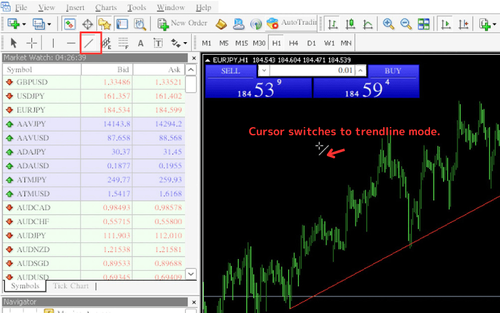
How to Draw Trendlines on MT4 (Mac)
How to draw, modify, and customize trendlines on charts in MT4 for Mac.
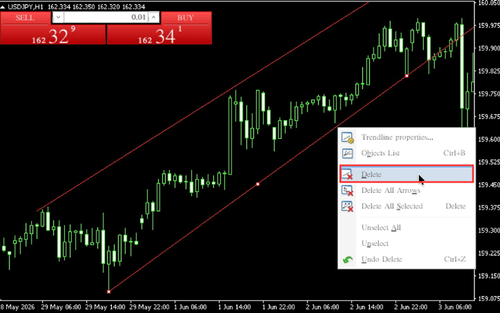
How to Delete Trendlines on MT4 (Mac)
How to delete trendlines on MT4 (Mac): remove them from the chart right-click menu, from the Objects List, or with the Delete key for recently drawn lines.
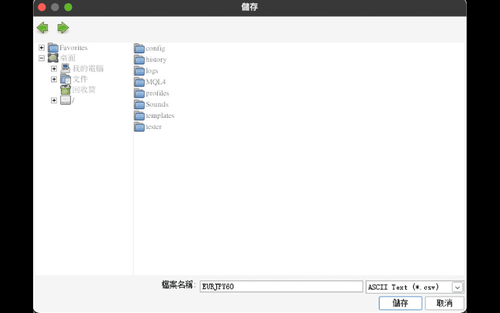
How to Download Chart Price Data as a CSV on MT4 (Mac)
How to download chart price data as a CSV file in MT4 for Mac using Save As in the File menu.
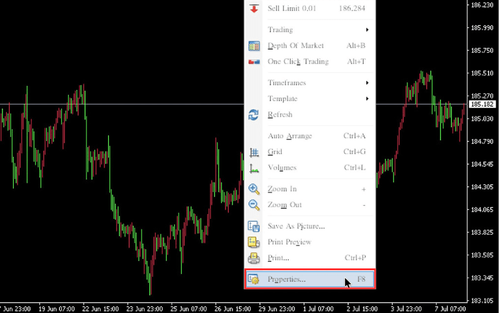
How to Fix the Scale in MT4 (Mac)
How to fix the price scale on MT4 (Mac) charts, set a 1:1 scale ratio, and adjust the display position.
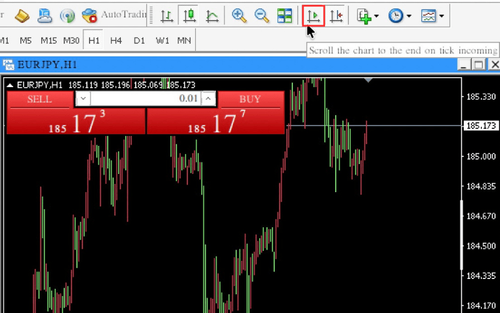
How to Scroll MT4 Charts Step by Step (Mac)
How to use MT4 (Mac) step-by-step scrolling: turn off auto-scroll, then press F12 to advance the chart one bar at a time - ideal for reviewing past price movements.
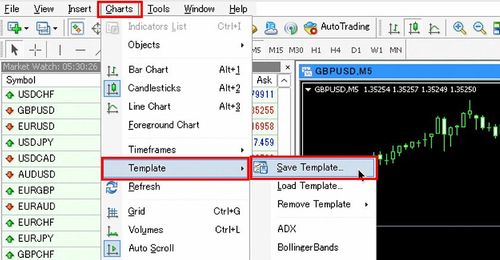
How to Use Template Charts in MT4 (Mac)
This guide explains how to save, apply, delete, and load chart templates in MT4 (Mac) via the Charts menu, toolbar, or right-click.
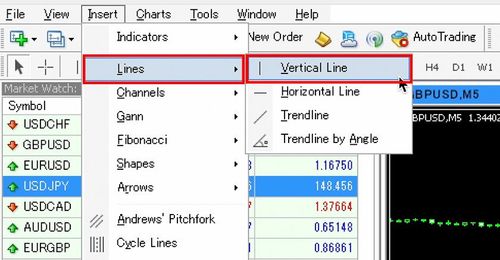
How to Draw Vertical Lines in MT4 (Mac)
This guide explains how to draw, move, configure, and delete vertical lines in MT4 (Mac) via the Insert menu or toolbar and the line properties window.
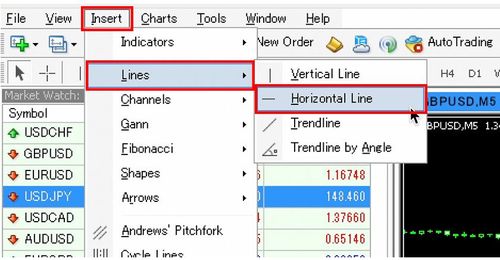
How to Draw Horizontal Lines in MT4 (Mac)
This guide explains how to draw, move, configure, and delete horizontal lines in MT4 (Mac) via the Insert menu or toolbar and the line properties window.
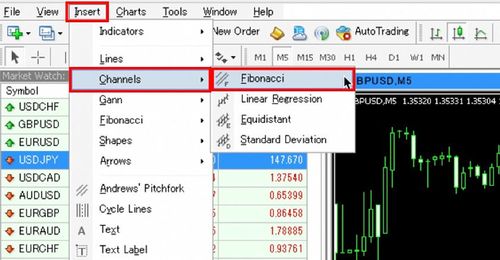
How to Draw Fibonacci Retracements in MT4 (Mac)
This guide explains how to draw, move, configure, and delete Fibonacci retracements in MT4 (Mac) via the Insert menu or toolbar and the properties window.
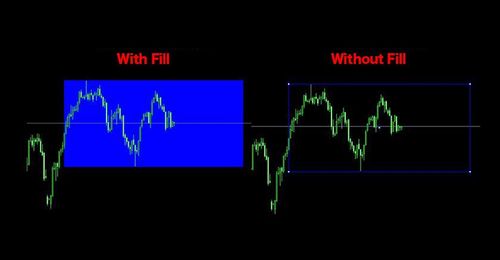
How to Draw Shapes on MT4 (Mac)
This guide explains how to draw, modify, and style rectangles and triangles on MT4 (Mac) charts via Insert > Shapes and the object properties window.
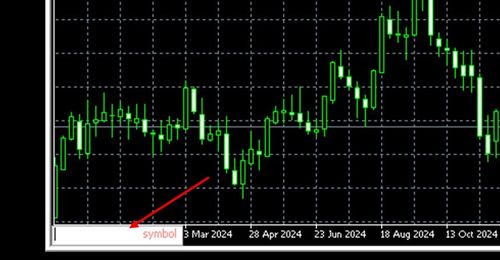
How to Use the Fast Navigation Box in MT4 (Mac)
This guide explains how to open and use the Fast Navigation Box in MT4 (Mac) to jump to a date/time and change the symbol or timeframe.
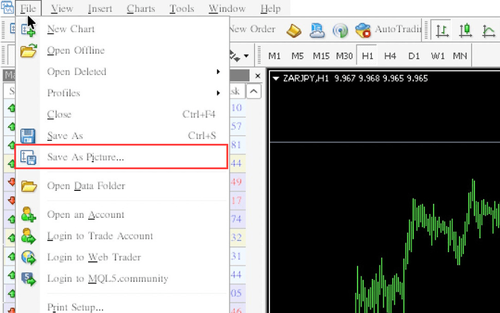
How to Save Chart Images in MT4 (Mac)
Explains how to save chart images in MT4 (Mac), either by uploading to the MQL5 community server or downloading to your computer.
Other Operations for MT4 (Mac)
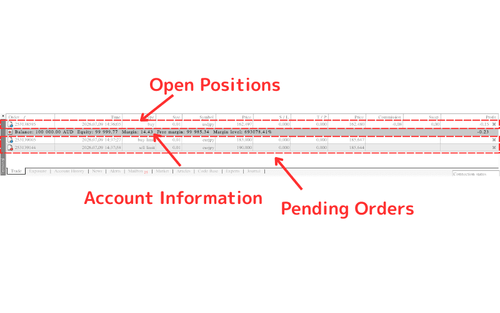
Check Positions, Orders, and Assets in MT4 (Mac)
How to check current positions, pending order details, and account asset information in the MT4 (Mac) terminal 'Trade' tab, and how to customize the displayed items.
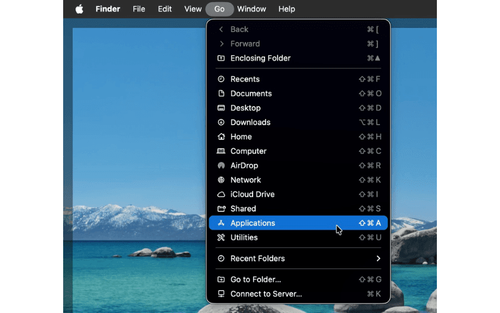
How to Uninstall MT4 (Mac)
How to uninstall MT4 (Mac) from the Finder "Applications" folder—drag MetaTrader 4 to the Trash, right-click "Move to Trash", or press command + delete, with screenshots.
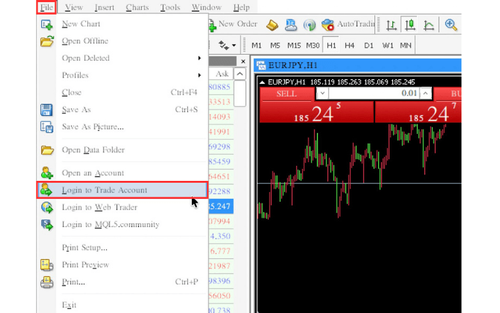
How to Switch Accounts on MT4 (Mac)
How to switch between multiple MT4 (Mac) accounts—log in to a new account and save its information from the "File" menu, then double-click it under "Accounts" in the Navigator, with screenshots.
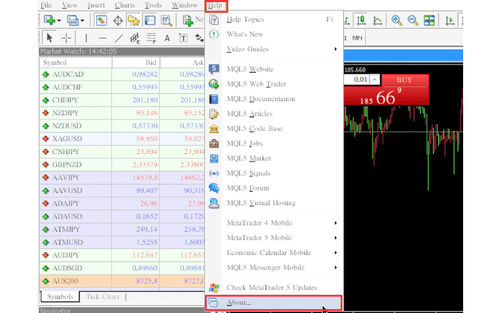
How to Check the Version of MT4 (Mac)
How to check your MT4 (Mac) version and build number from the "About" dialog in the "Help" menu.
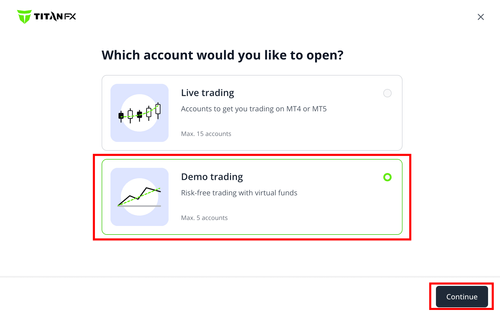
How to Create a Demo Account on MT4 (Mac)
This guide explains how to open a Titan FX demo account from within MT4 (Mac): selecting the TitanFX-Demo01 server, entering the required details, and saving the login information shown on the final screen. It also notes the 30-day expiry of demo accounts.
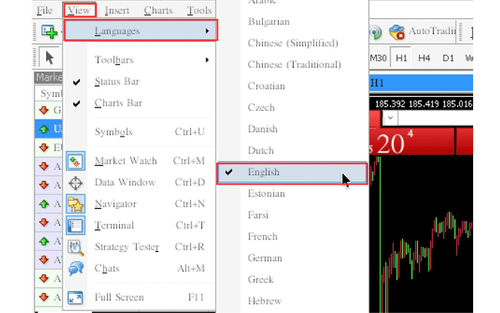
How to Change the Language on MT4 (Mac)
How to change the display language on MT4 (Mac) by selecting a language under "Languages" in the "View" menu and restarting.
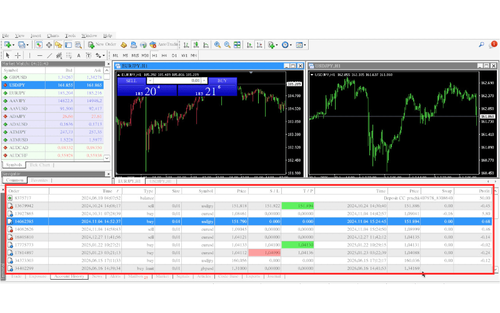
How to Check Account History on MT4 (Mac)
How to view your MT4 (Mac) trading history in the "Account History" tab—displaying the tab, adding Commissions/Taxes/Comments, and specifying the period.
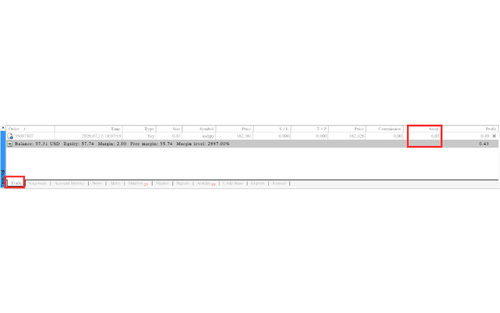
How to Check Swap Points on MT4 (Mac)
How to check swap points on MT4 (Mac)—open positions in the "Swap" column of the "Trade" tab, and closed positions in the "Account History" tab.
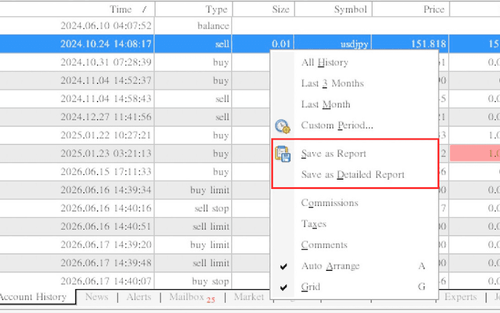
How to Create a Profit and Loss Report on MT4 (Mac)
How to create a profit and loss report (HTML) on MT4 (Mac) by right-clicking the "Account History" tab and choosing "Save as Report" or "Save as Detailed Report".
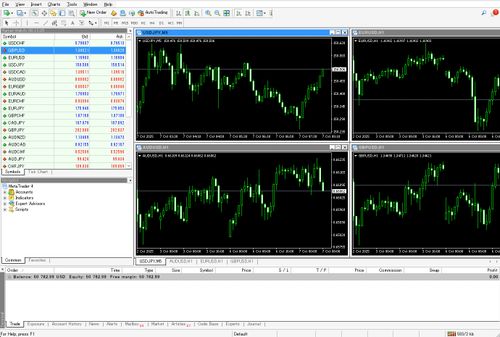
How to Show/Hide the Chart Bar in MT4 (Mac)
This guide explains how to show or hide the Charts Bar in MT4 (Mac) from the View menu, and how to switch charts from the Window menu when it is hidden.
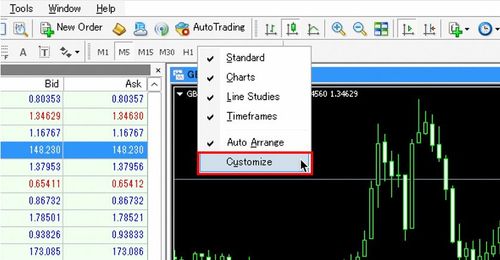
How to Customize Timeframe Settings on the Toolbar in MT4 (Mac)
This guide explains how to customize which timeframes appear on the MT4 (Mac) toolbar via the Customizing toolbar dialog, and how to toggle the Timeframes toolbar.
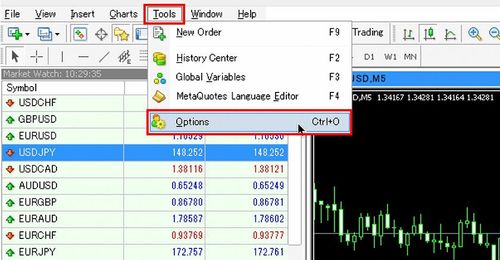
How to Set Sound in MT4 (Mac)
This guide explains how to change or disable event sounds in MT4 (Mac) from Tools > Options > Events.
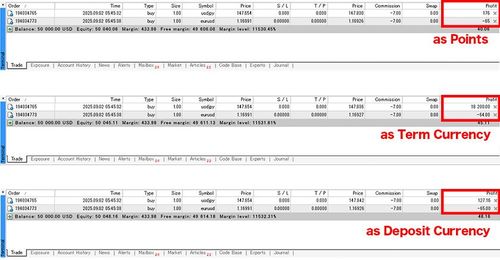
How to Switch the Profit and Loss Display in MT4 (Mac)
This guide explains how to switch the profit and loss display in the MT4 (Mac) Trade tab between points, instrument settlement currency, and account currency.
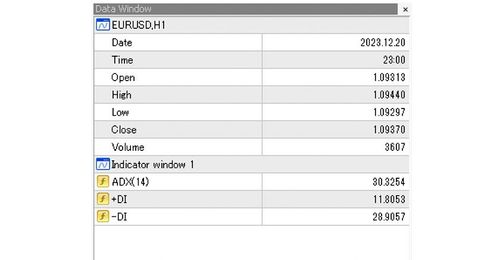
How to Display the Data Window in MT4 (Mac)
This guide explains what the Data Window is in MT4 (Mac) and how to show it from the View menu.

List of Shortcut Keys for MT4 (Mac)
A categorised list of the main MT4 (Mac) shortcut keys and what they do: chart operations, switching the chart display, window operations, trading functions, and other useful shortcuts.