

How to Download Chart Price Data as a CSV on MT5 (Windows)
MT5 allows you to download chart price data as a CSV file.
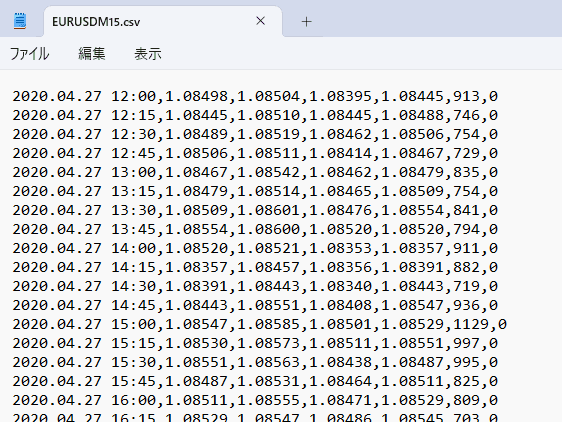
How to Download a CSV File
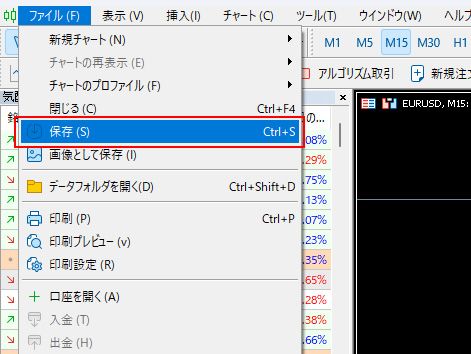
Click "Save (S)" in the "File" menu.
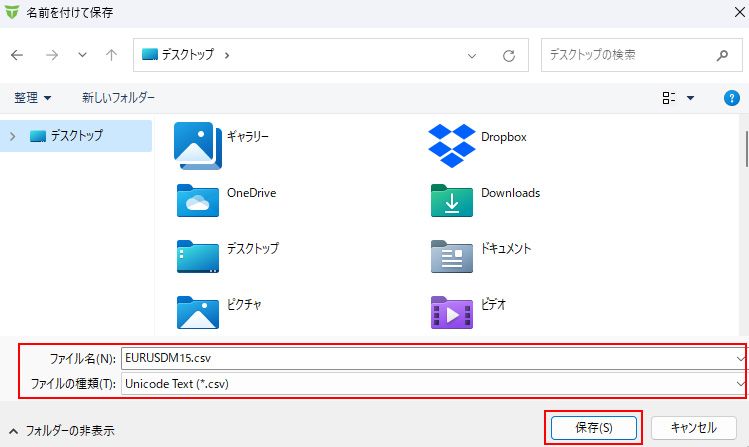
Select the location where you want to save the file, enter the file name in "File name," choose "Unicode Text (*.csv)" as the file type, and click "Save" to store the price data in CSV format.
*You can also choose other file formats, such as HTML, instead of CSV for download.
Further Reading
- How to Display the Data Window on MT5 (Windows)
- How to Check Account History in MT5 (Windows)
- How to Download Chart Price Data as a CSV on MT5 (Mac)
- How to Download Chart Price Data as a CSV on MT4 (Mac)
- How to Download Historical Data: One-Minute Bar CSV, Account Type and Importing into MT4 and MT5