

MQL4 Tutorial: What Is MQL4? A Beginner's Guide to Writing MT4 EAs
In foreign exchange and contract for difference (CFD) trading, improving execution efficiency and the stability of a strategy is a focus for many traders. MQL4 offers one solution: develop an Expert Advisor (EA) on the MetaTrader 4 (MT4) platform to automate order placement, risk control, and money management.
This MQL4 tutorial is designed for absolute beginners. Starting from environment setup, it walks through the core operating logic of MetaTrader 4 (MT4), breaks down basic syntax and event functions, and—combined with the free resources and forward-test data from Titan FX—shows how to gradually build an automated trading system of your own.
- How MQL4 functions as the "trading-instruction manual" for MT4
- The EA development flow in MetaEditor (.mq4 → compile → .ex4)
- The minimum syntax: data types, the
OnTick()event function, and price variables (Ask/Bid/Close[0]) - Common EA development errors (syntax, error 130, error 134) and how to stabilize execution
- How to leverage the 70+ free tools and resources including EAs and the forward-test ranking that Titan FX makes available
- 1. What Is MQL4? From MT4 to Automated Trading
- 2. Writing an EA in MQL4: The MetaEditor Workflow
- 3. Essential Syntax: Data Types and the OnTick Function
- 4. Avoiding the Pitfalls: Common EA Errors and Stability Tips
- 5. Free EA Resources: Use Titan FX Forward-Test Data
- 6. FAQ: Questions on MQL4 and EA Development
- 7. Conclusion
1. What Is MQL4? From MT4 to Automated Trading
MQL4 is the programming language MetaQuotes designed for MetaTrader 4 (MT4). Think of it as MT4's "trading-instruction manual." It converts a trading strategy into a program a computer can execute automatically, removing the need to monitor the screen by hand.
Three Common Program Types in MT4
Using MQL4 in MT4, the three most common program types are:
- EA (Expert Advisor): Automatically executes orders, sets stop-loss/take-profit, and manages money — the core tool for automated trading (the focus of this article)
- Custom Indicator: Plots technical indicators, lines, and shapes on the chart
- Script: Executes a one-off task such as bulk-closing positions, drawing a line, or modifying orders, then stops
Of these, EAs are the most powerful automation tool, and the central topic of this article.
How MT4 Operates (Using an EA as an Example)
MT4 operates on Ticks as its base unit. Every time the market price changes, one Tick is generated.
Once an EA is attached to a chart:
- MT4 continuously delivers the latest Tick data to the EA
- The EA receives those Ticks via the
OnTick()function and decides whether to place orders, manage positions, or adjust stops based on the strategy you wrote
Key point:
In many simple tick-driven EAs, the main automated-trading checks run inside OnTick(). It is the EA's "heartbeat"—each beat runs your trading logic once.
Compared to MQL5, MQL4 has a simpler syntax, which makes it a good entry point for beginners, and the EA ecosystem is mature, with abundant existing code available to study and adapt.
2. Writing an EA in MQL4: The MetaEditor Workflow
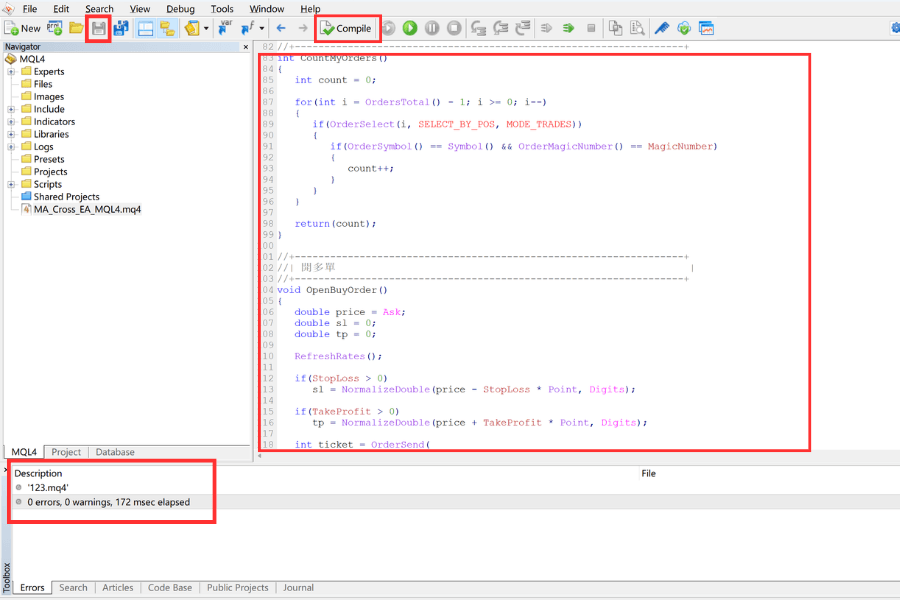
Open MT4's MetaEditor and follow these steps to develop:
- ① Log in to MT4. Click the yellow icon in the navigation bar to open MetaEditor.
- ② Click "New" → "Expert Advisor (template)". Under "Expert", enter the name and author info, then continue.
- ③ Optionally select EA event handlers as needed; you can also leave them unchecked and proceed.
- ④ Write the code in the editor pane (file extension .mq4). When done, click "Compile". On success, an .ex4 executable is produced.
- ⑤ Return to MT4. In "Navigator" → "Expert Advisors", drag the file onto a chart to attach it.
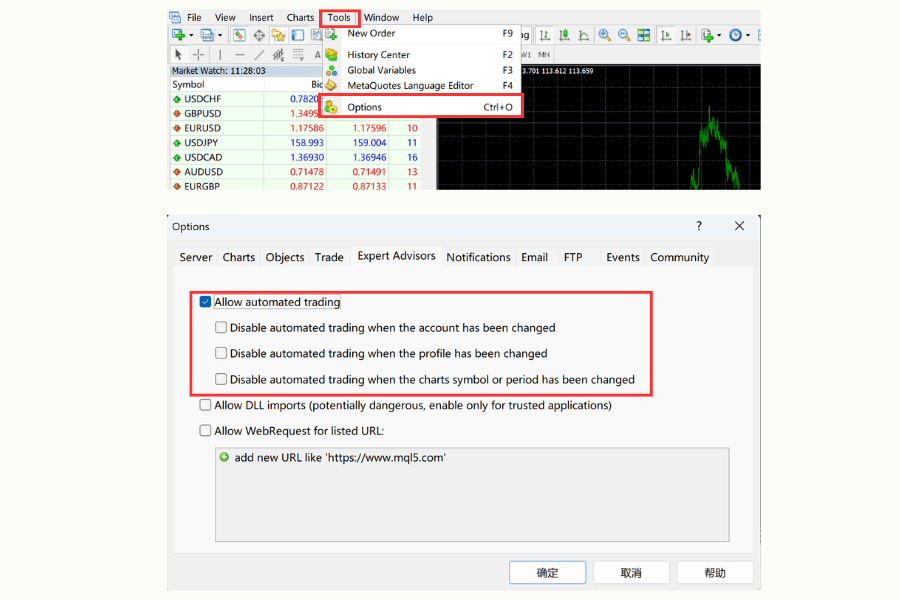
Note: The most common beginner issue is that no smiley face appears in the upper-right corner after attaching the EA. This typically means "Allow automated trading" is disabled. Click "Tools" → "Options" → "Expert Advisors" and check "Allow automated trading".
3. Essential Syntax: Data Types and the OnTick Function
Developing an MQL4 EA does not require memorizing thousands of lines of code. Get the core data types and the runtime "heart" right, and complete automated strategies become straightforward to assemble.
Core Data Types
| Data Type | Description | Practical Use |
|---|---|---|
| int | Integer (no decimals) | Indicator periods, MagicNumber, order ticket numbers |
| double | Decimal-precision numbers | Ask/Bid prices, lot size, points |
| bool | true / false | Whether to enter a position, whether a signal is valid |
The EA's Heart: the OnTick() Function
OnTick() is the most important event function in an MQL4 EA.
- Trigger timing: Every time a new quote (Tick) arrives, the system runs the code inside OnTick() once.
- Development focus: All trading-decision logic (e.g., "buy when the fast line crosses above the slow line") goes here.
Common Price Variables
- Ask / Bid: Current ask and bid (drives entry price decisions)
- Close[0]: Live price of the current incomplete candle
- High[0] / Low[0]: High and low of the current candle
With these, plus a basic if (such as if(Close[0] > High[1])), it becomes possible to express a first automated trading rule.
4. Avoiding the Pitfalls: Common EA Errors and Stability Tips
When writing an MQL4 EA, syntax errors are relatively easy to spot, but logic errors and runtime issues are where most beginners get stuck. Below is a quick reference for the most common mistakes and ways to avoid them.
Quick Reference: Common Development Errors
| Error Type | Common Cause | Fix |
|---|---|---|
| Syntax error | Missing ; or unmatched braces | Double-click the MetaEditor error message to jump to the line |
| Order failure (130) | Stop-loss/take-profit too tight | Use MarketInfo() to check the minimum distance and add a buffer |
| Insufficient funds (134) | Not enough margin | Calculate lot size dynamically or check account balance first |
Tools to Improve Stability
| Tool | Main Function | When to Use |
|---|---|---|
| Print() | Logs variable values or messages to the "Experts" log | When you need to trace internal logic |
| Comment() | Displays info in real time in the upper-left of the chart | When you want to watch a key variable as it changes |
| Strategy Tester | Visual Mode shows the EA running visually | Early-stage validation of entry/exit logic |
| Demo account testing | Runs in real market conditions with virtual funds | Final check before going live |
Important: Avoid over-fitting to historical data. Start from a simple strategy, run it for an extended period on a demo account, and only move to live execution after risk management is proven sound.
5. Free EA Resources: Use Titan FX Forward-Test Data
If building an EA from scratch feels like too much work, well-documented broker-provided resources can help. Titan FX publishes 70+ free tools and resources for MT4/MT5, including EAs, indicators, and market analysis.
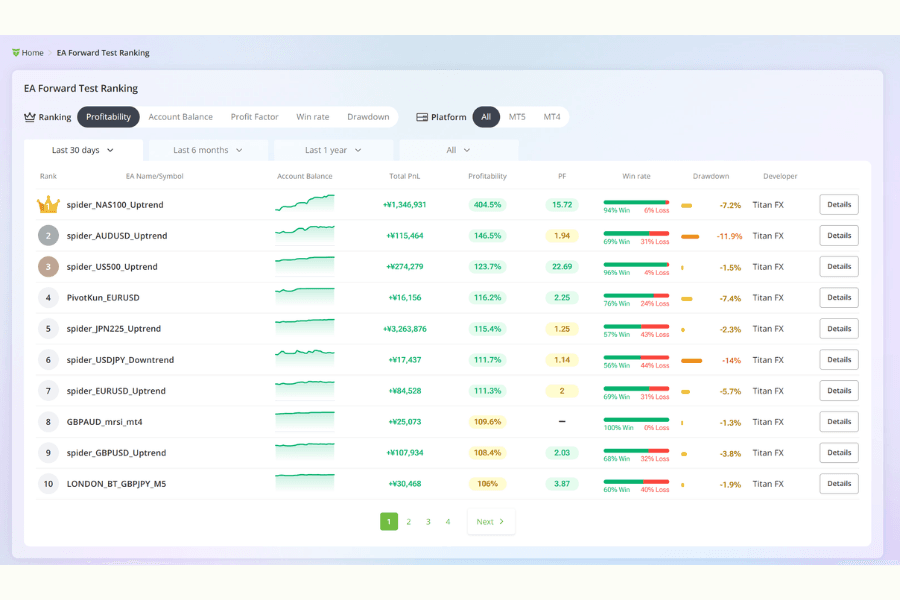
The value of these resources is transparency:
- Titan FX Research publishes forward-test results under real market conditions (more reliable than pure historical backtests).
- The EA Ranking page clearly shows return rate, max drawdown, win rate, and profit factor.
Beginners can pick a top-ranked EA whose drawdown matches their style, download it, and observe its behavior on a demo account first. This not only accelerates the path to automation, but is also one of the best ways to study how a professionally built EA is structured.
6. FAQ: Questions on MQL4 and EA Development
Q1: Can multiple EAs be attached to a single chart?
No. Only one EA can run on a chart at a time. To run multiple strategies, open multiple chart windows for the same currency pair.
Q2: Can an MT4 EA be used directly on MT5?
No. MQL4 and MQL5 differ significantly in their trading-logic structure, so the code cannot be shared directly. The logic has to be rewritten under MQL5's object-oriented architecture.
Q3: What is the difference between .mq4 and .ex4?
.mq4 is the editable source file; .ex4 is the compiled executable. Edit .mq4 to modify the program; load .ex4 onto the platform.
Q4: Does an EA always make consistent profits?
Not necessarily. EA performance depends on the interaction between strategy logic and market environment. No single strategy makes consistent profits across all market regimes, which is why risk management and continuous improvement remain essential.
7. Conclusion
Through this tutorial, you have a working view of MT4 environment setup, MQL4's basic syntax, the EA development flow, debugging and optimization, and how to use Titan FX's free resources.
Writing an EA does take practice, but starting from simple logic and validating with backtests and demo accounts builds a stable system in stages. Referencing Titan FX's forward-test ranking and mature EAs further compresses the learning and ramp-up time.
Further Reading
Titan FX's financial market research and analysis team produces investor education content across a wide range of financial instruments, including foreign exchange (FX), commodities (crude oil, precious metals, and agricultural products), stock indices, U.S. equities, and crypto assets.
Primary Sources by Category
- Official platform documentation: MetaQuotes, MetaTrader 4 and MQL4 Reference public documentation.
- EA development and testing materials: MQL4 Community, MetaEditor, Strategy Tester and official / technical resources on EA development.
- Titan FX related materials: Titan FX MT4, EA auto trading, forward testing and EA ranking pages.