

Market Orders Explained: Key Differences from Limit Orders, Pros, Cons & Practical Uses

In fast-moving markets, getting filled right now sometimes matters more than getting filled at a specific price. The market order is the order type built for speed.
This article explains what market orders are and how they are used, how they differ from limit orders, their pros and cons, and how to place one in MT4/MT5.
- Definition: The most basic order—fills immediately at the current market price, no price set.
- vs limit order: Market orders prioritize speed; limit orders prioritize price control.
- Pros: Fast, near-certain execution—ideal for quick entries, exits, and urgent closes.
- Cons: No control over the fill price; slippage risk in volatile or thin markets.
- How to place: Buy or sell at market with one click in MT4/MT5.
1. What Is a Market Order
1-1. Market Order Definition
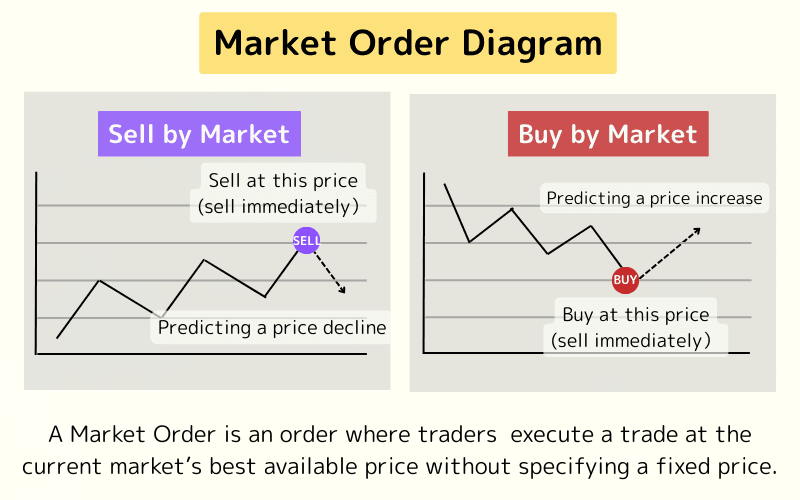
A Market Order is an instruction to buy or sell at the best available market price, without specifying a fixed price.
This order type prioritizes speed, allowing traders to enter or exit the market instantly. It is widely used in forex, stock, futures, and other financial markets.
Because of their rapid execution, Market Orders are ideal for situations where quick position entry or exit is essential—particularly in volatile market conditions.
1-2. How Market Orders Work
The execution process for a Market Order works as follows:
- Once submitted, the trading platform immediately matches the order with the current market price (bid or ask).
- Execution typically occurs within milliseconds. However, the final price may differ slightly from the quoted price due to rapid price changes—a phenomenon known as slippage.
- Titan FX provides ultra-fast execution with minimal slippage, consistently ranking among the world’s leading brokers.
- Leveraging the Equinix NY4 financial data center and top-tier liquidity providers, Titan FX ensures exceptional trade execution speed and reliability.
2. Market Order vs. Limit Order
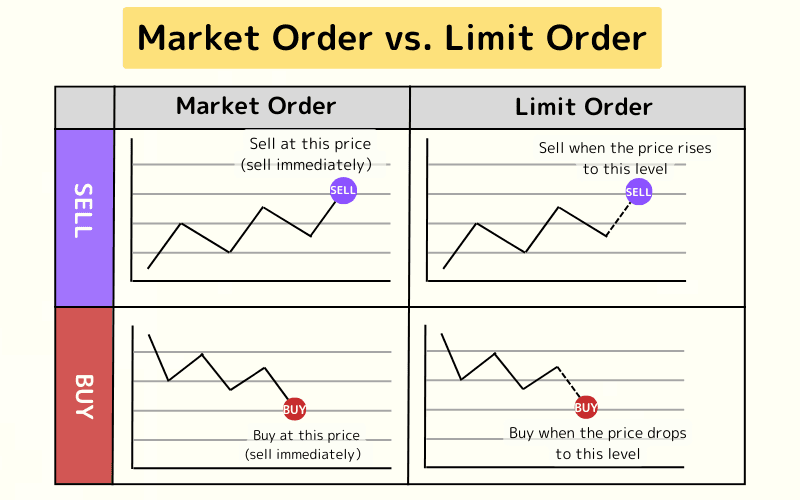
Market Orders and Limit Orders are two of the most commonly used order types in forex trading. Each serves a different purpose—Market Orders prioritize execution speed, while Limit Orders emphasize price control.
A Limit Order allows traders to specify the exact price at which they are willing to buy or sell. For a buy order, the price must be below the current market price; for a sell order, it must be above the current market price.
The order is only executed when the market price reaches or surpasses the specified level, providing greater control over entry or exit conditions and minimizing the risk of unfavorable pricing.
Learn more in our guide: What Is a Limit Order?
Key Differences:
| Feature | Market Order | Limit Order |
|---|---|---|
| Execution Timing | Executes immediately at the current market price | Executes only when the market reaches the set price |
| Price Control | None; executes at the best available price | Allows traders to set an exact price |
| Execution Speed | Extremely fast; near-instant | Slower; depends on market conditions |
| Slippage Risk | Possible, especially during volatility | Minimal; fills at the specified price or better |
| Use Cases | Quick entries/exits, trend following | Pullback entries, support/resistance strategies |
| Complexity | Simple; no price input needed | Slightly more complex; requires price input |
3. Uses of Market Orders
Market Orders are primarily used for:
- Opening a Position (Entry)
- Closing a Position (Exit)
Opening a Position (Entry)
Traders use Market Orders to enter the market instantly and capitalize on short-term price movements, such as when technical analysis signals a breakout pattern.
Common in scalping, day trading, or high-frequency trading.
Closing a Position (Exit)
Traders use Market Orders to close positions quickly, locking in profits or cutting losses, especially during rapid price changes.
Ideal for risk management or achieving trading objectives.
4. Advantages and Disadvantages of Market Orders
Market Orders are known for their speed but come with limitations. Below are their key advantages and disadvantages to help traders decide when to use them.
Advantages
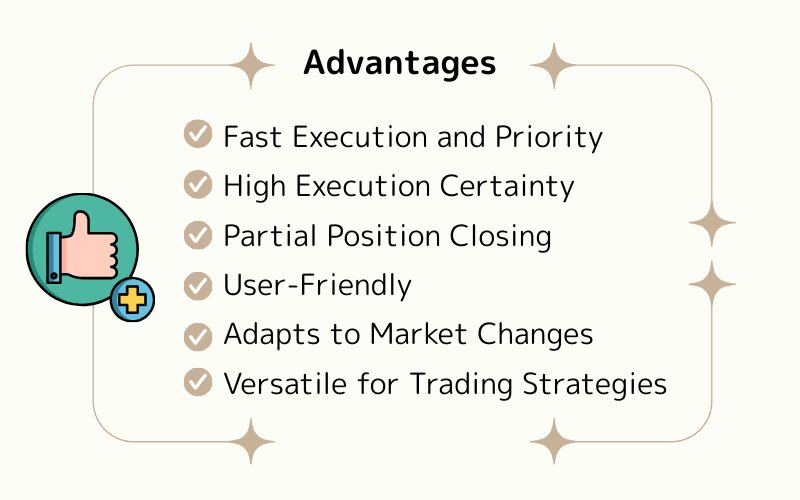
Advantage 1: Fast Execution and Priority
Market Orders execute instantly at the current market price, perfect for seizing fleeting trading opportunities, such as during major news releases or price breakouts.
In volatile markets (e.g., scalping), Market Orders complete in milliseconds and have higher priority than Limit Orders, improving entry or exit efficiency.
Advantage 2: High Execution Certainty
Market Orders almost always execute, especially in high-liquidity markets like major currency pairs.
This eliminates the risk of missing trades due to untriggered price levels, crucial for traders aiming to lock in profits or stop losses quickly.
Advantage 3: Partial Position Closing
Market Orders support partial position closing, allowing traders to close a portion of their position while retaining the rest for further observation.
For example, with a 10-lot position, a trader can close 7 lots to secure profits and hold 3 lots, offering flexibility without additional fees or restrictions.
Advantage 4: User-Friendly
No need to set price conditions; traders simply click “Buy” or “Sell” to execute instantly.
This simplicity benefits beginners and allows advanced traders to act swiftly in fast-moving markets.
Advantage 5: Adapts to Market Changes
Market Orders enable rapid responses to sudden events, such as economic data releases or central bank announcements.
Titan FX’s Economic Calendar and Global Economic Indicators help traders stay informed and execute timely strategies.
Advantage 6: Versatile for Trading Strategies
Market Orders suit various trading styles, including day trading, trend following, breakout strategies, and urgent stop-loss execution.
Their instant execution enhances strategy flexibility and responsiveness.
Disadvantages
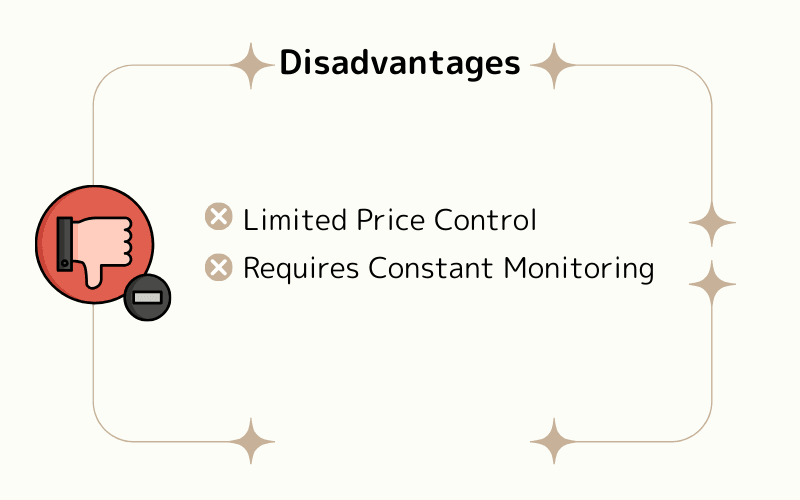
Disadvantage 1: Limited Price Control
Market Orders execute immediately at the best available price, without allowing traders to specify a price.
In fast-moving markets, such as during news events or low-liquidity periods, traders may face higher-than-expected buy prices or lower-than-expected sell prices, leading to slippage and potential cost overruns.
This lack of price control poses a risk for traders prioritizing precision or using automated strategies.
Disadvantage 2: Requires Constant Monitoring
Market Orders are real-time orders, requiring traders to actively monitor the market to time their entries or exits.
For traders unable to watch the market continuously or trading part-time, this real-time demand may limit opportunities and flexibility during sudden market moves.
To improve efficiency and reduce monitoring demands, Titan FX offers dozens of free Expert Advisors (EAs) for automated trading, enabling 24/7 intelligent trading.
5. How to Place a Market Order
In forex trading, traders can place Market Orders quickly using platforms like MetaTrader 4 (MT4) or MetaTrader 5 (MT5).
Below is a step-by-step guide for placing a Market Order on MetaTrader 5 (MT5).
Standard Market Order Process
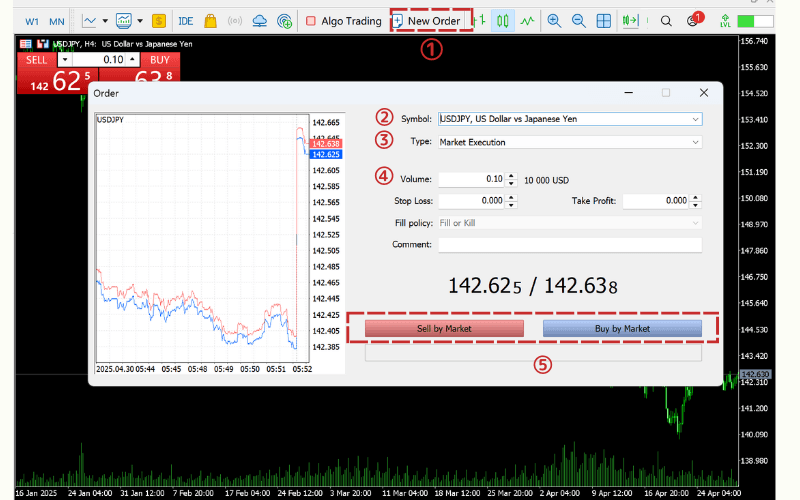
- ① Open MT5 and click “New Order.”
- ② Select the trading instrument (e.g., EUR/USD).
- ③ Choose “Market Execution.”
- ④ Enter the lot size (e.g., 0.1 lots) and set stop-loss or take-profit levels if desired.
- ⑤ Click “Sell by Market” or “Buy by Market” to complete the order.
- Note: The execution price may vary slightly due to slippage.
One-Click Trading
The One-Click Trading feature enables rapid order placement, ideal for short-term trading or markets requiring instant reactions. To avoid errors, confirm the market price and lot size before trading.
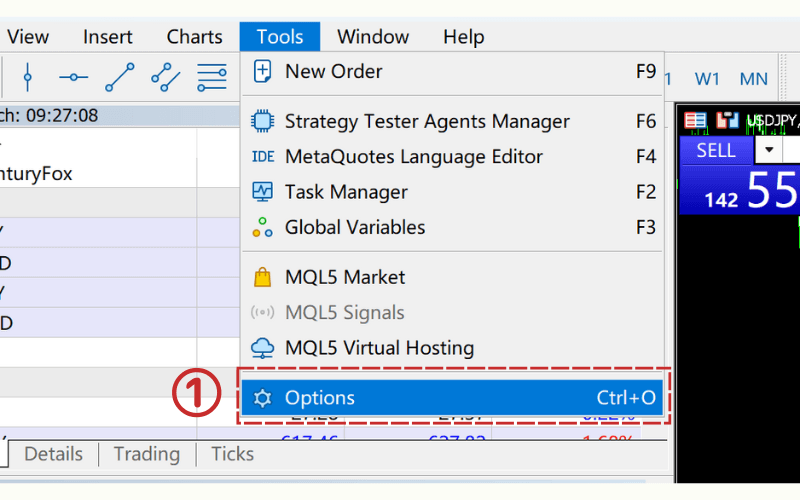
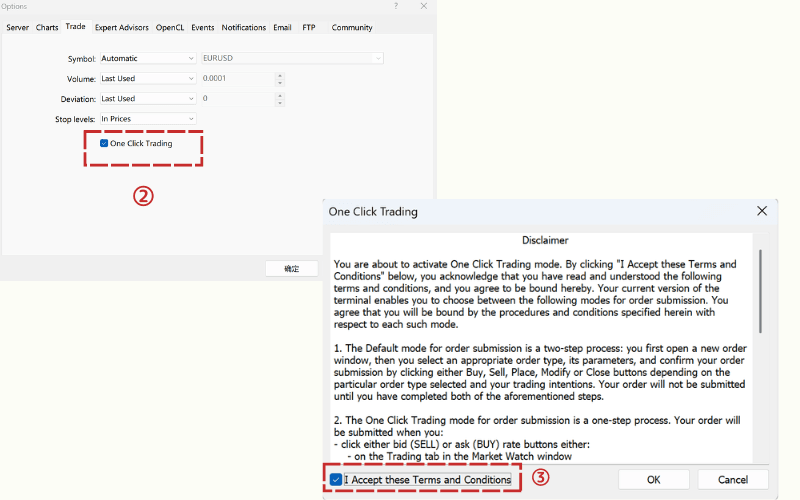
To enable One-Click Trading, follow these steps:
① In the MT5 Tools menu, click “Options.”
- ② Check the “One Click Trading” box in the Trade tab.
- ③ Review and accept the disclaimer by checking “I Accept these Terms and Conditions.”
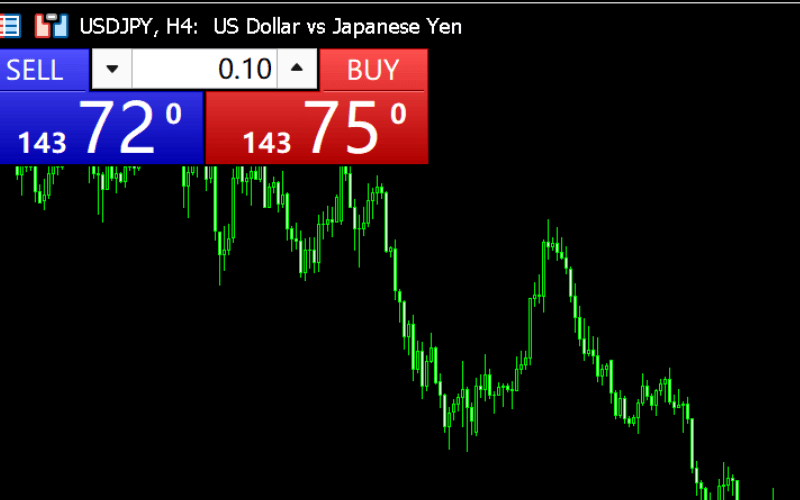
Once enabled, a trading panel appears in the top-left corner of the chart.
Enter the lot size in the center-top field, then click “BUY” or “SELL” to place the order.
Trade Forex CFDs with Titan FX
Titan FX offers 50+ currency pair CFDs on MT4/MT5 with up to 1,000:1 leverage on major pairs, tight spreads, and the flexibility to go long or short. Micro accounts can reach up to 2,000:1 leverage when eligible.
6. Market Order FAQ
Q1. Do Market Orders have priority over Limit Orders?
Market Orders typically take precedence over Limit Orders because they execute immediately at the current market price, while Limit Orders wait for the market to reach a specified price. In forex markets and most trading platforms, Market Orders are prioritized to ensure rapid execution.
Q2. Are Market Orders guaranteed to execute?
Market Orders have very high execution certainty and usually execute instantly. However, in extreme market conditions (e.g., high volatility or low liquidity), execution may fail or occur at a price deviating from expectations.
Q3. Are Market Orders suitable for beginners?
Market Orders are simple and fast, making them ideal for beginners entering or exiting the market quickly. However, due to potential slippage, beginners should practice with a demo account before trading live.
7. Summary
A Market Order is an order that executes immediately at the current market price, ideal for short-term trading or urgent position exits.
Its high execution certainty and ease of use make it particularly effective in high-liquidity markets like major currency pairs.
However, Market Orders carry slippage risks and lack price control, so traders should monitor market volatility.
Compared to Limit Orders, Market Orders prioritize execution speed, while Limit Orders focus on price control. Traders should choose based on their goals and market conditions.
Further Reading
Titan FX Trade Strategy Research Lab covers forex (FX), commodities (oil, precious metals, agricultural products), stock indices, U.S. equities, and crypto assets, producing educational content for retail investors across asset classes.
Primary Sources (by Category)
- Educational Resources: Investopedia — Market Order, BabyPips
- Platform: Order functions of the Titan FX MT4/MT5 trading platforms