How to use MT5/MT4
The entities below are duly authorised to operate under the Titan FX brand and trademarks. Titan FX Limited (reg. No. 40313) regulated by the Vanuatu Financial Services Commission with its registered office at 1st Floor Govant Building, 1276 Kumul Highway, Port Vila, Republic of Vanuatu. Goliath Trading Limited (licence no. SD138) regulated by the Financial Services Authority of Seychelles with its registered address at IMAD Complex, Office 12, 3rd Floor, Ile Du Port, Mahe, Seychelles. Titan Markets (licence no. GB20026097) regulated by the Financial Services Commission of Mauritius with its registered office at c/o Credentia International Management Ltd, The Cyberati Lounge, Ground Floor, The Catalyst, Silicon Avenue, 40 Cybercity, 72201 Ebene, Republic of Mauritius. Atlantic Markets Limited (registration no.2080481) regulated by the Financial Services Commission of the British Virgin Islands with its registered address at Trinity Chambers, PO Box 4301, Road Town, Tortola, British Virgin Islands. The Head Office of Titan FX is at Pot 564/100, Rue De Paris, Pot 5641, Centre Ville, Port Vila, Vanuatu. The Titan FX Research Hub purpose is to provide solely informational and educational content to its users, and not investment, legal, financial, tax or any type of personalised advice. Opinions, forecasts, and any other information contained in this website do not constitute recommendations or solicitation to buy or sell financial instruments. Trading leveraged products like CFDs carries high risk and may not suit all investors. Users should conduct independent research or consult qualified professionals before making any trading decisions. While efforts are made to provide accurate information, no warranty is given for the completeness or suitability of the information contained in this website. Reliance on this content is at your own risk and Titan FX accepts no liability for loss or damage. This information is for residents of jurisdictions where Titan FX transactions are permitted.
MT4 allows you to save chart images.
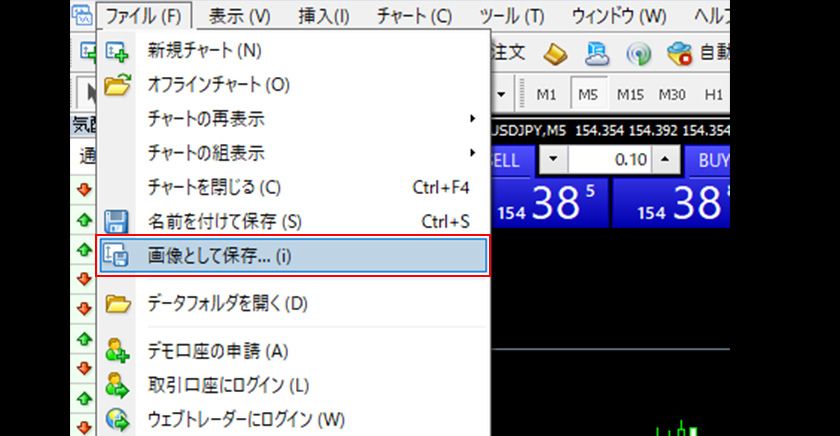
Select the chart you wish to save, then choose "Save As Picture (I)" from the "File" menu, or right-click on the chart where you want to save the image and select "Save As Picture (i)."
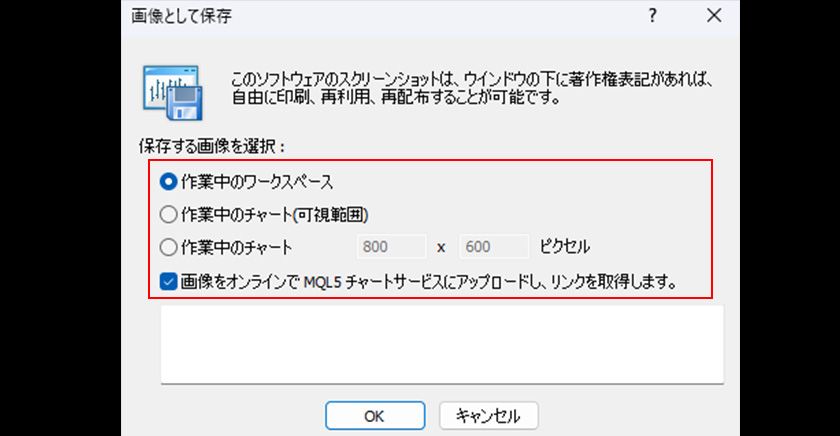
In the window that appears, choose from the following three options for saving the image:
・Active Workspace: Saves an image of your current computer screen.
・Active Chart (Visible Range): Saves an image of the currently displayed part of the chart.
・Active Chart: Saves an image of the chart with pixel-specific settings.
If you check "Upload the image to MQL5 Charts Service and get a link," the image will be uploaded to the MQL5 community server, and you will get a URL to display the image. (You will need an MQL5 community account to manage your image gallery.)
If you uncheck this option, the image will be saved directly to a specified location on your PC.
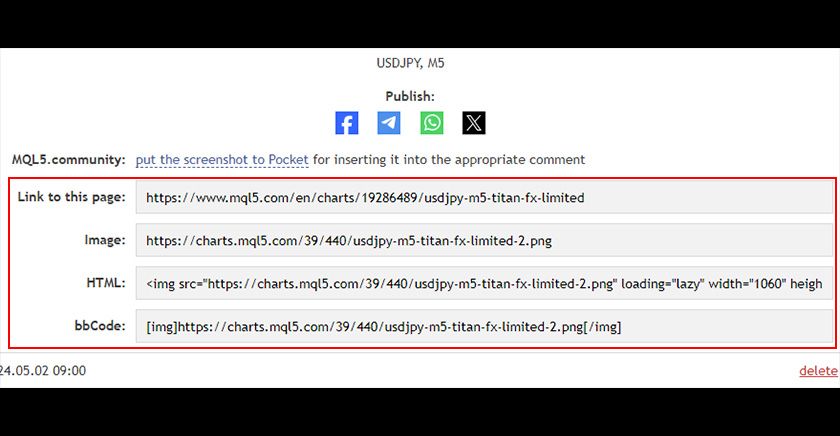
If you choose to upload to the MQL5 Charts Service, you will be redirected to the MQL5 community page, where you can copy the required URL format and use the image.
If you choose to save it to your PC, specify the location in the displayed "Save" window.