

MQL5 Tutorial: What Is MQL5? A Beginner's Complete Guide to Writing MT5 EAs
MQL5, paired with the MetaTrader 5 (MT5) platform, offers a more powerful object-oriented architecture and multi-threaded computation, enabling traders to develop EAs (Expert Advisors) that run faster and behave more predictably.
This MQL5 tutorial is designed for absolute beginners. Starting from MetaEditor environment setup, it walks through MT5's Tick-driven operating logic, breaks down the core syntax and event functions, and—combined with Titan FX's free EA resources and live forward-test data—shows how to build an efficient automated trading system.
- The Tick-driven mechanism in MT5 and the role MQL5 plays inside it
- The EA development flow in MetaEditor 5 (.mq5 → compile → .ex5)
- The minimum syntax: 4 data types (int / double / string / datetime) and 4 event functions (OnInit / OnTick / OnTimer / OnDeinit)
- Common MQL5 development errors (compile, order failure, indicator handles) and stability tips
- How to leverage the 70+ free tools and resources including EAs and the forward-test ranking that Titan FX makes available
- 1. What Is MQL5? MT5 and the Tick-Driven Mechanism
- 2. Writing an EA in MQL5: The MetaEditor 5 Workflow
- 3. Essential Syntax: Data Types and Event Functions
- 4. Avoiding the Pitfalls: MQL5 Errors and Stability Tips
- 5. Free EA Resources: Use Titan FX Forward-Test Data
- 6. FAQ: Common MQL5 Development Questions
- 7. Conclusion
1. What Is MQL5? MT5 and the Tick-Driven Mechanism
MQL5 is the modern programming language MetaQuotes designed for MetaTrader 5 (MT5). Its syntax is close to C++. It lets traders convert strategies into more efficient automated trading systems.
Three Common Program Types in MT5
- EA (Expert Advisor): Automatically executes orders, sets stop-loss/take-profit, and manages money — the core tool for automated trading (the focus of this article)
- Custom Indicator: Plots technical indicators or custom signals on the chart to support market analysis
- Script: Executes a one-off task (such as bulk-closing positions) and stops when finished
How MT5 Operates (Using an EA as an Example)
MT5 operates on Ticks as its base unit. Every time the price changes, one Tick is generated.
Once an EA is attached to a chart:
- MT5 continuously delivers the latest Tick data to the EA
- The EA receives those Ticks mainly via the
OnTick()function and runs its trading logic
Key point: In simple tick-driven EAs, the main entry and exit checks often run inside OnTick(), while other event handlers can support the broader workflow.
2. Writing an EA in MQL5: The MetaEditor 5 Workflow
Open MT5's MetaEditor 5 and follow these steps:
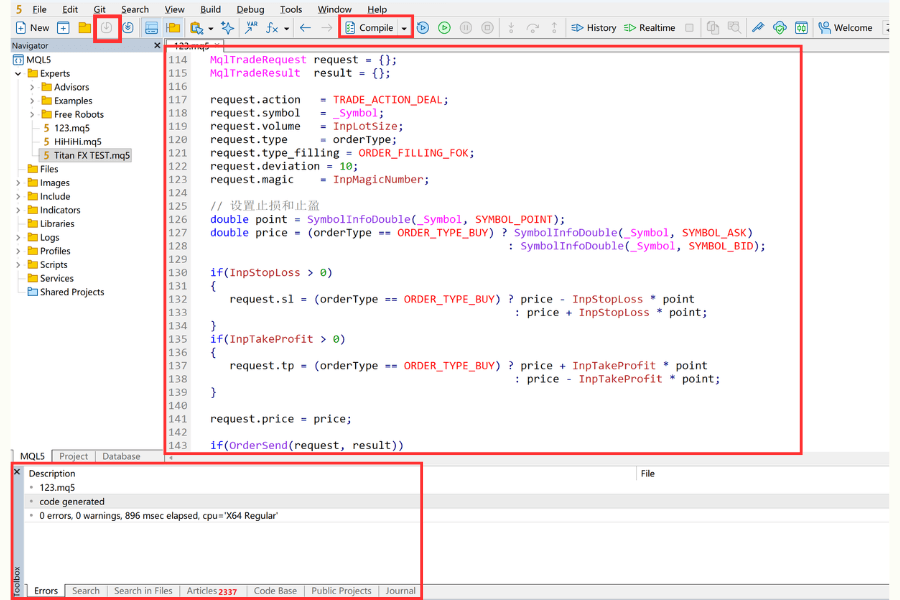
- ① Log in to MT5. Click "IDE" in the navigation bar to open MetaEditor.
- ② Click "New" → "Expert Advisor (template)" or "Expert Advisor (generate)". Under "Expert", enter the name and author info, then continue.
- ③ Optionally select EA event handlers as needed; you can also leave them unchecked and proceed.
- ④ Write the code in the editor pane (file extension .mq5). When done, click "Compile". On success, an .ex5 executable is produced.
- ⑤ Return to MT5. In "Navigator" → "Expert Advisors", drag the file onto a chart to attach it.
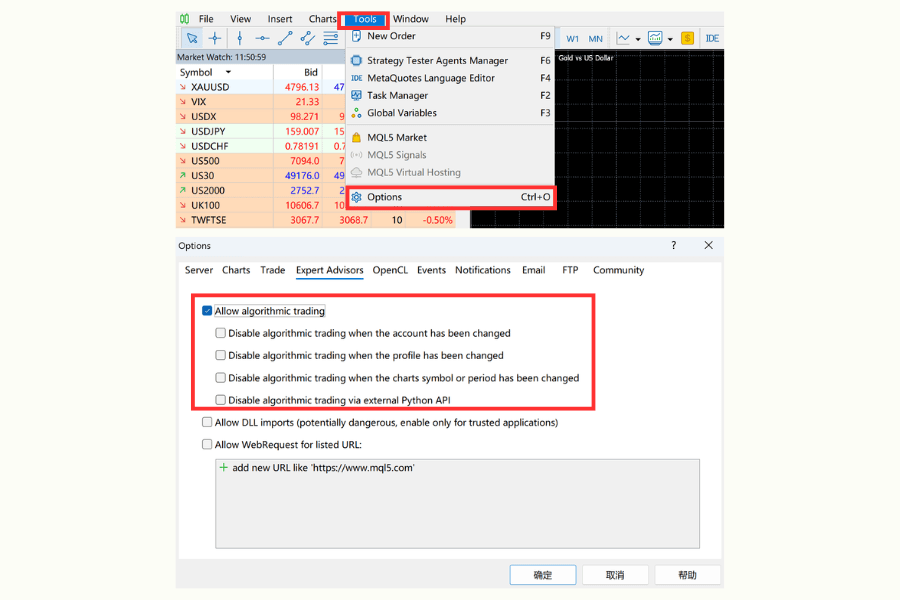
Note: Beginners often see the EA do nothing after loading it. This typically means automated trading is not enabled. Confirm that the "AutoTrading" button at the top of MT5 has turned green. Click "Tools" → "Options" → "Expert Advisors" and check "Allow algorithmic trading". Optionally, configure the disable conditions (Disable AutoTrading) as needed.
3. Essential Syntax: Data Types and Event Functions
MQL5's syntax is cleanly layered. Mastering the basic data containers and trigger mechanism is enough to build a tightly reasoned EA.
Common Data Types
When defining data in MQL5, choosing the right container ensures both efficiency and safety.
| Data Type | Description | Practical Use |
|---|---|---|
| int | Stores integers (no decimals) | Order ticket numbers, indicator periods |
| double | Stores high-precision decimals | Instrument quotes, lot-size calculations |
| string | Stores text | Trade memos, content of email notifications |
| datetime | Stores date and time | Restricting an EA to a specific trading window |
EA Core Event Functions
MQL5 has richer event handling than its predecessor, but beginners should focus on the four core "heartbeats" first.
| Function | Trigger Timing | Core Role |
|---|---|---|
| OnInit() | When the EA is loaded onto the chart | Initialize indicator handles |
| OnTick() | Every time a new quote (Tick) arrives | Decide entry/exit (the most critical part) |
| OnTimer() | At a scheduled interval (e.g., once per second) | Suitable for non-price-driven logic |
| OnDeinit() | When the EA is removed or the chart is closed | Clean up resources, free memory used by indicators |
For beginners, mastering OnInit(), OnTick(), and OnDeinit() is enough.
4. Avoiding the Pitfalls: MQL5 Errors and Stability Tips
In MQL5 development, syntax errors are usually easy to fix; logical stability is the real challenge.
Quick Reference: Common Development Errors
| Error Type | Common Cause | Fix |
|---|---|---|
| Compile error | Missing ;, mismatched CopyBuffer arguments | Double-click the error message at the bottom of MetaEditor to jump to the line |
| Order has no effect | AutoTrading not enabled, account mode mismatch | Check the button at the top of MT5; using the CTrade class to simplify commands also helps |
| Data fetch fails | Indicator handle not initialized | Confirm handle validity inside OnInit and call ArraySetAsSeries |
Tools to Improve Stability
| Tool | Main Function | When to Use |
|---|---|---|
| Print() / Comment() | Print info to the log or chart | When you need to trace internal logic and confirm conditions trigger correctly |
| Visual Backtest | Strategy Tester with Visual Mode enabled | Validate entry/exit behavior against historical data |
| Resource Release | Use IndicatorRelease() | Inside OnDeinit, prevents long-running EAs from bogging down the system |
Important: When parallel-optimizing parameters with MT5's multi-threading, watch out for the over-fitting trap. If historical performance looks too perfect but live drawdown is severe, parameters are likely fitted too tightly to past data. Start from simple logic instead.
5. Free EA Resources: Use Titan FX Forward-Test Data
If learning while operating in real markets sounds appealing, using well-documented broker-provided templates can be an efficient route. Titan FX publishes 70+ free tools and resources including EAs that fully support MT5's multi-asset trading needs.
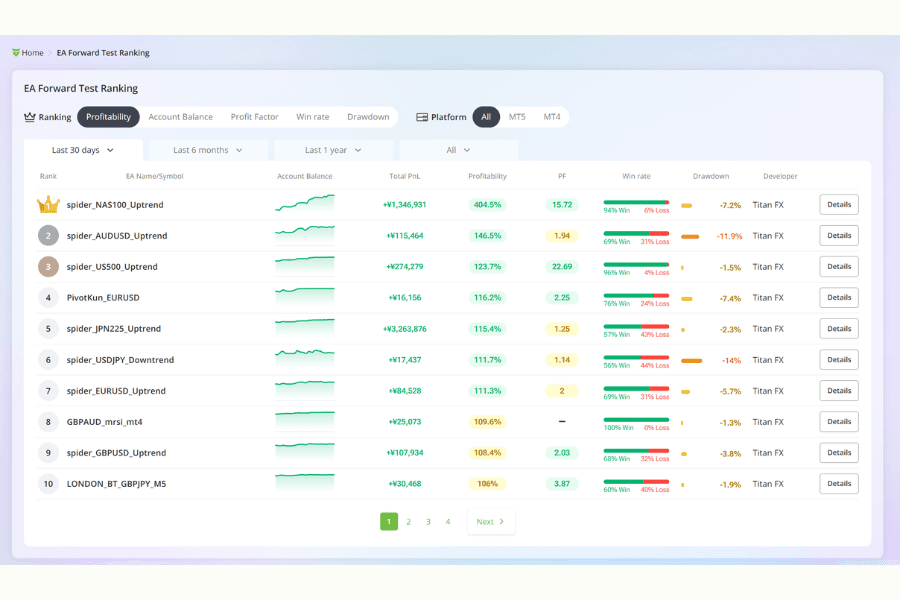
The value of these resources is transparency:
- Titan FX Research publishes forward-test results under real market conditions (more reliable than pure historical backtests).
- The EA Ranking page clearly shows return rate, max drawdown, win rate, and profit factor.
Beginners can pick a top-ranked EA whose drawdown matches their style, download it, and observe its behavior on a demo account first. This not only accelerates the path to automation, but is also one of the best ways to study how a professionally built EA is structured.
6. FAQ: Common MQL5 Development Questions
Q1: My EA works in the Strategy Tester, but does not place trades on a live account—why?
Common causes include broker server-time differences, different spread settings, slippage settings that are too tight, or an account mode mismatch (Netting vs. Hedging). The recommendation is to test on a demo account first, in an environment that mirrors real spreads and latency.
Q2: How do I run a multi-symbol backtest?
This is one of MT5's strengths. In your code, pass a non-current-chart symbol name (e.g., "EURUSD") to iClose() or CopyBuffer(). MT5's Strategy Tester automatically loads the relevant historical data and computes multi-pair flows in sync—no extra configuration needed.
Q3: How do I restrict an EA to a specific trading window?
Add a time check at the top of OnTick(). Use TimeCurrent() to get the server time, then extract the hour and minute via the MqlDateTime struct. If the time is outside the configured range (e.g., the European/U.S. session), exit the function early to avoid running during low-liquidity periods.
7. Conclusion
This MQL5 introduction has covered the full flow from environment setup to core syntax and EA debugging. MQL5 not only delivers excellent execution performance, but also makes multi-asset allocation and complex-strategy backtests simple and efficient.
The value of automated trading lies in discipline and execution. Start from simple logic, treat Titan FX's free EA templates and forward-test ranking as material for "reverse engineering," and validate stability thoroughly on a demo account. As your understanding of OnTick logic and money management grows, MQL5 becomes a powerful tool for building your own automated trading system.
Further Reading
Titan FX's financial market research and analysis team produces investor education content across a wide range of financial instruments, including foreign exchange (FX), commodities (crude oil, precious metals, and agricultural products), stock indices, U.S. equities, and crypto assets.
Primary Sources by Category
- Official platform documentation: MetaQuotes, MetaTrader 5 and MQL5 Reference public documentation.
- EA development and testing materials: MQL5 Community, MetaEditor 5, Strategy Tester and multi-symbol testing resources.
- Titan FX related materials: Titan FX MT5, EA auto trading, forward testing and EA ranking pages.