
 Home
- Investment Guide: Strategies for Stocks, Forex, and Metals
- Titan Options Explained: High/Low vs Turbo, Payouts & Risks
Titan Options Explained: High/Low vs Turbo, Payouts & Risks
There is no margin requirement, and no spreads, commissions, or swaps. The most you can lose on a single trade is the amount you commit to it. However, the price feed, trading rules, and risks all differ from CFDs traded on MT4 and MT5, so it is worth understanding the product before you start.
This guide covers how Titan Options works, the difference between Turbo and High/Low trading, the available instruments, how costs and payouts are calculated, the risks to understand before trading, and how to get started.
- Titan Options is a fixed-term derivative with two possible outcomes at expiry: you receive the payout, or you lose the full trade amount
- There are two trading types: Turbo, which expires in under a minute, and High/Low, with expiries from 1 minute to 1 trading day
- No margin, spreads, commissions, or swaps apply, and the payout rate is shown before you trade
- Prices come from a separate feed and are not linked to MT4 or MT5 CFD prices
- Titan FX is the counterparty to every trade. Each trade has a capped loss, but losses add up over many trades
1. What Are Titan Options?
Titan Options is a fixed-profit/loss trading account from Titan FX, built for trading short-term price moves. You predict whether the price of your chosen instrument will be above or below your entry price at expiry, then place the trade.
| Item | Details |
|---|---|
| Product type | Fixed-term OTC derivative |
| Account | Sub-account in the Client Cabinet |
| Platform | Dedicated, separate from MT4/MT5 |
| Price feed | Separate feed, not linked to CFDs |
| Counterparty | Titan FX |
The payout is fixed before you trade: before you place a trade, the platform shows the payout rate, the duration, and the trade amount. If your prediction is right at expiry, you get your trade amount back plus the payout. If it is wrong, you lose the full trade amount.
You do not own the underlying asset: Titan Options is an over-the-counter (OTC) product. You never own the instrument itself, and no asset is delivered. Pricing, volatility, trading hours, and liquidity may differ significantly from the same instrument on a regular market.
Not the same as standard options: standard options involve paying a premium for the right to buy or sell at a strike price, with calls, puts, and strikes. Titan Options has no premium. The entry price is the price shown on the platform at the moment your trade is confirmed, and at expiry the only question is whether the price is above or below it.
2. How to Trade Titan Options
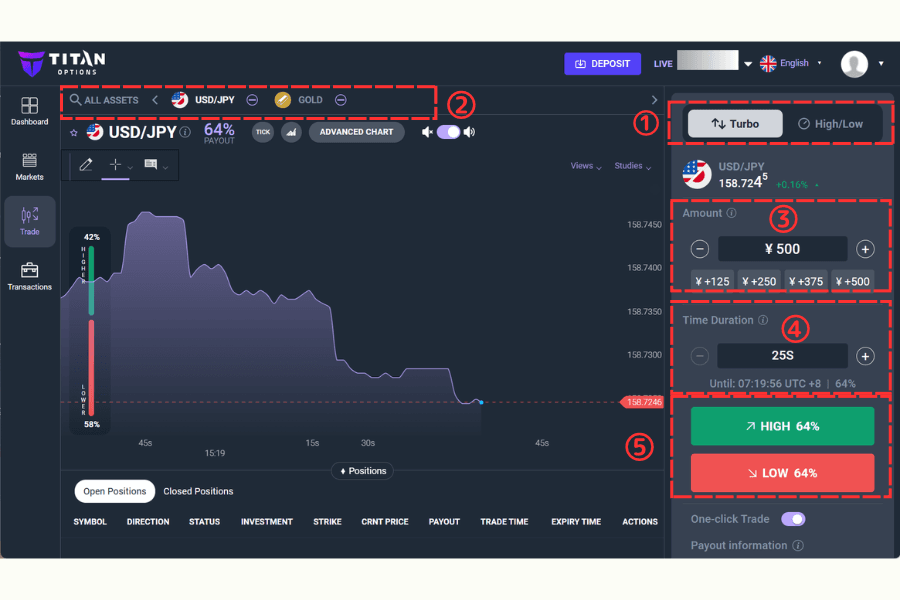
The trading screen shows a chart of the selected instrument on the left and the order panel on the right. Every trade follows the same steps:
-
① Choose a trading type: switch between "Turbo" and "High/Low" at the top of the panel
-
② Choose an instrument: for example USD/JPY, gold, or Bitcoin. The current payout rate appears next to the instrument name
-
③ Set the amount: this is the most you can lose on the trade
-
④ Set the duration: the field is called "Time Duration" in Turbo and "Trade Expiry" in High/Low. The expiry time and the payout rate for the trade are shown below it
-
⑤ Press "HIGH" or "LOW": predict whether the price will be above or below the entry price at expiry. Once the trade is confirmed, the amount is deducted from your account immediately and the trade cannot be changed
Below the order panel there is a "One-click Trade" switch. When it is on, pressing "HIGH" or "LOW" places the trade straight away, so check this setting before you start.
At expiry, the result is decided by the price on the Titan Options platform. If the price has moved in your chosen direction, you receive the payout shown when you placed the trade. If it has not, you lose the full trade amount, with no partial refund.
Say you trade $100, the platform shows a payout rate of 84%, and you choose "HIGH."
If the price at expiry is above the entry price: you get your $100 back plus a payout of 100 × 84% = $84, so $184 is credited to your account.
If the price at expiry is not above the entry price: you lose the full $100.
Actual payout rates vary by instrument, duration, and market conditions. Always check the figure shown on the platform when you trade.
3. Turbo vs High/Low Trading
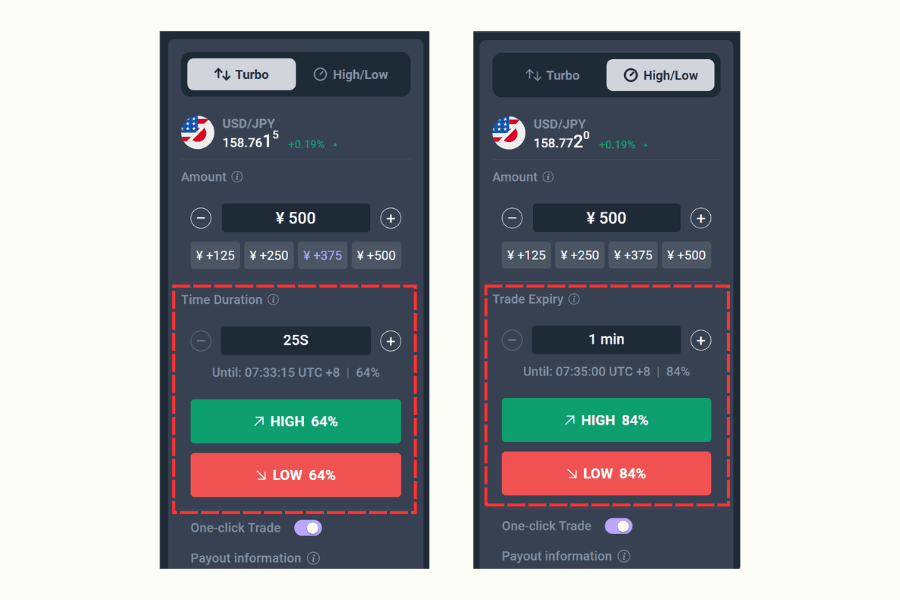
Titan Options offers two trading types. Both work the same way: you predict whether the price will be above or below the entry price at expiry. The differences are the duration and whether you can adjust the position before expiry.
| Item | Turbo | High/Low |
|---|---|---|
| Duration | Under 1 minute | 1 minute to 1 trading day |
| Sell Back | No | Yes |
| Double Up | No | Yes |
| Hedge | No | Yes |
Turbo Trading
Turbo durations are measured in seconds. As of November 2026, the trading screen offers 25 to 55 seconds, so every trade expires in under a minute. The durations shown on the trading screen are what count. The shorter the duration, the more short-term price noise decides the result, and once a Turbo trade is placed, you cannot close it early or adjust it.
Three High/Low Features
-
① Sell Back: closes a position before expiry. If the position is in profit, you receive less than the full payout you would get at expiry. If it is at a loss, selling back can reduce the loss. Sell Back is not available in the last 30 seconds before expiry
-
② Double Up: opens a second trade with the same parameters. The new trade opens at the current market price, which may differ from your original entry price. Doubling up increases the amount at stake in the same direction, and the new trade can also be lost in full
-
③ Hedge: opens a trade in the opposite direction on the same instrument. The amount and expiry can differ from the original trade, letting you manage exposure in both directions at once
4. Available Instruments
Titan Options covers five instrument categories, and the two trading types do not offer exactly the same instruments. Here is what the Titan FX website lists as of November 2026:
| Category | High/Low | Turbo |
|---|---|---|
| Forex | Majors and crosses | Some pairs + OTC |
| Crypto | Bitcoin, Ethereum, etc. | Same + OTC |
| Precious metals | Gold, silver | Gold, silver |
| Indices | Dow, S&P 500, etc. | VOL OTC only |
| Stocks | U.S. stocks | OTC only |
Turbo indices are limited to VOL 100 OTC through VOL 500 OTC, and Turbo stocks are OTC instruments only, such as Apple OTC and Tesla OTC. To trade indices like the Dow and S&P 500, or stocks like NVIDIA, use High/Low.
OTC instruments are separate products: "EURUSD" and "EURUSD OTC," for example, may reference similar assets, but they are distinct products with different characteristics, pricing methods, trading conditions, and price behavior. Before trading an OTC instrument, you can compare its price action with the regular instrument in Demo Mode.
The website list shows the range of instruments Titan Options can offer. What you can trade at any given moment is whatever appears in the instrument list on the trading screen, so you may see fewer instruments on the platform than on the website. Titan FX may also add, remove, or suspend instruments.
5. Titan Options vs CFDs
Titan Options and Titan FX CFDs (contracts for difference) are entirely different products, with different structures, pricing, and risks. Experience with CFDs does not mean you understand Titan Options.
| Item | Titan Options | CFDs |
|---|---|---|
| Maximum loss | Amount per trade | Depends on size and leverage |
| Margin | Not required | Required |
| Price feed | Separate feed | Liquidity providers |
| Holding period | Ends at expiry | Open until closed |
| Profit/loss | Fixed outcome at expiry | Changes with price |
| Stop-loss orders | Not available | Available |
| Platform | Titan Options platform | MT4, MT5 |
The prices are not linked: Titan Options prices come from an independent data source and have no connection to MT4 or MT5 CFD prices, so the two can differ noticeably at the same moment. Base your Titan Options decisions only on the Titan Options platform price. If you rely on CFD prices instead, you do so at your own risk.
6. Costs and Payouts
Titan Options has no spreads, commissions, or margin, and no swap or rollover fees. Every trade ends automatically at expiry.
-
Amount: the most you can lose on a trade, deducted from your account when the trade is confirmed. Minimum and maximum amounts vary by instrument and duration and are shown on the platform
-
Payout rate: the payout on a winning trade is a fixed percentage of the amount and varies by instrument, duration, and market conditions. A payout rate of 84% means the payout is 84% of your amount, and the amount itself is returned on top. The rate shown when you trade is the rate you receive, with no other fees deducted
-
Sell Back value: where the platform allows an early exit, you get back less than your original amount. The platform calculates this value from the remaining time and current price, and early exit is not guaranteed on every trade
The Payout Rate Sets Your Break-Even Win Rate
Because the payout on a win is smaller than the amount you risk, each loss costs more than each win earns. You can work out the win rate needed to break even like this:
Payout rate 84%: 1 ÷ 1.84 ≈ 54.3%
Payout rate 64%: 1 ÷ 1.64 ≈ 61.0%
On USD/JPY, checked on November 24, 2026, the High/Low payout rate was 84% and the Turbo rate was 64%. On the same instrument, Turbo needs a win rate about 7 percentage points higher. This figure is only the break-even point, so over the long run your win rate has to beat it to come out ahead. Payout rates change over time, so work out the required win rate from the current rate before you trade.
7. Risks to Understand Before Trading
Titan Options is a trading service designed for short-term price moves. Trading involves risk, and losses may occur. The risks set out in the Product Disclosure Statement (PDS) fall into four groups, and each one has something you can prepare for in advance:
-
Single-trade and cumulative losses: each trade can lose no more than its amount, so you know the worst case before you trade. Losses still add up over many trades. The Risk of Ruin Simulator also works for Titan Options: enter your actual win rate as the win rate, the payout rate as the payoff ratio (about 0.8 for 84%), and your amount per trade as a share of your account as the risk per trade. The result shows how losing streaks affect your balance, which helps you set limits per trade and per day
-
No changes after you trade: once a trade is confirmed, it cannot be changed, and you cannot set stop-loss or limit orders. Every trade ends at expiry regardless of market conditions. Sell Back is only available where the platform allows it and is never guaranteed, so decide your amount and duration before you trade
-
Pricing and platform: during sharp moves, thin liquidity, or system problems, prices may be affected, and Titan FX may suspend trading or freeze prices. If your connection or the platform is interrupted during a trade, the result is still decided by the platform price at expiry, so trade on a stable connection. Crypto prices are especially volatile and can move sharply in a short time
-
Trade structure: Titan FX is the counterparty to every trade. When you lose, Titan FX keeps the trade amount. When you win, Titan FX pays the payout. This is a structural conflict of interest, and the PDS discloses it explicitly. No compensation scheme or guarantee fund applies to Titan Options
Titan Options is not available to residents of Australia, Canada, Iran, North Korea, the United States, and certain other jurisdictions. Its tax treatment may also differ from that of CFDs.
8. How to Get Started
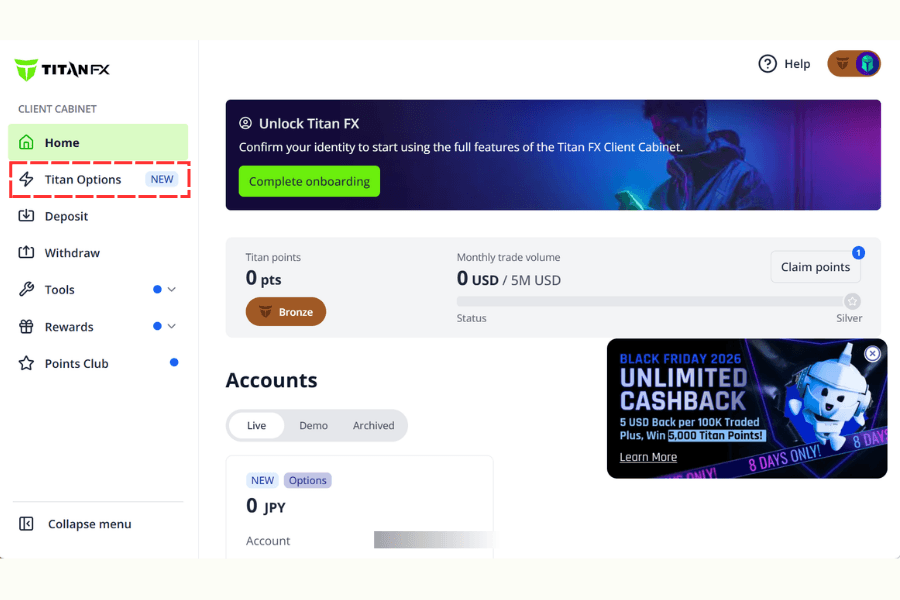
A Titan Options account is opened in the Client Cabinet as a sub-account under your existing client profile.
-
① Log in to the Client Cabinet: "Titan Options" appears in the left-hand menu
-
② Open a Titan Options account: open "Titan Options," read the PDS and complete the risk acknowledgement, then follow the on-screen steps. Each client can open one Titan Options account
-
③ Practice in Demo Mode: on the Titan Options trading screen, switch from Live Mode to Demo Mode to try the platform and the rules of both trading types with virtual funds
-
④ Deposit and start trading: you can deposit directly into your Titan Options account. Available deposit methods depend on your country or region, and you can check them in the Client Cabinet
Titan Options does not currently support external EAs or automated trading. After receiving a payout, you can request a withdrawal through the standard withdrawal review process.
Titan Options Details Open Titan Options9. FAQ
Q1: Are Titan Options the same as standard options?
No. Standard options involve paying a premium for the right to buy or sell at a strike price. Titan Options has no premium: you only predict whether the price will be above or below the entry price at expiry, and the outcome is either a fixed payout or the loss of the full trade amount.
Q2: Can I lose more than my trade amount?
A single trade can lose no more than its amount, and there are no margin calls. Losses can still add up across many trades.
Q3: Can I set a stop-loss?
No. Once a trade is confirmed, it cannot be changed, and stop-loss and limit orders are not available. In High/Low, you can use Sell Back where the platform allows it, except in the last 30 seconds before expiry. Turbo trades cannot be closed early.
Q4: Are Titan Options prices the same as on MT4 and MT5?
No. Titan Options uses an independent price feed that is not linked to MT4 or MT5 CFD prices. Always use the price on the Titan Options platform.
Q5: What fees does Titan Options charge?
There are no spreads, commissions, margin, or swaps. A winning trade pays out at the rate shown when you placed it, with no other fees deducted.
Q6: Can I practice with a demo first?
Yes. Switch from Live Mode to Demo Mode on the Titan Options trading screen to practice with virtual funds.
10. Summary
Titan Options is a fixed-term, fixed-amount derivative from Titan FX. You choose an instrument, a direction, and a duration. If you are right at expiry, you receive a fixed payout. If you are wrong, you lose the full trade amount. There is no margin and there are no spreads or commissions, but prices come from a separate feed, you cannot set a stop-loss after trading, and Titan FX is the counterparty to every trade.
Before trading, use Demo Mode to learn the rules of Turbo and High/Low, and work out the required win rate from the current payout rate. Each trade has a capped loss, but losses still add up over many trades, so set limits on both your amount per trade and your total amount in advance.
Further Reading
Titan FX Trading Strategy Lab. We produce educational content for investors covering FX, commodities (crude oil, precious metals, agricultural products), stock indices, U.S. equities, and cryptocurrencies.
Primary Sources (by Category)
- Titan FX materials: Titan FX "Titan Options" product page, Titan Options trading platform (November 2026), Product Disclosure Statement - Titan Options (updated June 2026)