
 Home
Home- User How to Use for MT4 (Windows Version)
- What Is MT4? Features, Pros & Cons, and MT5 Differences
What Is MT4 (MetaTrader 4)? A Complete Guide to Features, Pros & Cons, and MT5 Differences
MT4 (MetaTrader 4) is one of the most classic and widely used forex trading platforms in the world. Released by MetaQuotes in 2005, it is still widely used today for forex and contract for difference (CFD) trading.
Compared with the later MT5, MT4 is known for its simple operation, stable system, and abundant resources, making it especially suitable for traders who focus on the forex market. Whether for technical analysis, automated trading (EA), or everyday order placement, MT4 delivers a smooth and intuitive trading experience.
This article gives a complete introduction to what MT4 is, its main features and advantages, how to actually use it, and how it differs from MT5 — helping you quickly understand this classic trading platform.
1. What is MT4 (MetaTrader 4)?
MT4 (MetaTrader 4) is a classic trading platform released by MetaQuotes in 2005, used mainly for forex and contract for difference (CFD) trading. Thanks to its simple operation and stable system, it remains one of the most widely used platforms among traders worldwide.
Compared with MT5, MT4 has a more streamlined design, focused on the forex market and core trading functions. Whether for placing orders, technical analysis, or using EAs (automated trading programs), MT4 delivers a smooth and intuitive trading experience.
In addition, MT4 has a mature ecosystem, with a large library of technical indicators and EA resources built up in the market, allowing traders to quickly build and apply their own trading strategies.
For users who want to focus on forex trading and value stability and simple operation, MT4 remains a reliable and practical choice.
The development and history of MT4 (brief)
MT4 (MetaTrader 4) was released in 2005, originally designed for forex trading. With its simple operation, stable execution, and powerful technical analysis features, MT4 quickly became the mainstream platform for retail forex trading worldwide.
As the market evolved, MT4's MQL4 programming language attracted many traders to develop automated trading programs (EAs), gradually forming a mature trading ecosystem.
Even after MT5 was launched in 2013, MT4 continued to be adopted by many traders and brokers thanks to its stability and broad user base, and it remains one of the most representative trading platforms in the forex market today.
This is why, even though MT5 is more fully featured, MT4 still has a large base of loyal users.
2. Key advantages and features of MT4
Although MT4 has been around for a long time, its stability and mature ecosystem keep it one of the most popular platforms in forex trading. Below are MT4's core advantages and main features.
Advantage 1: Simple to use, easy for beginners
MT4's interface is designed to be intuitive, with functions concentrated on the trading core, so even beginners can quickly get familiar with the workflow.
From placing orders and setting stop-loss/take-profit levels to viewing charts, everything is easy to do.
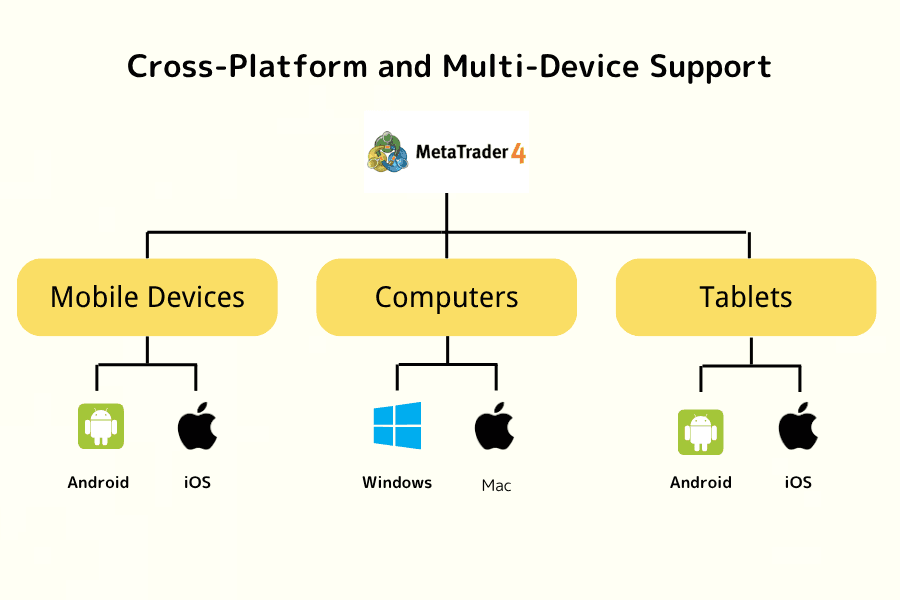
In addition, MT4 supports Windows, Mac, iOS, Android, and other devices, letting traders trade anytime, anywhere.
Advantage 2: Stable system with high execution efficiency
MT4 has been proven in the market for many years. It runs stably and uses few resources, so it works smoothly even on older devices.
It is especially suitable for running the platform for long periods or trading with EAs.
Advantage 3: Focused on forex trading, with good efficiency
MT4 is mainly designed for the forex market and offers high efficiency in quote processing and order execution. For users who focus on forex trading, it is a very mature and reliable platform.
Advantage 4: Mature EA (automated trading) ecosystem
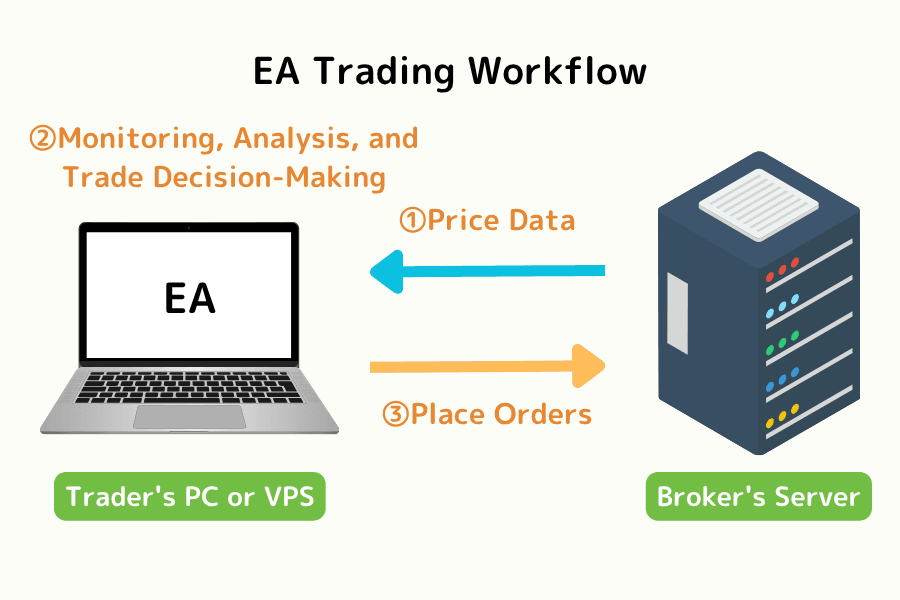
One of MT4's biggest strengths is its complete EA ecosystem. There are already large numbers of automated trading programs and indicators developed with MQL4 in the market, which traders can use directly or develop themselves.
In addition, with the backtesting feature, you can validate strategy performance and optimize parameters to improve trading efficiency.
Related reading: What is an EA? — About automated trading on MT4 and MT5
Advantage 5: Supports fast order placement and order management on the chart
MT4 lets you trade directly on the chart, including one-click order placement and dragging to modify stop-loss and take-profit prices. Traders can execute trades quickly while analyzing the market, without missing opportunities.
Related reading:
- MT4 (Windows): How to modify and cancel pending orders (limit / stop orders)
- MT4 (Windows): How to modify the stop-loss and take-profit prices of open positions
Advantage 6: Complete technical analysis tools
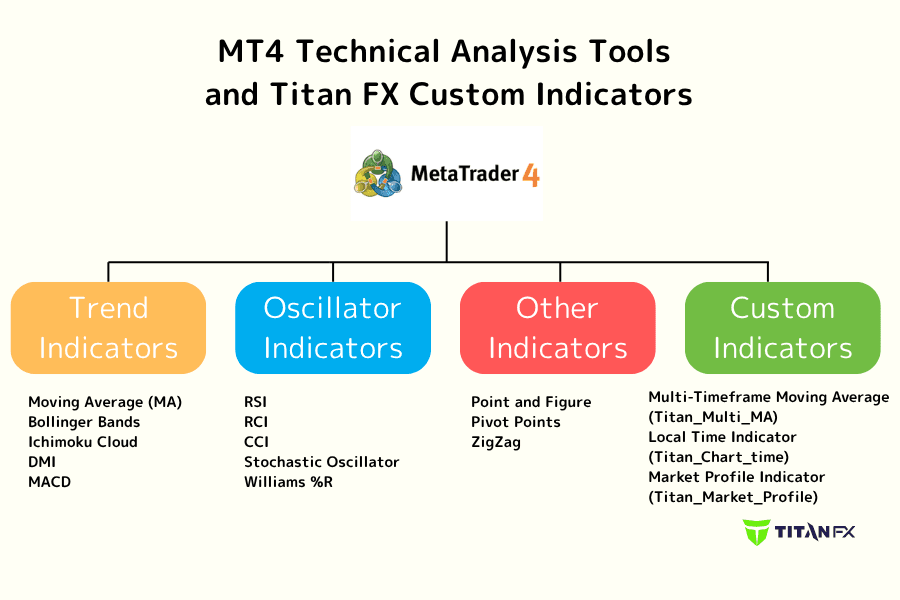
MT4 comes with a variety of built-in technical indicators and drawing tools that can be used for trend analysis and trading decisions.
You can also install custom indicators (such as the dedicated indicators offered by Titan FX) to further strengthen your analysis.
Related reading: List of free MT4-exclusive indicators
Advantage 7: Supports EA backtesting (strategy validation)
MT4 provides a strategy backtesting feature, so traders can use historical data to test EA performance and assess whether a strategy has potential profitability.
Through backtesting and parameter optimization, you can validate a strategy before trading for real, improving trading stability and risk control.
Related reading: MT4 (Windows) backtesting: parameter settings, optimization, and report download
Advantage 8: Free to use with abundant resources
The MT4 platform itself is completely free; you only need to open an account with a broker to use all of its features.
Because it has such a long history of use, there are vast amounts of tutorials, EAs, and strategy resources online, so the learning curve is relatively low.
3. Differences between MT4 and MT5 (full comparison)
MT4 (MetaTrader 4) and MT5 (MetaTrader 5) are both developed by MetaQuotes and are currently the most mainstream trading platforms. However, the two differ clearly in their positioning and target users.
Below is a summary of the core differences between MT4 and MT5 to help you quickly understand which platform suits you better.
| Feature | MT4 (MetaTrader 4) | MT5 (MetaTrader 5) |
|---|---|---|
| Release date | 2005 | 2010 |
| Tradable products | Forex, CFD | Forex, CFD, stocks, futures, etc. |
| Interface | Simple and intuitive | More features |
| Timeframes | 9 | 21 |
| Pending order types | 4 | 6 |
| Technical indicators | About 30 | About 38 |
| EA language | MQL4 | MQL5 (multi-threaded) |
| Backtesting | Single-threaded | Multi-threaded, multi-currency |
| Target users | Forex traders, beginners, EA users | Multi-asset traders, advanced traders |
MT4 vs MT5: which should you choose?
Overall, it is not a question of which of MT4 and MT5 is "better," but rather which suits traders with different needs.
| Type | Traders suited to MT4 | Traders suited to MT5 |
|---|---|---|
| Trading market | Focus on forex or CFD trading | Want to trade multiple assets such as stocks, indices, and crypto |
| Operation needs | Prefer a simple, stable platform | Need more features and analysis tools |
| EA use | Use existing EAs or mature strategies | Develop advanced strategies or backtest across multiple markets |
| Experience | Beginners or traders used to MT4 | Advanced traders |
Summary: the difference in positioning between MT4 and MT5
MT4's strength lies in "simplicity and stability," making it especially suitable for users who focus on forex trading and use mature EA strategies.
MT5, on the other hand, is more complete in features and extensibility, suiting traders who need multi-asset trading and advanced analysis tools.
If you mainly trade forex and value stability, MT4 is still a very practical choice; if you want to use more features and expand your trading markets, you can consider MT5.
4. MT4 guide: from beginner to advanced
In addition to basic trading functions, MT4 (MetaTrader 4) offers complete support for technical analysis and automated trading. Below, we walk through MT4's core operations step by step, from beginner to intermediate to advanced.
Beginner: MT4 basic operations and interface overview
The beginner section introduces MT4's basic operations, including the platform interface and the use of common technical analysis tools. Whether you use Windows, iOS, or Android, the logic of the MT4 interface is fairly consistent, so it is easy to pick up.
Basic interface layout of MT4 for Windows
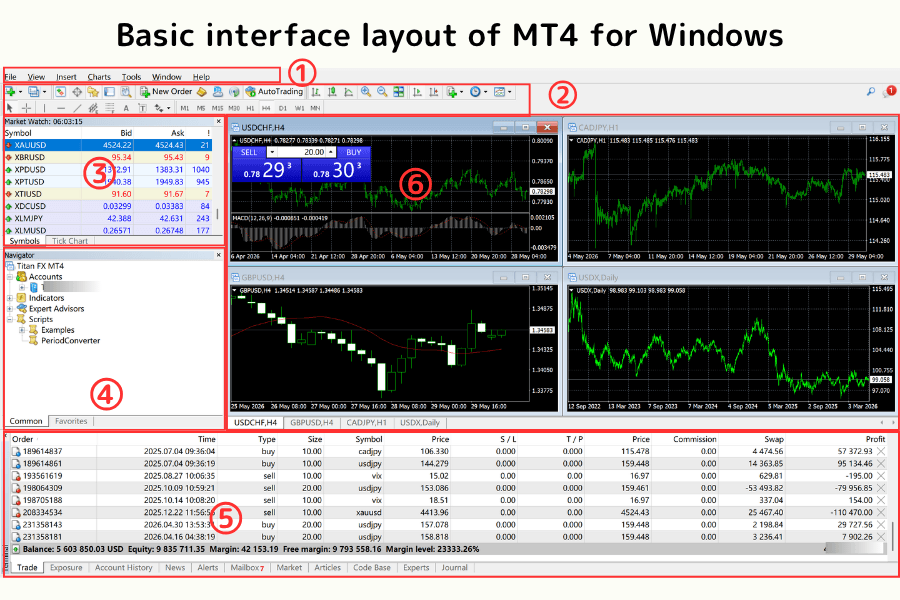
The Windows version of MT4 offers full features, including chart analysis, technical indicators, and trade execution. The main interface includes: (1) menu bar, (2) toolbar, (3) Market Watch, (4) Navigator, (5) Terminal, and (6) chart.
Related reading: Detailed overview of the MT4 interface for Windows
Basic interface layout of MT4 for iOS (iPhone / iPad)
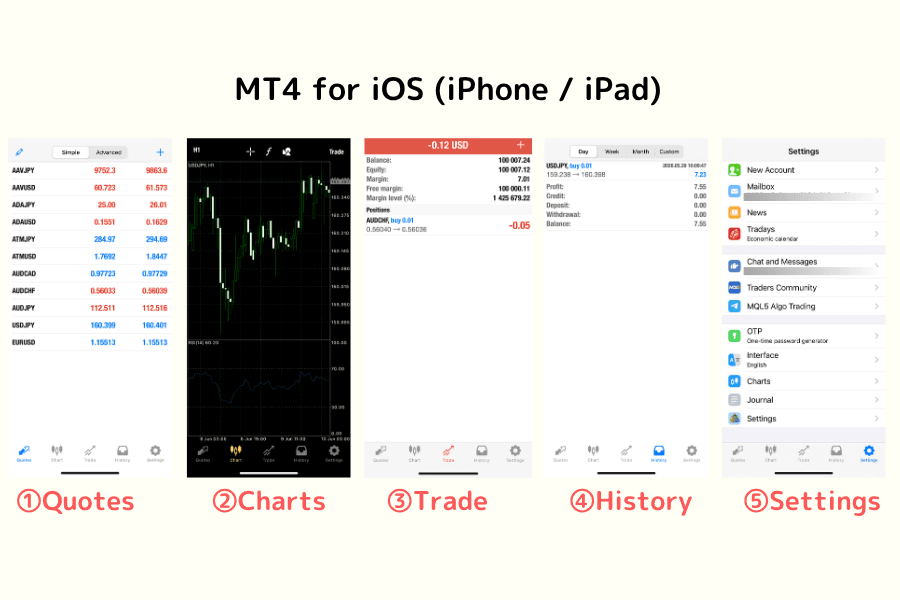
The iOS version provides mobile trading features, letting you check quotes, switch charts, and place orders quickly. The main interface includes: (1) Quotes, (2) Charts, (3) Trade, (4) History, and (5) Settings.
Related reading: Detailed overview of the MT4 interface for iOS
Basic interface layout of MT4 for Android
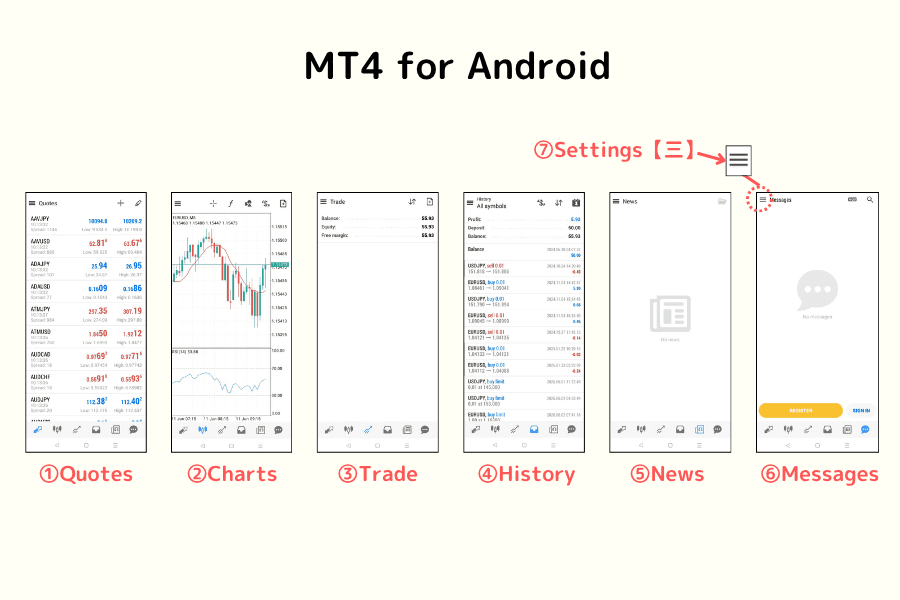
The Android version of MT4 provides real-time quotes and technical analysis features. The main interface includes: (1) Quotes, (2) Charts, (3) Trade, (4) History, (5) News, (6) Mailbox, and (7) Settings.
Related reading: Detailed overview of the MT4 interface for Android
Technical indicators available in MT4
MT4 comes with a variety of built-in technical indicators, including:
- Trend indicators (Moving Average)
- Oscillators (MACD, RSI)
- Momentum and volume indicators
Traders can freely add and adjust them on the chart as needed to perform complete technical analysis.
Intermediate: MT4 technical indicators and custom tools
At the intermediate stage, users can improve the accuracy of their analysis by installing custom indicators.
Download indicators from the official MQL site
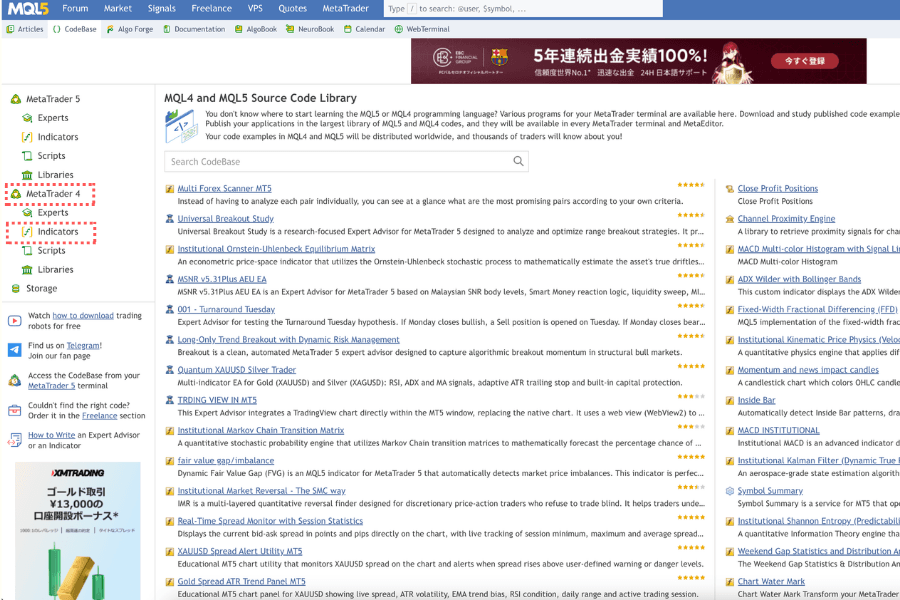
The official MQL site offers a large number of free and paid indicators that traders can download and use as needed.
Use Titan FX custom indicators
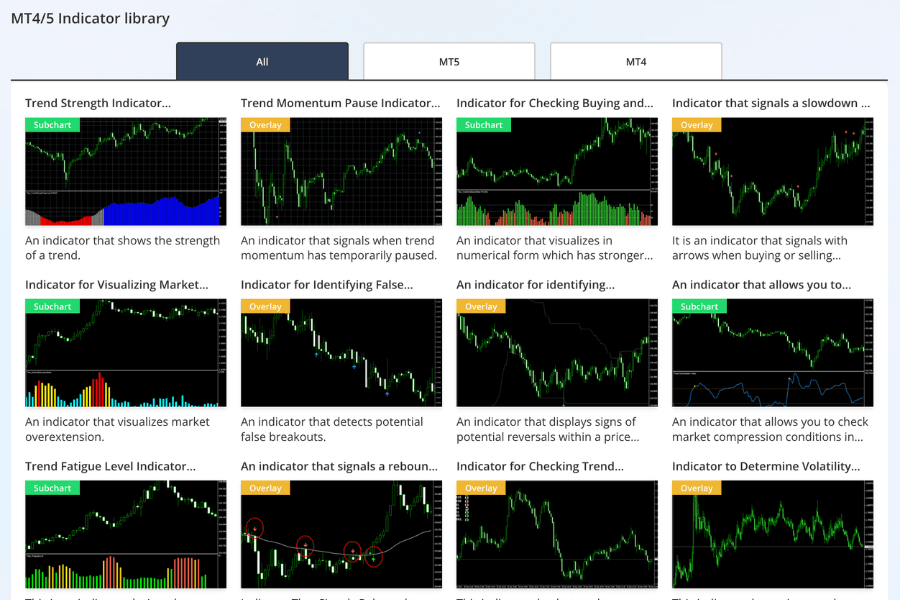
Titan FX offers several free custom indicators, such as multi-timeframe moving averages and Bollinger Band extension indicators, to help traders carry out more precise market analysis.
View all Titan FX custom indicatorsAdvanced: MT4 EA automated trading and strategy application
At the advanced stage, traders can automate strategies through EAs (automated trading programs) to improve trading efficiency and reduce the impact of emotions.
What is an EA (automated trading)?
An EA (Expert Advisor) is a program that can automatically execute trades on MT4, performing market analysis, order placement, and risk management based on preset conditions.
This approach is especially suitable for:
- Traders who cannot watch the charts for long periods
- Users who need to execute strategies consistently
Titan FX offers free EA tools
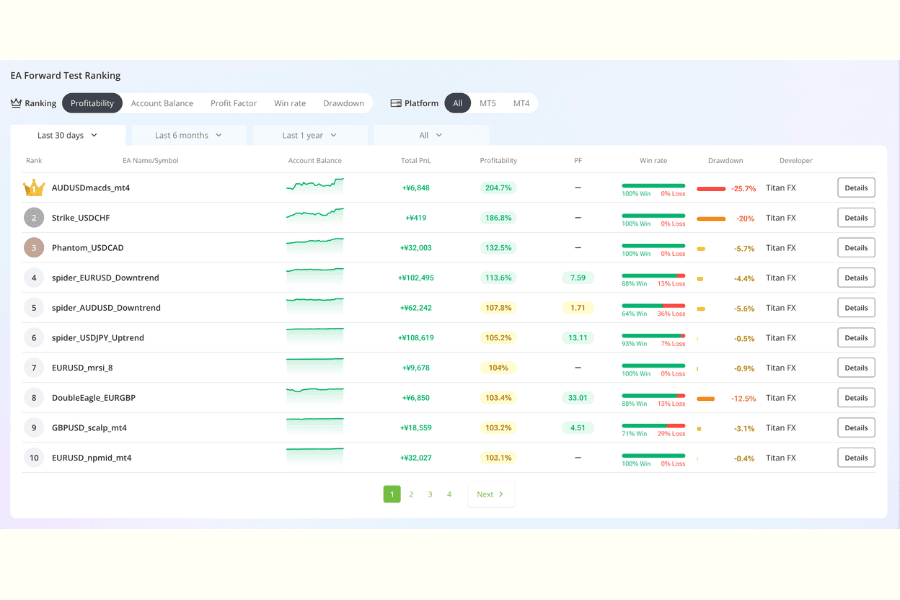
Titan FX offers several free EAs covering different trading strategies and market scenarios; users only need to open an account to download and use them.
With these EAs, traders can quickly adopt mature strategies without developing their own, greatly lowering the barrier to entry.
How to start using an EA? (quick steps)
| Step | Description |
|---|---|
| Step 1: Choose an EA | Select a suitable EA from the MQL site or Titan FX |
| Step 2: Install the EA | Place the EA in MT4's Experts folder |
| Step 3: Backtest to validate | Use the Strategy Tester to check the strategy's performance |
| Step 4: Enable trading | Apply the EA to a chart and turn on automated trading |
5. Advantages of the MT4 platform offered by Titan FX
Beyond MT4's own stability and ease of use, choosing the right broker is equally important.
As a well-known forex broker, Titan FX combines the MT4 platform with several trading advantages to make the trading experience more complete.
Advantage 1: Free custom indicators and EA tools
Titan FX offers several proprietary technical indicators and EAs (automated trading programs) that users can download and install for free.
These tools cover different trading strategies and market scenarios, helping traders quickly build an analysis system and improve trading efficiency.
Related reading: List of free MT4 indicators
Advantage 2: Low spreads and fast execution
Titan FX provides a competitive low-spread environment combined with a high-speed order execution mechanism, so traders can maintain good execution quality even in volatile markets.
This is especially important for short-term trading and EA strategies.
Advantage 3: Multi-platform support
Through Titan FX, users can use MT4 on Windows, Mac, iOS, Android, and other devices, trading and monitoring the market anytime, anywhere.
Advantage 4: Free demo account
Titan FX offers an MT4 demo account, allowing beginners to get familiar with the platform in a risk-free environment, and making it convenient to test strategies and validate EAs.
Related reading: How to open an MT4 demo account
Advantage 5: Stable trading environment and professional support
Titan FX provides a stable trading infrastructure and professional customer support, helping traders solve problems and improve trading efficiency while using MT4.
6. How to start trading with MT4?
If you want to start trading with MT4, you can get going quickly by following these simple steps.
| Step | Description |
|---|---|
| Step 1: Open an account | Open a real or demo account with a broker that supports MT4 (such as Titan FX) |
| Step 2: Fund the account | Deposit via credit card or another method to start trading |
| Step 3: Download and log in to MT4 | Install MT4, log in to your account, and select the corresponding server |
| Step 4: Start trading | Choose a product (such as forex, gold, or oil) and place an order |
| Step 5: Install indicators and EAs | Install Titan FX's custom indicators and EAs to improve trading efficiency |
Further guides
- How to download, install, and log in to MT4
- How to place and close orders on MT4
- How to install indicators and EAs on MT4
7. MT4 frequently asked questions (FAQ)
Below are some of the most common questions and answers traders have when using MT4.
Q1: Is MT4 safe? Could it be a scam?
MT4 itself is a trading platform software developed by MetaQuotes; it is not a scam tool.
In forex or CFD trading, the party that actually handles your funds is the "broker (dealer)," not the MT4 platform itself.
The trading flow is usually:
- Open a broker account → log in with MT4 → deposit → trade
So the key to safety is "choosing a legitimate and reliable broker," not MT4 itself.
Related reading: How to spot common MT4/MT5 platform scams
Q2: Which languages does MT4 support?
MT4 supports many languages, including English, Traditional Chinese, Simplified Chinese, and more, serving traders in different regions around the world.
Users can switch languages as needed to improve usability and readability.
Related reading:
- MT4 (Windows): How to change the language
- MT4 (Android): How to switch the language
- MT4 (iOS): How to switch the language
Q3: Can MT4 manage multiple accounts at the same time?
Yes. MT4 supports multi-account management, letting users switch quickly between different trading accounts.
This is very useful for traders who want to diversify risk, use different strategies, or carry out money management.
In addition, MT4 provides trading reports and history features, making it easy to track the performance of each account.
Related reading: How to switch accounts on MT4
Q4: Is MT4 free to use?
Yes, MT4 itself is a free trading platform.
As long as you open an account with a broker that supports MT4, you can download and use all the basic features, including technical analysis tools and EA trading.
Q5: Can MT4 use automated trading (EA)?
Yes. MT4 supports EAs (automated trading programs), which can trade automatically according to a preset strategy.
Traders can use ready-made EAs, or develop their own strategies with the MQL language and validate and optimize them with the backtesting feature.
8. Conclusion
As a classic forex trading platform, MT4 (MetaTrader 4) is still used by large numbers of traders worldwide today, thanks to advantages such as "simple operation, a stable system, and a mature EA ecosystem."
For users who focus on forex trading, want to use automated trading (EA), or prefer a clean operating interface, MT4 remains a very practical and reliable choice.
Through this article, you have learned about MT4's core features and operation, as well as how it differs from MT5, and have grasped how to use it from beginner to advanced levels.
If you want to experience MT4 trading firsthand, you can open an account on a platform that supports MT4 (such as Titan FX) and combine it with free indicators and EA tools to build a more complete trading system.
Whether you are a beginner getting started or an advanced trader running strategies, MT4 is a trading platform worth using over the long term.
Further Reading