

Limit Order: Definition, Benefits, and How to Use It
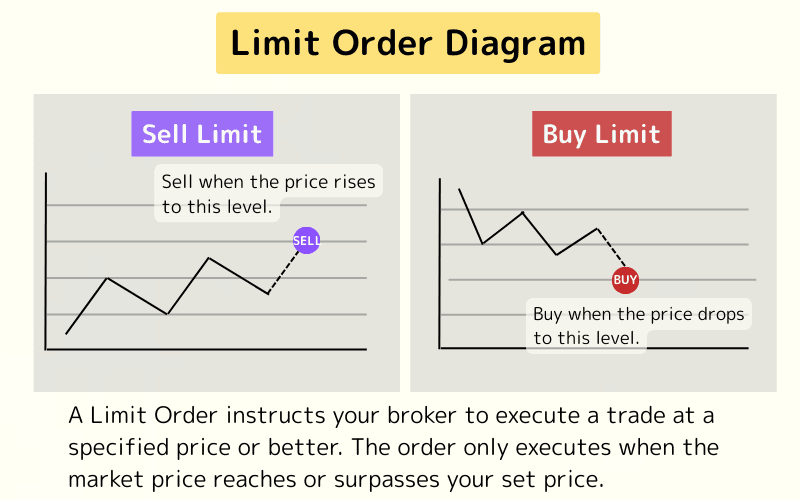
"I’d buy if it drops to this level," or "I’d sell once it climbs to here" — a limit order lets you reserve exactly that target price in advance. Because it executes automatically at your chosen level, you don’t have to watch the chart all day, which is why so many traders rely on it.
This article explains the concept of Limit Orders, compares them with Stop Orders, outlines their advantages and disadvantages, and provides a step-by-step guide to placing them on MT4/MT5 platforms. Whether you're a beginner or an experienced trader, this guide will help you use Limit Orders effectively.
- Definition: A pending order to trade at a set price or better
- Buy vs. sell: A buy limit sits below price; a sell limit sits above it
- vs. stop order: Limits trigger at a favorable price; stops at an unfavorable one
- Benefits: Automatic fills at your target price; price control and automation
- Drawbacks: It won’t fill until price is reached, and may take time
1. What Is a Limit Order?
1-1. Concept of Limit Orders
A Limit Order instructs your broker to execute a trade at a specified price or better. The order only executes when the market price reaches or surpasses your set price. This allows traders to place orders in advance and enter the market automatically at their target price, ensuring precise control over entry points.
Limit Orders emphasize price control, enabling traders to go long or short at desired levels rather than accepting the current market price. They are ideal for traders with strategic goals, such as entering at support for long positions or resistance for short positions, optimizing risk-reward ratios.
1-2. Types of Limit Orders
Limit Orders are divided into two types, both used for opening new positions:
- Buy Limit: Set at a price below the current market price, anticipating a price drop followed by a rebound.
- Sell Limit: Set at a price above the current market price, expecting a price rise followed by a decline.
2. Limit Orders vs. Stop Orders
To clarify how Limit Orders differ from Stop Orders when opening positions, the table below compares their price conditions, execution logic, and common applications:
| Order Type | Price Condition | Execution Logic | Common Applications |
|---|---|---|---|
| Buy Limit | Below current price | Buy when price falls to set level | Support rebounds, buying low |
| Sell Limit | Above current price | Sell when price rises to set level | Resistance pullbacks, selling high |
| Buy Stop | Above current price | Buy when price breaks above set level | Breakout buying, chasing upward momentum |
| Sell Stop | Below current price | Sell when price breaks below set level | Breakout selling, chasing downward momentum |
Examples of Limit and Stop Orders
The following examples illustrate how these orders work in different market scenarios, assuming EUR/USD is at 1.1000:
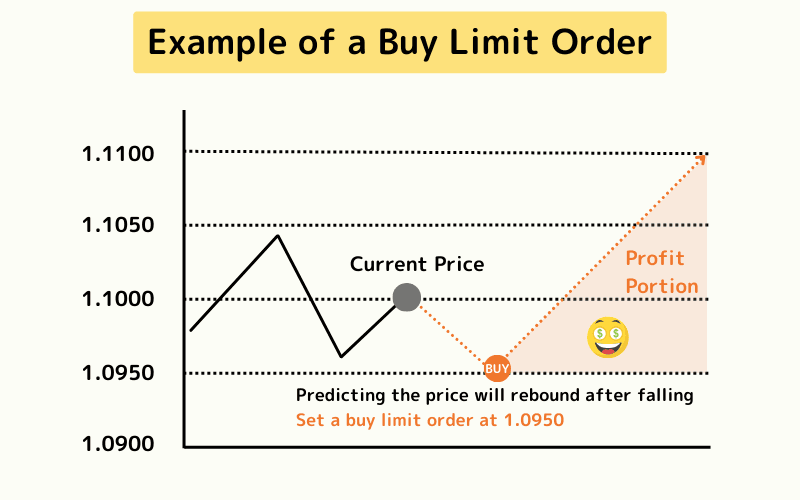
Buy Limit Order (Buying Low)
You predict the price will drop to 1.0950 and rebound. Set a Buy Limit at 1.0950. When the price hits this level, the order executes automatically, entering at a lower price for potential gains as the market rises.
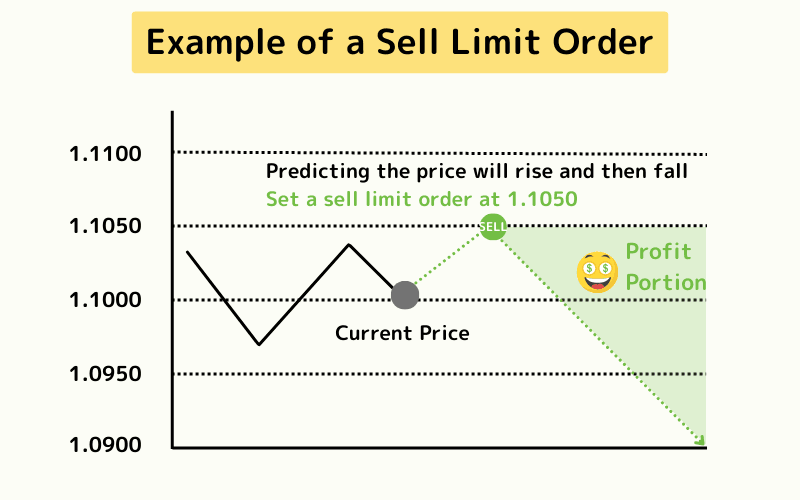
Sell Limit Order (Selling High)
You expect the price to rise to 1.1050 and then fall. Set a Sell Limit at 1.1050. When the price reaches this level, the order sells automatically, entering a short position at a favorable price for profits as the market declines.
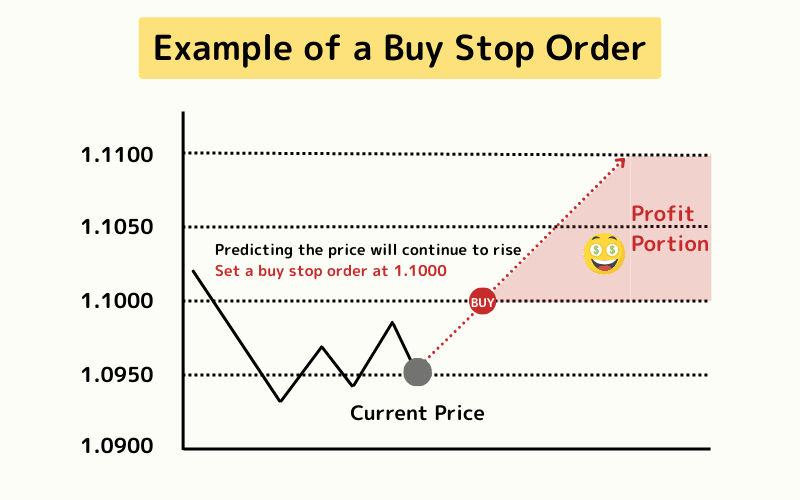
Buy Stop Order (Chasing Breakouts)
You anticipate a breakout above 1.1000 with continued upward momentum. Set a Buy Stop at 1.1000. When the price breaks this level, the order triggers, entering a long position to capture the upward trend.
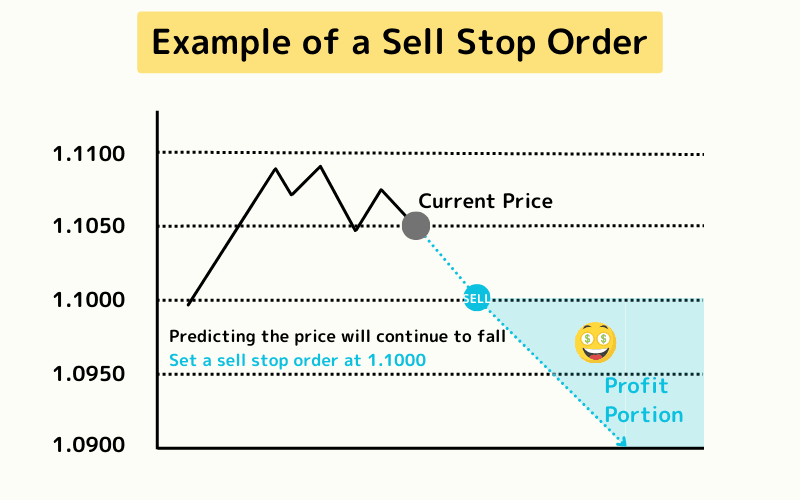
Sell Stop Order (Chasing Downtrends)
You predict a breakdown below 1.1000 with further declines. Set a Sell Stop at 1.1000. When the price falls below this level, the order executes, entering a short position to profit from the downtrend.
3. Advantages of Limit Orders
Limit Orders offer several benefits, especially for traders with clear price targets:
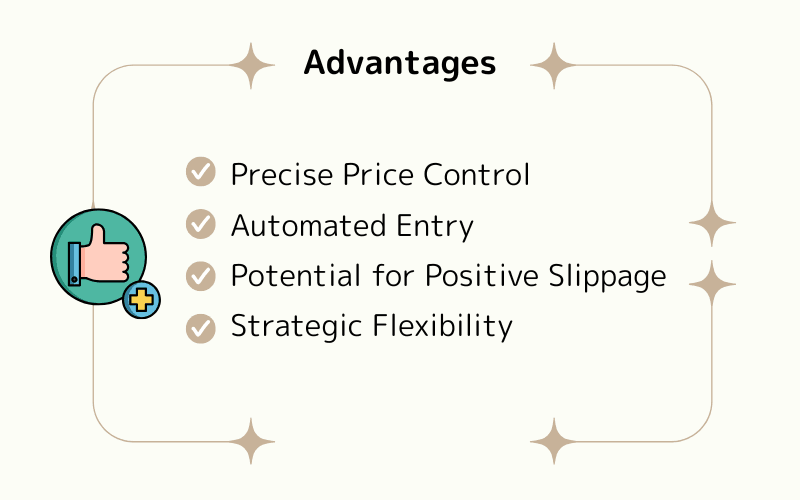
Advantage 1: Precise Price Control
Limit Orders ensure entry at a specified or better price, avoiding unfavorable entries due to market volatility. For example, setting a Buy Limit at EUR/USD 1.0700 allows precise entry at a support level, aligning with your strategy.
Advantage 2: Automated Entry
Once set, Limit Orders execute automatically when the price reaches the target, ideal for busy traders or those managing multiple assets. This frees you to focus on strategy rather than monitoring the market.
Advantage 3: Potential for Positive Slippage
In fast-moving markets, Limit Orders may execute at a better price than set, increasing potential profits. For instance, a Buy Limit at EUR/USD 1.0700 might fill at 1.0695 due to rapid price drops.
Advantage 4: Strategic Flexibility
Limit Orders suit counter-trend trading and support/resistance strategies, enabling precise entries with technical analysis. For example, a Sell Limit at a resistance level supports shorting opportunities.
4. Disadvantages of Limit Orders
Despite their benefits, Limit Orders have limitations that traders should manage carefully:
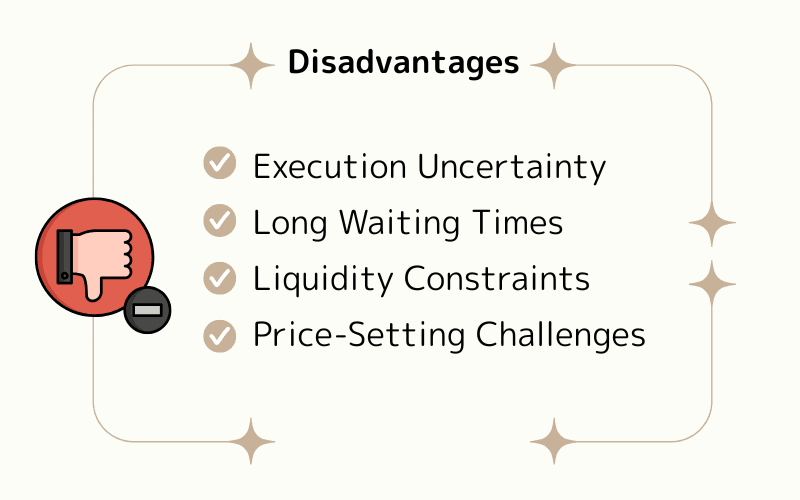
Disadvantage 1: Execution Uncertainty
If the market price doesn’t reach the set level, the order may never execute, causing missed opportunities. For example, a Sell Limit at EUR/USD 1.1100 may remain unfilled if the price peaks at 1.1090 and falls.
Disadvantage 2: Long Waiting Times
Limit Orders require the price to hit the target level, which may not suit short-term traders seeking quick entries. This can delay strategy execution.
Disadvantage 3: Liquidity Constraints
During low-liquidity periods (e.g., Asian session, 5:00–6:00 UTC+8 / 4:00–5:00 PM EST), Limit Orders may struggle to fill due to insufficient counterparties, reducing execution efficiency. However, this is rare in the forex market.
Disadvantage 4: Price-Setting Challenges
Setting prices requires technical analysis, and overly optimistic targets may prevent execution. For instance, a Limit Order far from the current price may remain pending indefinitely.
To mitigate risks, use support/resistance levels or candlestick patterns for price targets and regularly review order status.
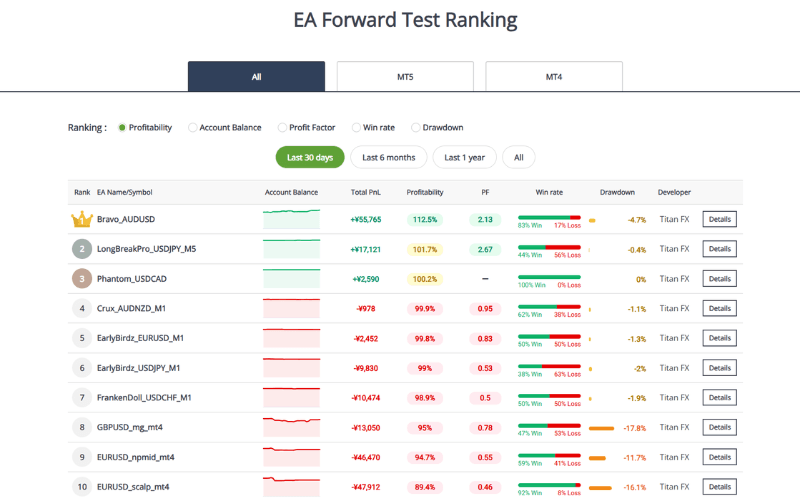
To boost efficiency and reduce monitoring, Titan FX offers dozens of free Expert Advisors (EAs) that automate trading based on preset strategies, enabling 24/7 intelligent trading.
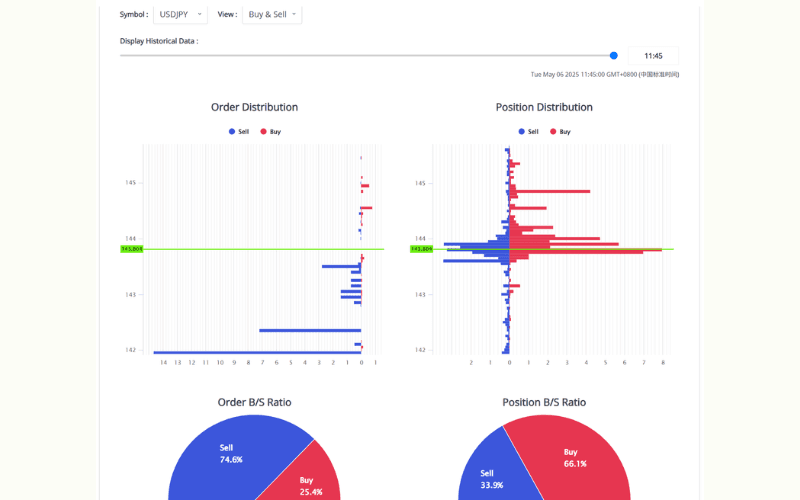
Additionally, use Titan FX’s proprietary tools, such as the Order and Position Visualization Tool, to track Limit Orders and positions:
Learn More About Titan FX Order and Position Tools
5. How to Place Limit Orders on MT4/MT5 Platforms
Limit Orders can be easily set up on MetaTrader 4 (MT4) or MetaTrader 5 (MT5) for opening new positions.
Below is a step-by-step guide using MetaTrader 5 (MT5):
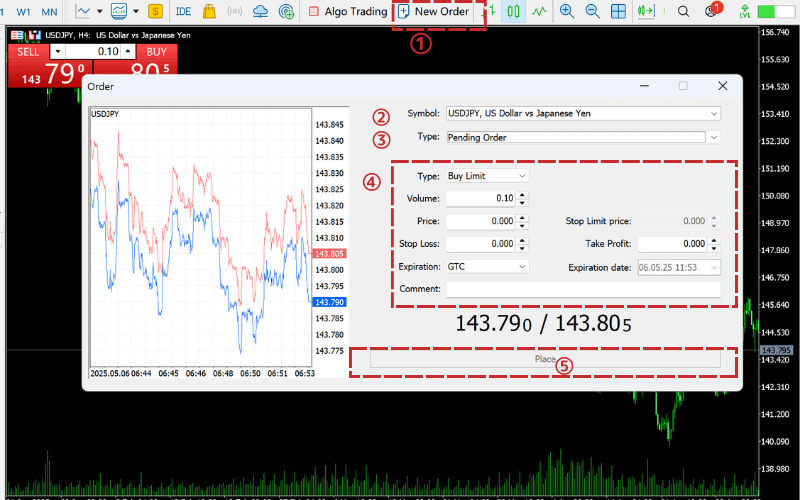
- ① Open MT5 and click “New Order.”
- ② Select the trading instrument (e.g., USD/JPY).
- ③ Choose “Pending Order.”
- ④ Select “Buy Limit” or “Sell Limit,” then enter the target price and volume (e.g., 0.1 lots).
- ⑤ Optionally set stop-loss or take-profit levels, then click “Place” to submit the order.
Example: USD/JPY is at 150.00, and you predict 149.00 as a support level. Set a Buy Limit at 149.00, and the order will execute automatically when the price reaches this level.
MT4 Order Tutorial MT5 Order TutorialTrade Forex CFDs with Titan FX
Titan FX offers 50+ currency pair CFDs on MT4/MT5 with up to 1,000:1 leverage on major pairs, tight spreads, and the flexibility to go long or short. Micro accounts can reach up to 2,000:1 leverage when eligible.
6. Frequently Asked Questions About Limit Orders
Q1: How Do Limit Orders Differ from Stop Orders and Market Orders?
These order types vary in execution timing and price control:
| Feature | Market Order | Limit Order | Stop Order |
|---|---|---|---|
| Execution Timing | Immediate execution | Executes when price hits preset level | Triggers when price breaks preset level |
| Price Control | None | Specifies ideal price | Sets trigger price, but execution price may vary |
| Slippage Risk | Possible | Minimal | Possible |
| Applicable Strategies | Quick entry | Buying low, selling high | Breakout trading, trend-following |
In Summary:
- Limit Order: Aims for better prices (buy low, sell high).
- Stop Order: Chases price continuation (buy on breakout, sell on breakdown).
- Market Order: Prioritizes speed, but risks slippage.
Q2: Who Are Limit Orders Suitable For?
Limit Orders are ideal for:
- Traders sensitive to entry prices.
- Those using support/resistance strategies or candlestick patterns.
- Swing traders or users of automated systems willing to wait for target prices.
Q3: What If a Limit Order Doesn’t Execute? Can It Be Modified?
Yes, unexecuted Limit Orders can be modified or canceled at any time. Adjust the price or delete the order as needed.
Q4: What Advanced Tools Can Enhance Limit Orders?
Titan FX offers tools to optimize Limit Order usage:
Expert Advisors (EAs)
Automate Limit Order placement and execution based on predefined strategies, supporting 24/7 trading.
Order and Position Visualization Tool
Displays Limit Orders and open positions on charts, helping traders manage layouts and risk.
Learn About Titan FX Order and Position Tools
These tools benefit traders of all levels, from beginners to those managing multiple positions, enhancing efficiency and precision.
Q5: What Are Advanced Variations of Limit Orders?
Beyond standard Limit Orders, consider these derivatives:
- Stop Limit Order: Executes at a specified price after a trigger.
- OCO (One Cancels the Other): Places simultaneous buy and sell orders; one executes, the other cancels.
- IFD (If Done): Links an entry order with an exit order for automated strategies.
Learn More: MT5/MT4 Pending Order Types and Tips
7. Conclusion
Limit Orders enable traders to enter positions at ideal prices, making them perfect for counter-trend or support/resistance strategies. They offer price control and automation but require patience due to potential execution delays.
For best results, set prices using technical analysis and leverage Titan FX’s MT4/MT5 platforms alongside tools like the Economic Calendar. With discipline and planning, Limit Orders can significantly enhance trading performance.
Further Reading
Titan FX Trade Strategy Research Lab covers forex (FX), commodities (oil, precious metals, agricultural products), stock indices, U.S. equities, and crypto assets — producing educational content for retail investors across asset classes.
Primary Sources (by Category)
- Reference: Investopedia — Limit Order
- Platform: MetaQuotes — MT4 / MT5