

What Is MT5 (MetaTrader 5)? A Complete Guide to Features, Pros & Cons, and MT4 Differences
MT5 (MetaTrader 5) is a multi-asset trading platform from MetaQuotes that lets you trade forex, indices, crypto, and more with advanced charting and automated trading (EAs).
From forex (FX) trading to contracts for difference (CFDs), stocks, futures, options, and commodities, MT5 brings a wide range of markets together in a single interface — so traders no longer have to switch between separate platforms.
Compared with the previous-generation platform, MT5 has improved significantly in functionality, speed, and flexibility, meeting the needs of everyone from beginners to professional traders. Whether you are doing technical analysis, automated trading, or trading multiple markets at once, MT5 delivers more powerful tools and a better trading experience.
- MT5 is MetaQuotes’ multi-asset trading platform
- Trade forex, indices, crypto, and more in one environment
- More timeframes, order types, and indicators than MT4, and faster
- Verify strategies with EAs and the Strategy Tester
- Runs on Win/Mac/iOS/Android; the platform itself is free
1. What Is MT5 (MetaTrader 5)?
MT5 is a new-generation trading platform released by MetaQuotes in 2010, designed for the modern multi-asset trading environment.
Compared with MT4, MT5 fully retains the powerful charting analysis and automated trading (EA) features while delivering major upgrades in several key areas.
MT5's biggest strength is its multi-asset capability. On a single platform, traders can trade forex, CFDs, stocks, indices, futures, energy, precious metals, and more, without switching between different software.
In addition, MT5 uses 64-bit multi-core processing technology for faster execution and greater stability, and it supports Depth of Market, more timeframes, and more order types, allowing traders to capture market opportunities more precisely.
Next, let's take a detailed look at MT5's main advantages and how it specifically differs from MT4.
2. The 11 Key Features and Benefits of MT5
Compared with the previous-generation platform, MT5 has greatly improved in functionality, speed, and flexibility, and has become the platform of choice for many forex and CFD traders. Below we summarize MT5's 11 core advantages to help you quickly understand why more and more traders are switching to MT5.
Benefit 1: A True Multi-Asset Trading Platform
MT5 breaks free from single-market limitations, supporting a wide range of asset types including forex, stocks, indices, futures, commodities, and crypto. This lets you trade across markets on the same platform, greatly improving trading efficiency.
Trading products Titan FX offers on the MT5 platform:
| Product Category | Number of Products | Examples |
|---|---|---|
| FX Currency Pairs | About 60 | USD/JPY (US Dollar / Japanese Yen), EUR/USD (Euro / US Dollar), etc. |
| Precious Metal CFDs | 11 | XAU/USD (Gold), XAG/USD (Silver), etc. |
| Energy CFDs | 4 | XTI/USD (US Crude Oil), XBR/USD (Brent Crude), XNG/USD (Natural Gas), etc. |
| Soft Commodity CFDs | 11 | Corn, Wheat, etc. |
| Stock Index CFDs | 25 | US500 (S&P 500), NAS100 (Nasdaq 100), etc. |
| Single-Stock CFDs | About 110 | US stocks |
| Crypto CFDs | 48 | BTC/USD (Bitcoin), ETH/USD (Ethereum), etc. |
Benefit 2: Rich Technical Analysis Tools
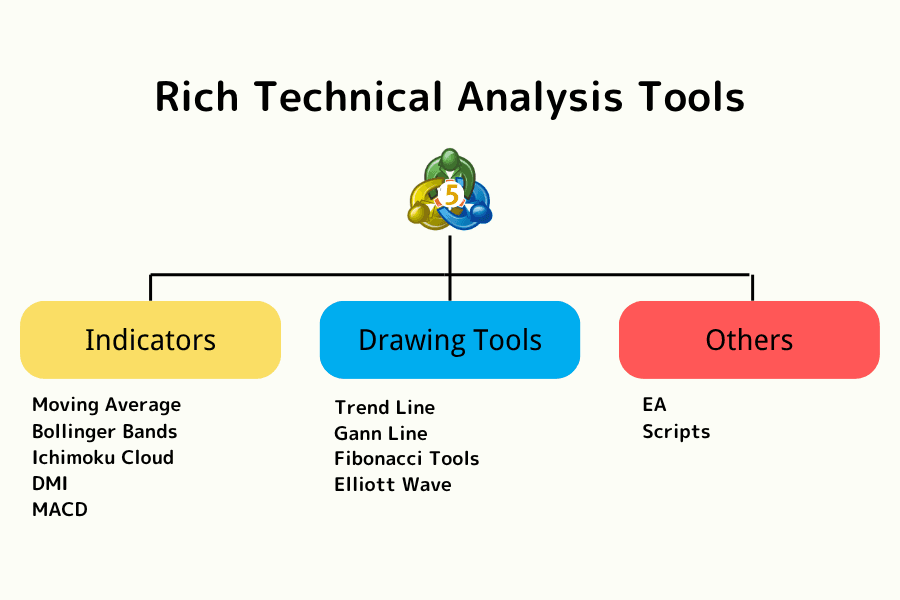
MT5 comes with a large number of professional technical indicators and drawing tools built in, helping traders analyze market trends more deeply, identify trading opportunities, and develop more systematic trading strategies.
Whether you use trend trading, range trading, or multi-indicator strategies, MT5 provides comprehensive analytical support.
As shown below, MT5 offers a complete technical analysis toolset and charting system:
Benefit 3: 21 Chart Timeframes (More Than MT4)
MT5 offers up to 21 chart timeframes, far more than MT4's 9. From M1 (1 minute) to MN (monthly), traders can flexibly switch their analytical perspective to suit different strategies.
This gives MT5 an edge in both scalping (short-term trading) and long-term trend analysis.
| Type | Timeframes | Abbreviation |
|---|---|---|
| Minutes | 1, 2, 3, 4, 5, 6, 10, 12, 15, 20, 30 minutes | M1–M30 |
| Hours | 1, 2, 3, 4, 6, 8, 12 hours | H1–H12 |
| Daily | 1 day | D1 |
| Weekly | 1 week | W1 |
| Monthly | 1 month | MN |
Benefit 4: Powerful Automated Trading (EA) Capabilities
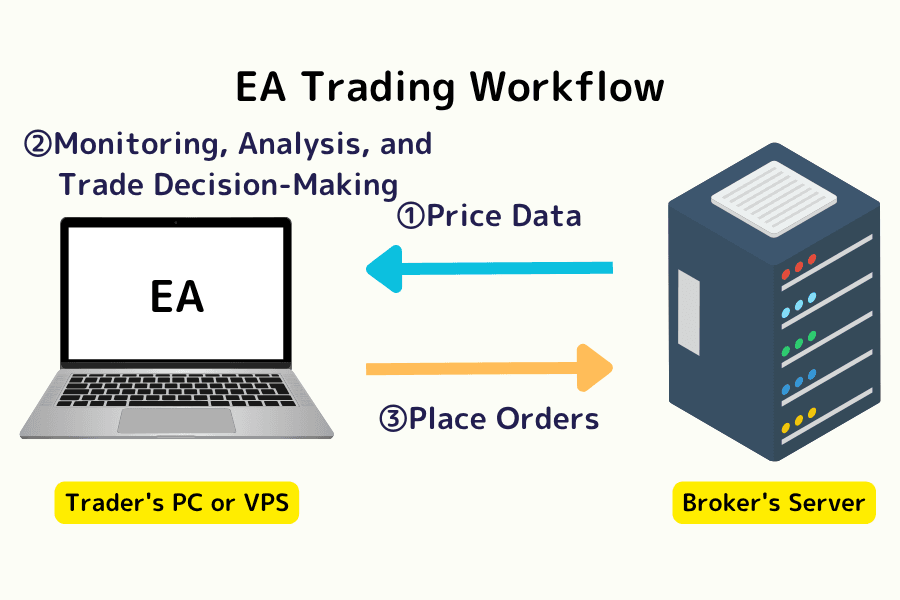
MT5 supports the MQL5 programming language and EA automated trading programs, and provides an advanced strategy tester that allows multi-currency, multi-threaded backtesting, greatly improving the efficiency and accuracy of developing automated trading strategies.
As shown below, MT5 provides comprehensive EA automated trading and strategy testing features:
Further reading: What Is an EA (Automated Trading Program)? Pros and Cons Explained
Benefit 5: Cross-Platform and Multi-Device Support
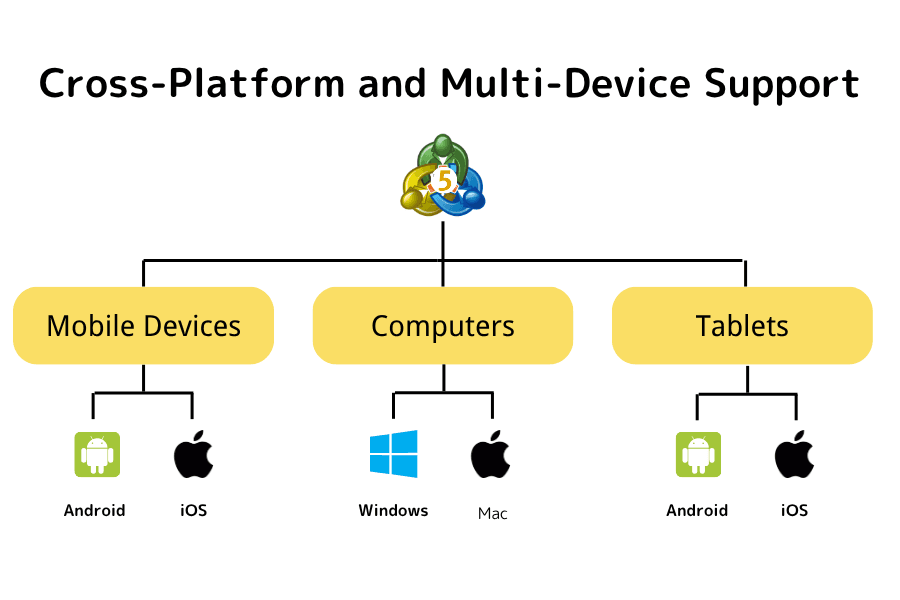
MT5 runs smoothly on Windows, macOS, iOS, Android, and more, and also offers a web version (WebTrader). Whether you use a desktop, smartphone, or tablet, you can trade anytime, anywhere.
As shown below, MT5 supports multi-device, cross-platform trading:
Benefit 6: More Order Types (More Flexible Risk Management)
MT5 offers 6 types of pending orders (including Buy Stop Limit and Sell Stop Limit), more advanced than MT4. This lets you set entry and exit points more precisely and strengthen risk control.
Further reading: The 6 Pending Order Types in MT5
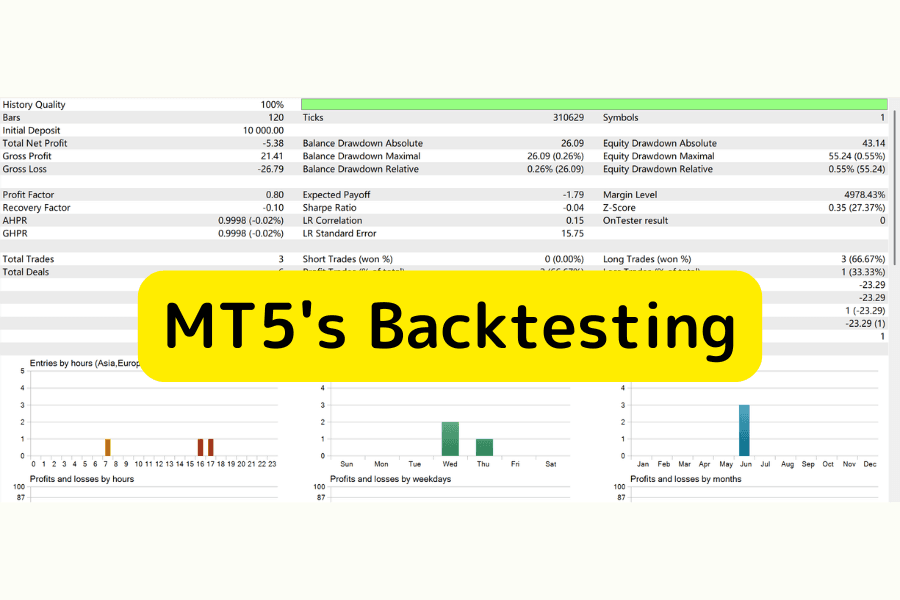
Benefit 7: Efficient Strategy Testing and Backtesting
MT5's strategy tester supports multi-threading and distributed computing, enabling fast backtesting of one or multiple instruments at the same time. It is an essential tool for developing and optimizing EA strategies.
As shown below, MT5's backtesting and strategy testing feature:
Further reading: A Detailed Guide to Backtesting in MT5
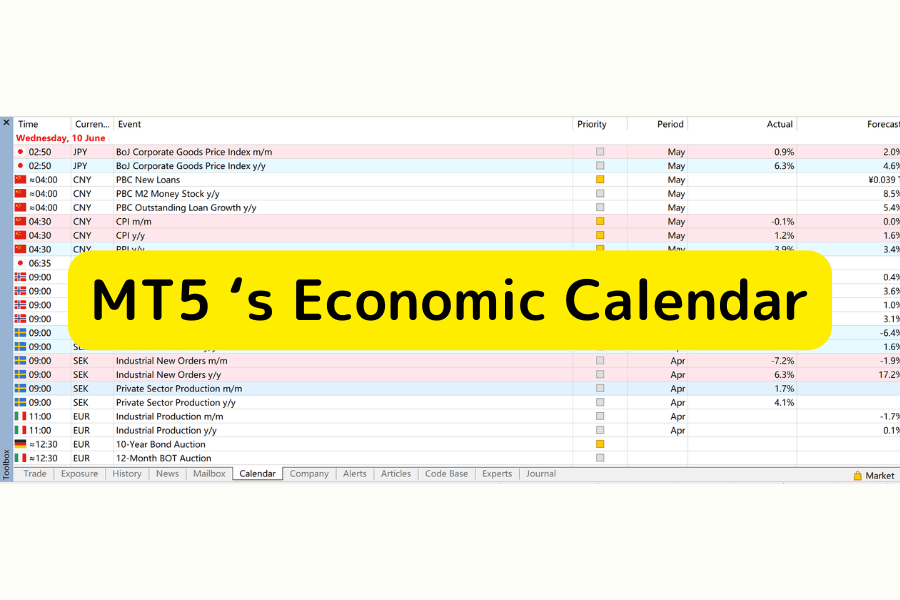
Benefit 8: Built-In Economic Calendar
MT5 has a built-in economic calendar, letting you track major global economic data and events (such as interest rate decisions, CPI, and US nonfarm payrolls) in real time without switching windows, helping you adjust your trading strategy in advance.
As shown below, MT5's economic calendar feature:
Further reading: How to Show or Hide the Economic Calendar in MT5
Benefit 9: Free to Use
The MT5 platform itself is completely free. Just open an account with a broker that supports MT5 (such as Titan FX) to use all of its advanced features (including technical indicators, EAs, automated trading, and the strategy tester).
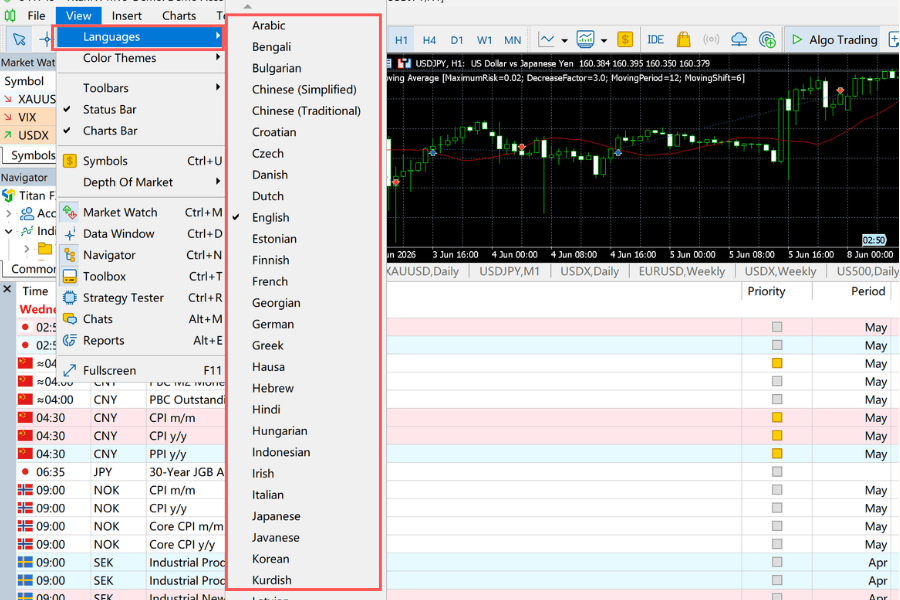
Benefit 10: Multilingual Support
MT5 supports many languages, including Traditional Chinese, Simplified Chinese, English, and Japanese, with a clear interface that rarely shows garbled text. Even when you switch your system language, MT5 displays correctly, which is clearly better than MT4.
As shown below, MT5's language-switching feature:
Further reading:
- How to Change the Language in MT5 (Windows)
- How to Switch the Language in MT5 (Android)
- How to Switch the Language in MT5 (iOS)
Benefit 11: Multi-Account Management
MT5 supports multi-account management, letting traders operate and switch between multiple accounts at once and view trading reports and performance in real time.
This feature is especially suited to professional traders, money managers, and users who need to diversify risk, greatly improving account management efficiency.
3. MT5 vs. MT4 (Full Comparison)
MT5 (MetaTrader 5) and MT4 (MetaTrader 4) are both developed by MetaQuotes and are currently the most mainstream trading platforms. However, the two differ clearly in feature design and target users.
Below we summarize the core differences between MT5 and MT4 to help you quickly decide which platform suits you better:
| Feature | MetaTrader 5 (MT5) | MetaTrader 4 (MT4) |
|---|---|---|
| Release Year | 2010 | 2005 |
| Supported Instruments | Forex, CFDs, futures, options, stocks, and more | Forex, contracts for difference (CFDs) |
| Number of Timeframes | 21 | 9 |
| Pending Order Types | 6 (including Stop Limit) | 4 |
| Depth of Market (DOM) | Supported | Not supported |
| Order Execution | Multiple modes (Market / Exchange, etc.) | Relatively limited |
| Number of Technical Tools | 38 | 30 |
| EA Language | MQL5 (more efficient, multi-threaded) | MQL4 |
| Strategy Testing | Multi-currency, multi-threaded, distributed backtesting | Mainly single-threaded |
| Supported Platforms | Windows, Mac, iOS, Android, Web | Windows, Mac, iOS, Android, Web |
MT5 vs. MT4: Which Should You Choose?
Overall, MT5 is an upgraded version of MT4, with clear improvements in instruments, analytical tools, and automated trading capabilities. Below is a summary of which platform suits different types of traders:
| Type | Traders Suited to MT5 | Traders Suited to MT4 |
|---|---|---|
| Trading Markets | Want to trade multi-asset markets such as stocks, indices, and crypto | Mainly focused on forex or CFD trading |
| Trading Strategy | Use EAs (automated trading) and need efficient backtesting | Already familiar with MT4 operation and its EA ecosystem |
| Feature Needs | Want more timeframes and advanced analytical tools | Prefer a simple, stable trading environment |
Overall, if you want fuller functionality and future scalability, MT5 is the ideal choice; MT4 suits traders who prefer simple operation and an existing system.
4. What Advantages Does Titan FX's MT5 Platform Offer?
Beyond MT5's own powerful features, Titan FX provides several additional, exclusive forms of support, giving traders a more complete trading experience and toolset when actually using MT5.
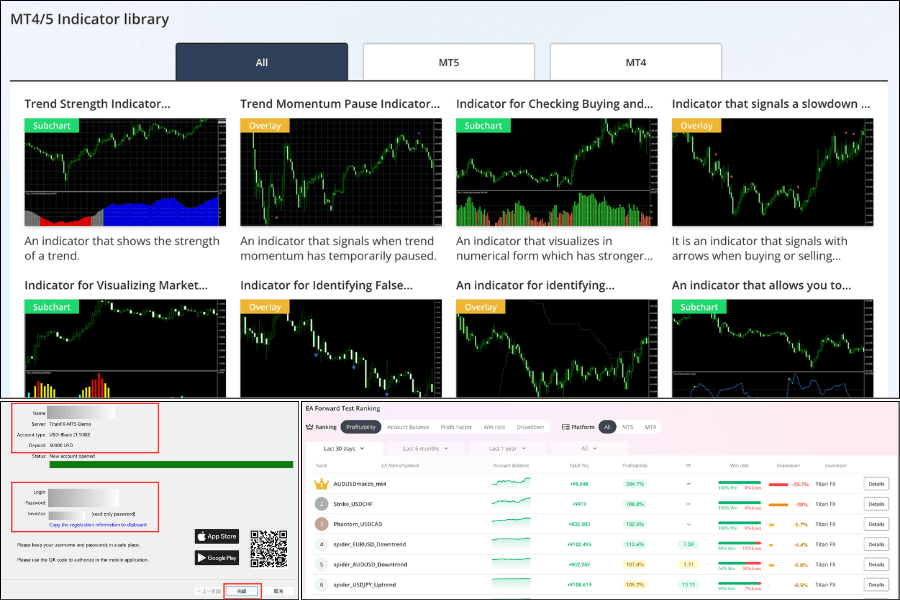
Advantage 1: Custom Indicators (Boosting Technical Analysis Efficiency)
Titan FX offers dozens of its own custom MT5 indicators, continuously updated, helping traders capture market movements more precisely.
These include practical tools such as the Multi-Timeframe Moving Average (Titan_Multi_MA) and the Bollinger Band %B (Titan_BB%B).
Just open a trading account to install and use these indicators for free, strengthening your chart analysis and trading decisions.
Further reading: List of Free MT5 Exclusive Indicators
Advantage 2: A Variety of EA (Automated Trading) Options
Titan FX provides multiple MT5-dedicated EAs (automated trading programs), letting traders choose the automated trading solution that fits their market and strategy needs.
For example, the oscillator-type strategy EarlyBirdz_EURUSD_M1, designed for EUR/USD, trades around the rhythm of the market near the New York close.
In addition, before using an EA, you can review detailed forward-test and backtest data to understand its performance and risk, improving transparency and trust.
Further reading: MT5 Free EA Ranking
Advantage 3: Cross-Platform Support (Seamless Multi-Device Trading)
Titan FX's MT5 platform supports Windows, Mac, iOS, Android, and the web version (WebTrader), letting traders trade and monitor the market anytime, anywhere.
Whether you use a computer or a mobile device, you get a consistent, smooth trading experience.
Further reading:
Advantage 4: A Free MT5 Demo Account (Beginners Can Start Quickly)
Titan FX offers a free MT5 demo account, letting traders use virtual funds to experience a real market environment and get familiar with the platform and the trading process.
For beginners or traders who want to test new strategies, this is a very practical tool.
Further reading: How to Register an MT5 Demo Account
5. How to Start Trading with MT5
If this is your first time using MT5 (MetaTrader 5), you can start trading quickly by following these steps:
Step 1: Open an MT5 Trading Account
To trade with MT5, you first need to open an account with a broker that supports MT5 (such as Titan FX).
Beginners are advised to open a demo account first to get familiar with the platform before moving on to live trading.
Further reading: How to Register an MT5 Demo Account
Step 2: Fund Your MT5 Account
Once your account is open, you can deposit funds into your MT5 account.
Titan FX offers several deposit methods. Credit card deposits are usually credited instantly with no fees, making them the top choice for most traders.
Step 3: Download, Install, and Log In to MT5
Next, download and install Titan FX's MT5 trading platform, and log in using your login ID, password, and server information.
Further reading: How to Download, Install, and Log In to MT5
Step 4: Start Trading (Placing and Closing Orders)
After logging in, you can select an instrument to trade, such as forex, gold, crude oil, or stock CFDs.
Further reading:
Step 5: Install Custom Indicators and EAs (Advanced)
To improve trading efficiency, you can install Titan FX's custom indicators and EAs (automated trading programs) to build a trading environment better suited to your strategy.
Further reading:
6. MT5 Frequently Asked Questions (FAQ)
Below we summarize frequently asked questions about MT5 (MetaTrader 5) to help you quickly resolve common doubts:
Q1. Is MT5 (MetaTrader 5) safe?
MT5 is a mainstream trading platform developed by MetaQuotes, with robust security mechanisms including data encryption and account protection.
Key security features include:
- Encryption technology to protect data transmission
- Two-factor authentication (2FA) support
- Stable servers that keep trading smooth
- Greater security when used with a regulated broker (such as Titan FX)
Q2. Is MT5 free to use?
Yes, the MT5 platform itself is completely free. Just open a trading account that supports MT5 to download and use all of its features.
Further reading: How to Download, Install, and Log In to MT5 for Free
Q3. Can I install custom indicators in MT5?
Yes. Just place the custom indicator in MT5's "Indicators" folder and restart the platform to use it.
Further reading: Titan FX Custom Indicators and How to Install Them
Q4. What should I do if I can't log in to MT5?
If you have trouble logging in, we recommend checking the following:
- Whether your login ID and password are correct
- Whether you have selected the correct server
- Whether your network connection is working
Further reading: What to Do When You Can't Log In to Your MT5 Account (Windows)
7. Summary: Is MT5 Right for You?
MT5 (MetaTrader 5) is a fully featured, highly flexible trading platform. Whether you are a beginner or a professional, you can use its powerful charting tools, automated trading features, and multi-asset support to build a trading strategy that suits you.
Compared with MT4, MT5 has clearly improved in execution efficiency, analytical power, and scalability, making it one of today's mainstream trading platforms.
If you want more advanced trading tools and want to trade multiple assets such as forex, indices, and crypto at the same time, MT5 is the ideal choice.
When starting out with MT5, we recommend getting familiar with the platform on a demo account first, then gradually moving on to live trading.
Further Reading